
Utilities Windows
DiskGenius
Manage partitions, clone drives and scan for lost files with DiskGenius for Windows. The Free edition handles core disk tasks; larger recovered files need Professional.
- Operating system
- Windows 11, 10, 8 and 7
- Architecture
- Not specified for the EXE installer on the download page
- Download package
- EXE installer
The publisher also offers separate 32-bit and 64-bit portable ZIP packages. The current version does not support Windows XP.
Link checked · Download guidance
What is DiskGenius?
DiskGenius combines partition management, drive cloning, backup and file-recovery tools in one Windows application. Use it to resize a volume, migrate Windows to an SSD, copy a disk or save a partition to an image file. Its disk-health tools read S.M.A.R.T. information and scan for bad sectors. The publisher lists Windows 11, 10, 8 and 7 for the current download.
The linked EXE installer starts in the Free edition. Core partitioning, cloning and backup tasks are available without a license, but scanning for lost data is not the same as being able to save everything found. Free can preview recovered files and copy small files; copying larger recovered files requires Professional. Free can also search for lost partitions but cannot write the recovered partition table back.
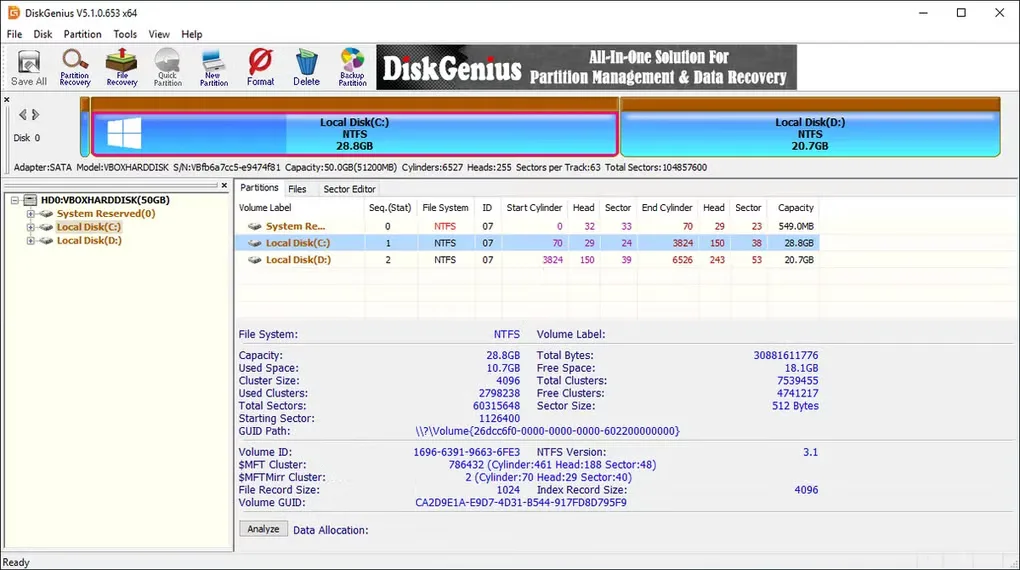
The screenshot shows the older 5.1.0.653 x64 interface from Softonic's Windows gallery, not the current 6.2.0.1829 release. The publisher explicitly excludes Windows XP from the current version.
What it offers
- Create, resize and split partitions, or allocate unallocated space to a volume.
- Clone a disk or partition and migrate Windows to a new drive.
- Back up disks and partitions to image files and restore from those images.
- Scan for lost files and preview recovery results before choosing an edition.
- Read S.M.A.R.T. information and scan drives for bad sectors.
Good to know
- Free copies only small recovered files; copying larger recovered files requires a Professional license.
- Free can search for and preview lost partitions but cannot save the recovered partition table.
- The current release does not support Windows XP.
Product images
Sources
References used for this listing. Retrieval dates do not indicate hands-on testing.
More in utilities
View category ↗
1.1.1.1 with WARP 2026.8.2115.0
Encrypt traffic from your Mac to Cloudflare’s network with WARP, or use DNS-only mode for encrypted DNS queries to the 1.1.1.1 resolver.
1.1.1.1 with WARP 2026.8.2115.0
Encrypt traffic between your Windows PC and Cloudflare, or use encrypted DNS only, with the free 1.1.1.1 with WARP app.

3uTools 9.12.005
Manage iPhone and iPad photos, music, apps and backups from Windows with 3uTools, a free utility that also includes device checks and firmware flashing tools.