

Utilities Windows
DiskSavvy for Windows
Find large files and folders across disks, network shares and NAS storage with DiskSavvy. This download is the paid Server edition for 64-bit Windows, with scheduled analysis and exportable reports.
- Operating system
- Windows 11 and 10; Windows Server 2025, 2022, 2019 and 2016; older systems also listed by publisher
- Architecture
- x64 (64-bit Windows)
- Download package
- EXE installer — DiskSavvy Server
The publisher lists a separate 32-bit installer. This entry links to Server, not Enterprise or the historical free desktop edition.
Link checked · Download guidance
What is DiskSavvy?
DiskSavvy analyzes storage use so you can see which directories and file categories occupy space. It can scan local disks, network shares and NAS storage, group results by file type or extension, and present disk usage in charts and reports. It suits administrators investigating storage growth across several locations rather than checking each folder manually.
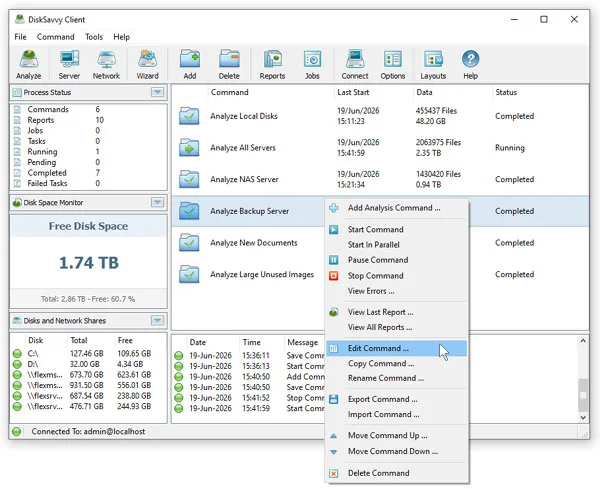
The download here is DiskSavvy Server, not the older free desktop listing described on Softonic. Server runs as a Windows service, with a client GUI and command-line utility. It supports scheduled analysis jobs, a stored report history and report exports including HTML, PDF, Excel and CSV. The publisher supplies a separate Enterprise edition with web-based management.
Server is commercially licensed and has published limits of 100 million files, 100 TB of disk space, 100 input directories and 100 analysis profiles. The linked package is the Windows x64 EXE installer; a 32-bit package is listed separately. The screenshot is the publisher's Server client illustration, not a capture from an installation performed for this entry.
What it offers
- Analyze disks, directories, network shares and NAS storage to identify large files and folders.
- Classify and filter disk usage results by file type, extension and other file attributes.
- Generate disk usage charts and export analysis reports to HTML, PDF, Excel, CSV and other supported formats.
- Schedule periodic analysis through a background Windows service and inspect saved report history.
- Use the client GUI or command-line utility to control storage analysis.
Good to know
- The linked Server edition requires a paid license; Softonic's free desktop label does not describe this package.
- Server is limited to 100 million files, 100 TB, 100 input directories and 100 analysis profiles according to the publisher's edition table.
- Web-based management is an Enterprise feature, not part of the linked Server edition.
Product images
Sources
References used for this listing. Retrieval dates do not indicate hands-on testing.
- DiskSavvy - Download — Softonic Windows listing ↗Retrieved
- DiskSavvy - Disk Space Analyzer - Downloads ↗Retrieved
- DiskSavvy - Disk Space Analyzer - Product Overview ↗Retrieved
- DiskSavvy - Product Versions and Features ↗Retrieved
- DiskSavvy - Purchase DiskSavvy Server ↗Retrieved
- DiskSavvy - Supported Operating Systems ↗Retrieved
- DiskSavvy - Disk Space Analyzer - DiskSavvy GUI Screenshots ↗Retrieved
More in utilities
View category ↗
1.1.1.1 with WARP 2026.8.2115.0
Encrypt traffic from your Mac to Cloudflare’s network with WARP, or use DNS-only mode for encrypted DNS queries to the 1.1.1.1 resolver.
1.1.1.1 with WARP 2026.8.2115.0
Encrypt traffic between your Windows PC and Cloudflare, or use encrypted DNS only, with the free 1.1.1.1 with WARP app.


3uTools 9.12.005
Manage iPhone and iPad photos, music, apps and backups from Windows with 3uTools, a free utility that also includes device checks and firmware flashing tools.