

Utilities Windows
Dism++ for Windows
Clean Windows component caches, manage updates and drivers, and customize system images with Dism++, a free portable servicing utility for experienced users.
- Operating system
- Windows Vista, 7, 8, 8.1 and 10, as listed by the publisher
- Architecture
- Publisher lists x86, x64 and ARM64; archive contents not inspected
- Download package
- Portable ZIP archive
Version field is the GitHub release label. Its asset is Dism++10.1.1002.1B.zip. Compatibility is publisher documentation, not an execution test.
Link checked · Download guidance
What is Dism++?
Dism++ brings Windows servicing tasks into a graphical interface. It can clean WinSxS and package caches, integrate updates and drivers, and customize operating-system images. The publisher describes it as a DISM-style frontend built on the lower-level Component Based Servicing (CBS) interface rather than the DISM API. Its tools suit administrators who need more control over system maintenance and deployment.
This is not a one-click performance fix. Cleanup and servicing choices can affect Windows components, and incorrect changes can break the system or individual features. Review each operation before applying it; the graphical interface does not remove the need for Windows servicing knowledge.
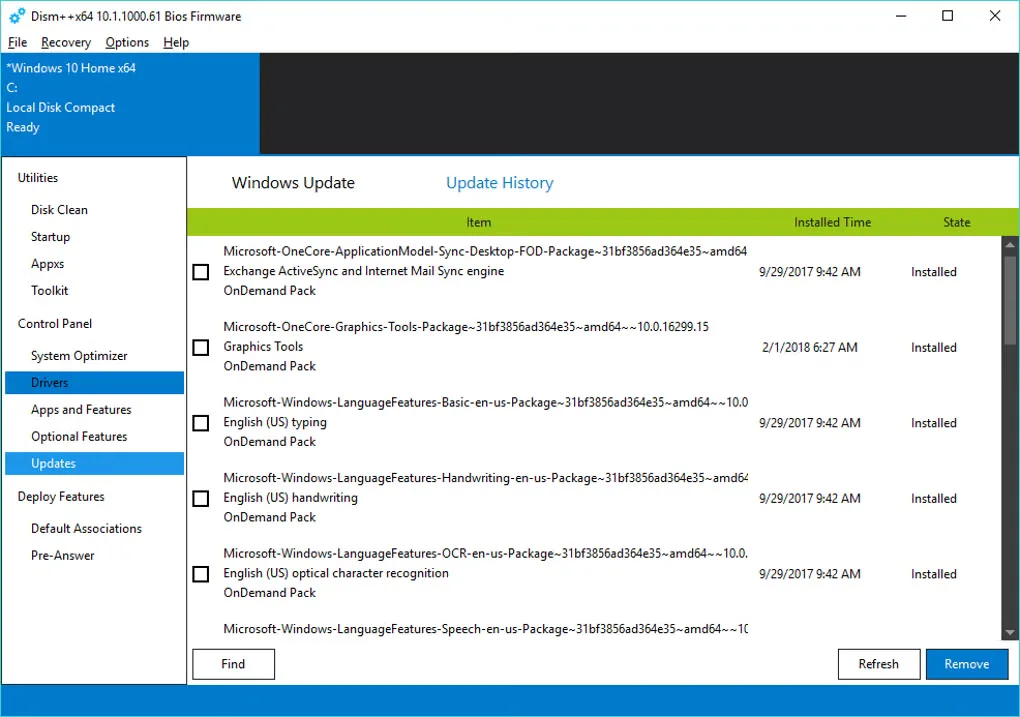
The linked publisher release is labeled 10.1.1002.2, dated March 26, 2023, but its downloadable ZIP is named Dism++10.1.1002.1B.zip. That filename is preserved rather than treated as proof of the executable version inside. The screenshot shows an older Dism++ interface, not a newly installed copy of this release.
What it offers
- Clean WinSxS and package caches through a graphical interface.
- Integrate Windows updates and drivers into system images.
- Customize operating-system images for deployment.
- Use the publisher-described portable utility without an installation workflow.
- Access backup and recovery tools alongside system-servicing controls.
Good to know
- Intended for experienced users and system administrators; incorrect servicing or cleanup changes can break Windows or its features.
- The publisher compatibility text consulted lists Windows Vista, 7, 8, 8.1 and 10; Windows 11 compatibility was not established from that evidence.
- The 10.1.1002.2 release links to an archive named 10.1.1002.1B; the archive contents and executable version have not been inspected.
Product images
Sources
References used for this listing. Retrieval dates do not indicate hands-on testing.
- Chuyu Team — official Dism++ release link ↗Retrieved
- Chuyu Team — English website resource text ↗Retrieved
- Chuyu Team — Dism++ 10.1.1002.2 release ↗Retrieved
- Chuyu Team — exact release assets ↗Retrieved
- Dism++ - Download ↗Retrieved
More in utilities
View category ↗
1.1.1.1 with WARP 2026.8.2115.0
Encrypt traffic from your Mac to Cloudflare’s network with WARP, or use DNS-only mode for encrypted DNS queries to the 1.1.1.1 resolver.
1.1.1.1 with WARP 2026.8.2115.0
Encrypt traffic between your Windows PC and Cloudflare, or use encrypted DNS only, with the free 1.1.1.1 with WARP app.

3uTools 9.12.005
Manage iPhone and iPad photos, music, apps and backups from Windows with 3uTools, a free utility that also includes device checks and firmware flashing tools.