
Utilities Windows
DOSBox Game Launcher for Windows
Organize DOS games into profiles, choose DOSBox settings per title and launch your collection from a graphical Windows frontend. DOSBox Game Launcher is free and open source; Java 17 or newer (x64) is required.
- Operating system
- Windows; publisher notes 0.99 drops support for versions older than Windows 7
- Architecture
- Requires 64-bit (x64) Java runtime
- Download package
- ZIP archive with launch.exe and DOSBox 0.74-3
Install Java Runtime Environment 17 or newer separately. Extract the ZIP before running launch.exe. Windows-version compatibility is publisher documentation, not a local installation test.
Link checked · Download guidance
What is DOSBox Game Launcher?
DOSBox Game Launcher (DBGL) keeps a DOS game collection in one place, with profiles that store each title’s emulator settings. It is a frontend for DOSBox rather than a replacement emulator. You can associate a different DOSBox version with each game, use templates as a starting point, and edit several profiles together when their settings need to change.
The library can display game information and screenshots, use MobyGames metadata, and filter the collection. Import and export wizards work with GamePackArchives, while import support also covers D-Fend profiles and eXoDOS collections. These tools suit a collection that needs repeatable per-game configurations rather than a single shared emulator setup.
The linked Windows ZIP is DBGL 0.99 and includes DOSBox 0.74-3. The publisher instructs users to extract it to a chosen directory and run launch.exe. A separate 64-bit Java 17-or-newer runtime is required. Older Java and 32-bit systems need older DBGL releases, not this package. For DOSBox-X profiles, the publisher specifies dosbox-x.reference.full.conf; otherwise some configuration options can remain disabled.
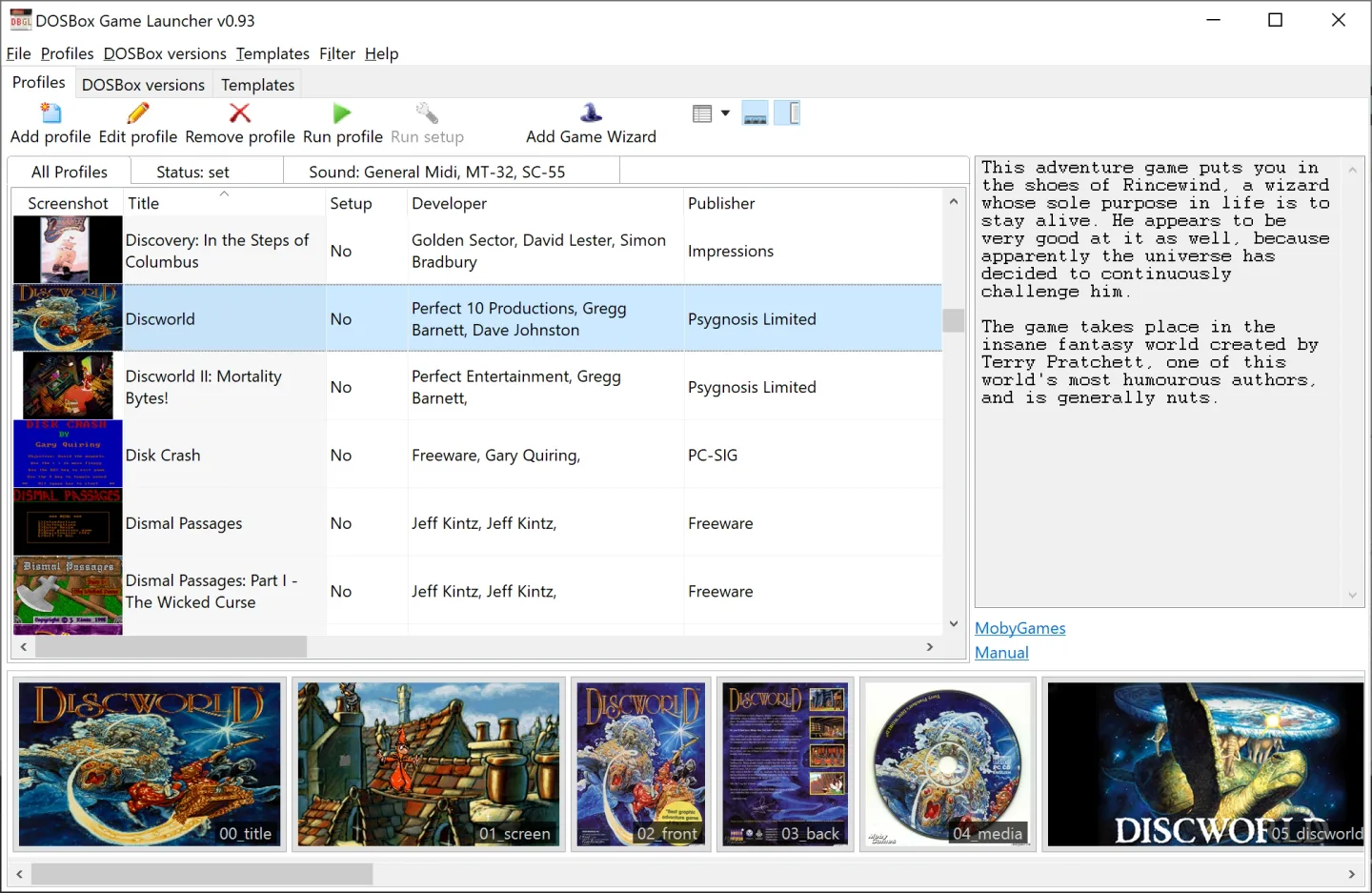
The screenshot is the publisher’s historical Windows main-window image, visibly labeled version 0.93. It illustrates the profile library and artwork layout, not the exact interface of the linked 0.99 release.
What it offers
- Store per-game DOSBox settings and associate different DOSBox versions with individual profiles.
- Use profile templates and edit multiple profiles in one batch.
- Import and export GamePackArchives; import D-Fend profiles and eXoDOS collections.
- Display game metadata and screenshots, with MobyGames support and library filtering.
- Configure supported DOSBox-X, Staging, ECE and SVN families.
Good to know
- DBGL 0.99 requires Java 17 or newer, 64-bit (x64); older Java and 32-bit systems require older DBGL releases.
- Some DOSBox-X options remain disabled unless its dosbox-x.reference.full.conf configuration file is used.
Product images
Sources
References used for this listing. Retrieval dates do not indicate hands-on testing.
More in utilities
View category ↗
1.1.1.1 with WARP 2026.8.2115.0
Encrypt traffic from your Mac to Cloudflare’s network with WARP, or use DNS-only mode for encrypted DNS queries to the 1.1.1.1 resolver.
1.1.1.1 with WARP 2026.8.2115.0
Encrypt traffic between your Windows PC and Cloudflare, or use encrypted DNS only, with the free 1.1.1.1 with WARP app.

3uTools 9.12.005
Manage iPhone and iPad photos, music, apps and backups from Windows with 3uTools, a free utility that also includes device checks and firmware flashing tools.