
Utilities Windows
Doxillion Document Converter for Windows
Convert documents between formats such as DOCX, PDF, ODT and TXT with Doxillion for Windows. Batch conversion handles multiple files; the free home-use edition supports fewer formats.
- Operating system
- Windows 7 through Windows 11, as listed by the publisher
- Architecture
- 64-bit Windows compatibility stated by publisher; native installer architecture unspecified
- Download package
- EXE installer
Publisher supports 64-bit Windows computers; this is not proof of a native x64 build. Linked free edition is limited to non-commercial home use.
Link checked · Download guidance
What is Doxillion Document Converter?
Doxillion is NCH Software's document converter for Windows. Add individual files or a folder, choose an output format and convert a batch rather than opening each document in its original application. The publisher lists conversions involving Word documents, PDFs, OpenDocument files, text and e-books, with separate input and output format lists.
The product also offers OCR for scanned documents and images, PDF merging and PDF compression. These are publisher-described capabilities, not results of an independent installation or conversion test.
The linked Windows EXE is the publisher's free-version download. NCH limits that edition to non-commercial home use and says it supports fewer formats than the paid product. The publisher's full format table therefore should not be read as a promise that every conversion is available in the free edition. Spreadsheet output is limited to tables, and some image-output conversions require the separate Pixillion application.
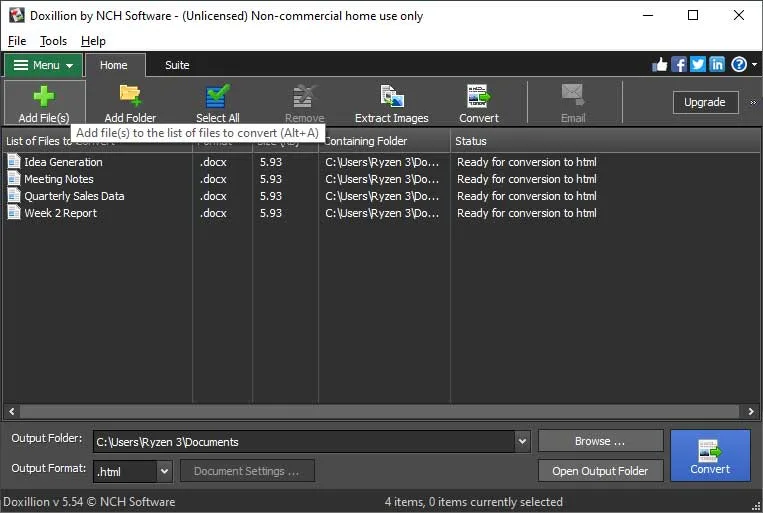
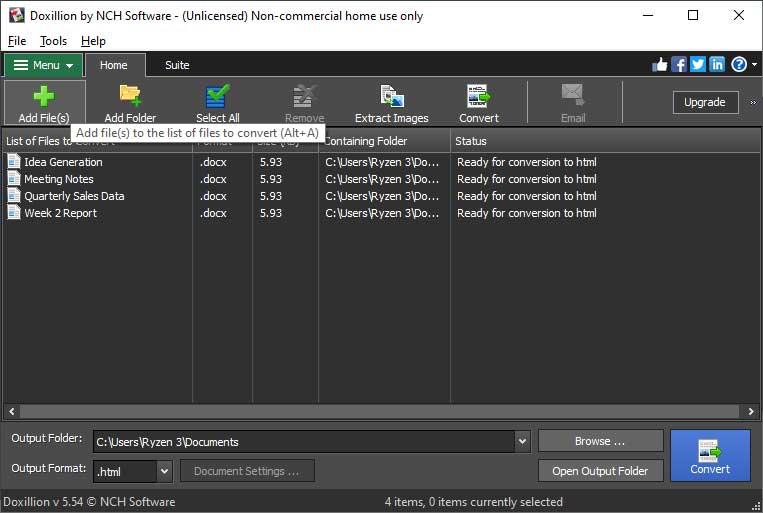
The screenshot is a publisher-provided illustration of the Windows interface, with a file queue, output folder and format selector. It shows an older version and does not establish the version delivered by the unversioned download link.
What it offers
- Batch-convert multiple documents or add a folder of files to the conversion queue.
- Choose supported document outputs such as DOCX, PDF, ODT, RTF, HTML and TXT; availability depends on edition and conversion direction.
- Use publisher-described OCR to convert scanned documents and images into editable text.
- Merge PDF files and compress PDFs using the product's PDF tools.
Good to know
- The free edition is for non-commercial home use only and supports fewer formats than the paid edition; the publisher does not identify the free subset on its main page.
- Input and output format support differ. Spreadsheet output converts tables only, and some image exports from PDF require Pixillion.
- The unversioned EXE link and illustrative older screenshot do not establish the current installer version or native processor architecture.
Product images
Sources
References used for this listing. Retrieval dates do not indicate hands-on testing.
More in utilities
View category ↗
1.1.1.1 with WARP 2026.8.2115.0
Encrypt traffic from your Mac to Cloudflare’s network with WARP, or use DNS-only mode for encrypted DNS queries to the 1.1.1.1 resolver.
1.1.1.1 with WARP 2026.8.2115.0
Encrypt traffic between your Windows PC and Cloudflare, or use encrypted DNS only, with the free 1.1.1.1 with WARP app.

3uTools 9.12.005
Manage iPhone and iPad photos, music, apps and backups from Windows with 3uTools, a free utility that also includes device checks and firmware flashing tools.