
Utilities Windows
Draftable Desktop
Compare Word, PDF, Excel and PowerPoint documents side by side on Windows with Draftable Desktop, now Draftable Compare for Enterprise, a paid app with a trial.
Direct publisher file
Link checked · Download guidance
What is Draftable Desktop?
Draftable Desktop helps you review what changed between two versions of a document without reading both from beginning to end. The publisher now calls the business edition Draftable Compare for Enterprise. It runs locally on Windows and supports offline comparison of Word, PDF, Excel and PowerPoint files, including scanned PDFs through OCR.
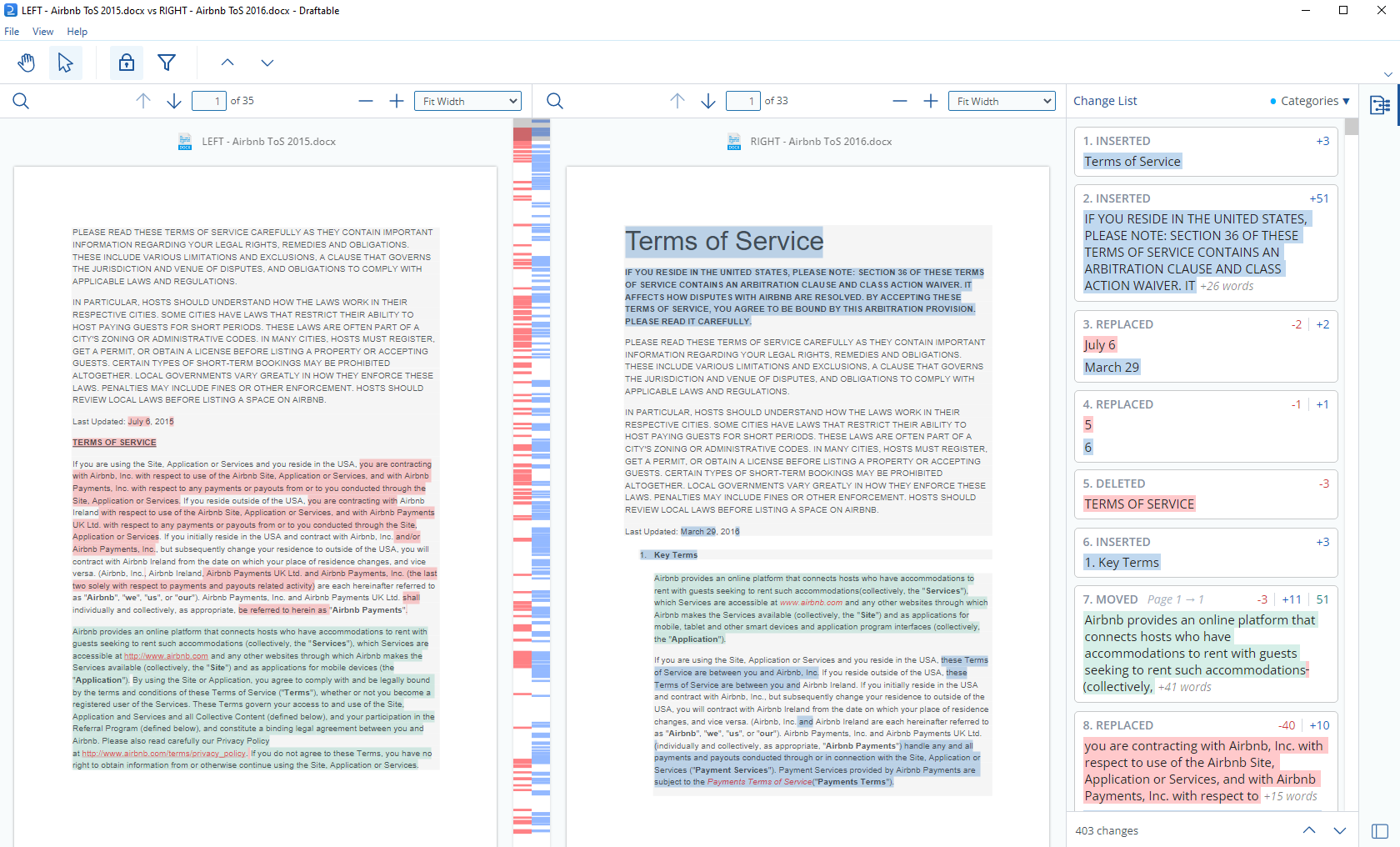
In the New Comparison launcher, place the original document on the left and the revision on the right, then choose Compare. The viewer highlights differences beside the documents and provides a change list for moving between edits. Zoom controls and change-type filters help focus the review; comparison results can be exported as a side-by-side or clean single-page PDF. The screenshot is the publisher's documented Windows viewer, not a claim about the appearance of a particular current build.
This is subscription software, not a free desktop utility. The publisher offers a five-day trial and requires a product key for activation. The Enterprise & Non-Legal plan includes side-by-side comparison but excludes legal redline output, Outlook email comparison and the document-management integrations listed for the higher legal plan. A full-feature trial should not be treated as the feature entitlement of the Enterprise subscription.
What it offers
- Compare Word, PDF, Excel and PowerPoint documents locally, including offline use.
- Review original and revised documents side by side with highlighted differences and a navigable change list.
- Compare scanned PDFs using OCR and compare free text.
- Adjust zoom and choose which types of changes appear in the viewer.
- Export comparison results as a side-by-side or clean single-page PDF.
Good to know
- Paid annual subscription after evaluation; activation requires a product key. The publisher advertises a five-day trial.
- Enterprise & Non-Legal does not include legal redline output, Outlook email comparison or the listed document-management integrations; those require the legal plan.
- The cited sources identify Windows but do not establish minimum Windows versions or CPU architecture. Confirm those requirements with the publisher before deployment.
Product images

Sources
References used for this listing. Retrieval dates do not indicate hands-on testing.
More in utilities
View category ↗
1.1.1.1 with WARP 2026.8.2115.0
Encrypt traffic from your Mac to Cloudflare’s network with WARP, or use DNS-only mode for encrypted DNS queries to the 1.1.1.1 resolver.
1.1.1.1 with WARP 2026.8.2115.0
Encrypt traffic between your Windows PC and Cloudflare, or use encrypted DNS only, with the free 1.1.1.1 with WARP app.

3uTools 9.12.005
Manage iPhone and iPad photos, music, apps and backups from Windows with 3uTools, a free utility that also includes device checks and firmware flashing tools.