

Utilities Windows
DriverStore Explorer for Windows
Inspect, back up and remove Windows driver packages with DriverStore Explorer (RAPR), an open-source utility for advanced users and administrators.
- Operating system
- Windows 7 or newer
- Architecture
- Not specified in the cited release asset metadata
- Download package
- ZIP archive; extract and run Rapr.exe
Publisher requires .NET Framework 4.7.2 or newer and administrator privileges. No architecture-specific package is identified in the cited release metadata.
Link checked · Download guidance
What is DriverStore Explorer?
DriverStore Explorer (RAPR) gives Windows administrators a graphical view of the third-party driver packages in the driver store. It lists package details such as version, date and size, helps identify older versions, and can export selected or all drivers for backup. Use it to review stored packages before deciding what to keep or remove.
The tool also adds and installs driver packages, supports batch deletion, and can work with an offline Windows image. Search, sortable columns and CSV export help when reviewing a long driver list. The publisher distributes a ZIP archive: extract it and run Rapr.exe. Windows 7 or newer, .NET Framework 4.7.2 or newer and administrator privileges are listed requirements.
Deleting drivers is a system-changing operation, not a guaranteed cleanup shortcut. The publisher warns that improper use can disable devices or prevent Windows from booting. Its unused-driver selection identifies packages without an associated device; it does not prove that those packages are safe to delete. Review the selection and export driver backups before removal. Automatic old/unused selection is disabled for offline stores.
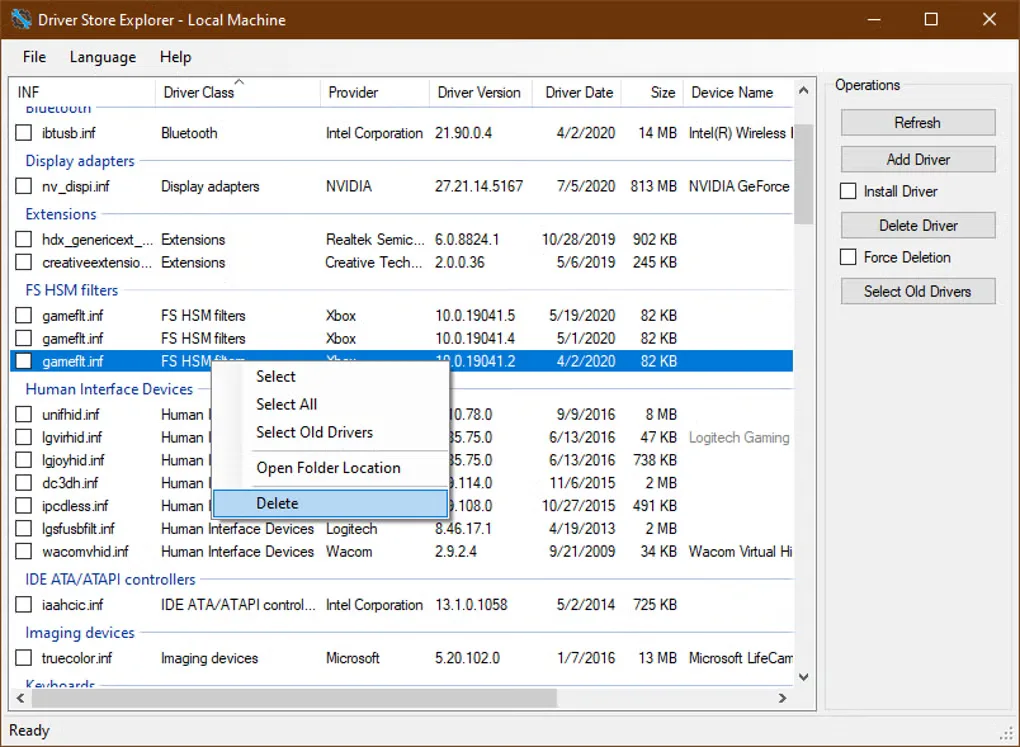
The gallery image shows an earlier interface with a driver list, operations panel and deletion context menu; it is not presented as a screenshot of version 1.0.36.
What it offers
- List third-party driver packages with version, date and size details.
- Export selected or all driver packages for backup, or export the list as CSV.
- Add and install driver packages; select multiple packages for removal.
- Identify older versions and review packages without an associated device.
- Inspect local or offline Windows driver stores with search and sortable columns.
Good to know
- Incorrect driver removal can cause device failures, system malfunction or prevent Windows from booting; back up drivers before deleting them.
- Unused-driver selection is not a safety verdict: essential software drivers can have no associated device.
- Automatic old/unused driver selection is disabled for offline stores; packages must be selected manually.
- Requires administrator privileges and .NET Framework 4.7.2 or newer.
Product images
Sources
References used for this listing. Retrieval dates do not indicate hands-on testing.
More in utilities
View category ↗
1.1.1.1 with WARP 2026.8.2115.0
Encrypt traffic from your Mac to Cloudflare’s network with WARP, or use DNS-only mode for encrypted DNS queries to the 1.1.1.1 resolver.
1.1.1.1 with WARP 2026.8.2115.0
Encrypt traffic between your Windows PC and Cloudflare, or use encrypted DNS only, with the free 1.1.1.1 with WARP app.

3uTools 9.12.005
Manage iPhone and iPad photos, music, apps and backups from Windows with 3uTools, a free utility that also includes device checks and firmware flashing tools.