
Utilities Windows
DriverView for Windows
List currently loaded Windows drivers with DriverView, NirSoft's free standalone utility. Inspect driver addresses, versions and company details, then export the list.
- Operating system
- Windows 10 and Windows 11; publisher also lists older Windows versions
- Architecture
- x64
- Download package
- ZIP archive containing a standalone executable
This link is the separate x64 package. Windows 11 24H2 and later require Administrator privileges. Windows 98 and ME are not supported. Publisher compatibility claims were not locally tested.
Link checked · Download guidance
What is DriverView?
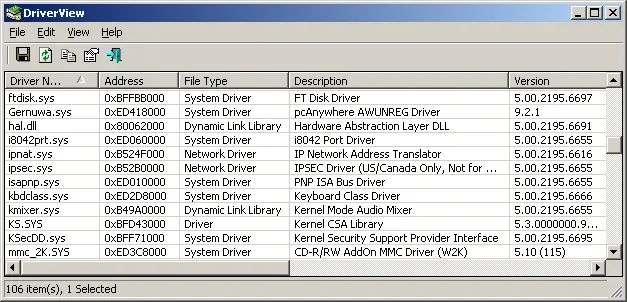
DriverView shows the device drivers currently loaded on a Windows system. Its table brings together driver names, memory addresses, descriptions, versions, product names and company details, making it useful for identifying a loaded driver before investigating it further. You can hide Microsoft drivers, rearrange columns and copy selected entries to the clipboard.
Save the list as text, CSV, HTML or XML when you need a record to share or compare. Command-line export and sorting options support generating reports without arranging each export manually. The Digital Signature column can show the signer name when Read Digital Signatures is enabled; that option is off by default.
The linked download is the publisher's x64 ZIP package. DriverView runs as a standalone executable without installation. NirSoft lists Windows 10 and Windows 11 among supported systems, but Windows 11 version 24H2 and later require running DriverView as Administrator. The screenshot is the publisher's older Windows-style interface example, not a capture from this author or proof of the current Windows 11 appearance.
What it offers
- Inspect currently loaded drivers with addresses, descriptions, versions, product names and company details.
- Hide Microsoft drivers and rearrange or choose table columns.
- Copy selected driver details or export reports as text, CSV, HTML and XML.
- Generate sorted driver-list exports using command-line options.
- Show signer names in the Digital Signature column after enabling Read Digital Signatures.
Good to know
- Windows 11 24H2 and later require running DriverView as Administrator.
- Digital-signature reading is disabled by default; enable it to populate signer details.
- Windows 98 and Windows ME are not supported.
Product images
Sources
References used for this listing. Retrieval dates do not indicate hands-on testing.
More in utilities
View category ↗
1.1.1.1 with WARP 2026.8.2115.0
Encrypt traffic from your Mac to Cloudflare’s network with WARP, or use DNS-only mode for encrypted DNS queries to the 1.1.1.1 resolver.
1.1.1.1 with WARP 2026.8.2115.0
Encrypt traffic between your Windows PC and Cloudflare, or use encrypted DNS only, with the free 1.1.1.1 with WARP app.

3uTools 9.12.005
Manage iPhone and iPad photos, music, apps and backups from Windows with 3uTools, a free utility that also includes device checks and firmware flashing tools.