

Utilities macOS
dupeGuru for macOS
Find duplicate files on Mac by filename or content, compare music tags and look for similar pictures with dupeGuru, a free, open-source duplicate finder.
- Operating system
- macOS; publisher download label specifies 10.12 or later
- Architecture
- Publisher reports compatibility with Intel and M1 Macs; native binary architecture not independently verified
- Download package
- ZIP archive (macOS Qt release)
Publisher homepage lists macOS 10.12+, while Softpedia lists 10.13+. Confirm requirements for your Mac; no current-macOS or native Apple Silicon test was performed.
Link checked · Download guidance
What is dupeGuru?
dupeGuru compares files in folders you choose and groups possible duplicates for review. Standard mode works with general files, Music mode adds tag-based comparisons and audio details, and Picture mode can find similar images rather than only identical copies. Filename scanning can also use fuzzy matching when names differ.
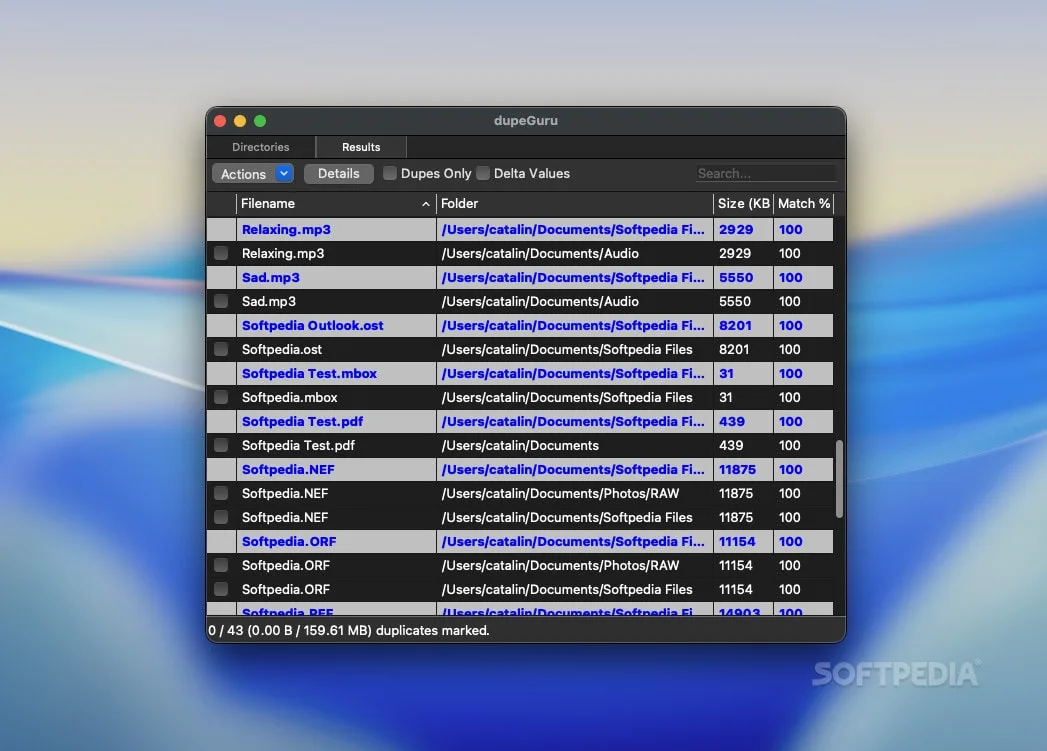
The results view lets you compare a file with its reference, filter the list and mark the duplicates you want to act on. Marked files can be moved, copied or sent to Trash. Reference folders let you designate files to keep.
A similarity match is not a reason to delete a file without checking it. The publisher's guide recommends reviewing every duplicate before deletion, especially with less strict matching settings. This entry links to the publisher's macOS Qt ZIP package for version 4.3.1; the screenshot shows dupeGuru's Mac results interface, not an installation or compatibility test.
What it offers
- Scan selected folders using filenames or file contents.
- Find similar filenames with fuzzy matching.
- Compare music tags in Music mode and similar images in Picture mode.
- Review grouped results, compare reference-file details and filter matches.
- Move, copy or send marked duplicates to Trash; designate reference folders for files to keep.
Good to know
- Fuzzy scans can include false duplicates; review matches before deleting files.
- Standard mode lacks the specialized music and picture features; choose the appropriate mode for those comparisons.
Product images
Sources
References used for this listing. Retrieval dates do not indicate hands-on testing.
- dupeGuru — finds duplicate files (publisher homepage) ↗Retrieved
- Results — dupeGuru 4.0.3 documentation ↗Retrieved
- Folder Selection — dupeGuru 4.0.3 documentation ↗Retrieved
- Release 4.3.1 — arsenetar/dupeguru ↗Retrieved
- arsenetar/dupeguru — official source repository ↗Retrieved
- dupeGuru — Download (Mac) — Softpedia ↗Retrieved
More in utilities
View category ↗
1.1.1.1 with WARP 2026.8.2115.0
Encrypt traffic from your Mac to Cloudflare’s network with WARP, or use DNS-only mode for encrypted DNS queries to the 1.1.1.1 resolver.
1.1.1.1 with WARP 2026.8.2115.0
Encrypt traffic between your Windows PC and Cloudflare, or use encrypted DNS only, with the free 1.1.1.1 with WARP app.


3uTools 9.12.005
Manage iPhone and iPad photos, music, apps and backups from Windows with 3uTools, a free utility that also includes device checks and firmware flashing tools.