

Utilities Windows
e-Sword for Windows
Read and compare Bible passages, search by words or Strong's numbers, and write study notes with e-Sword, a free Windows Bible study application.
Version 15.2.0 · Direct publisher file
Link checked · Download guidance
What is e-Sword?
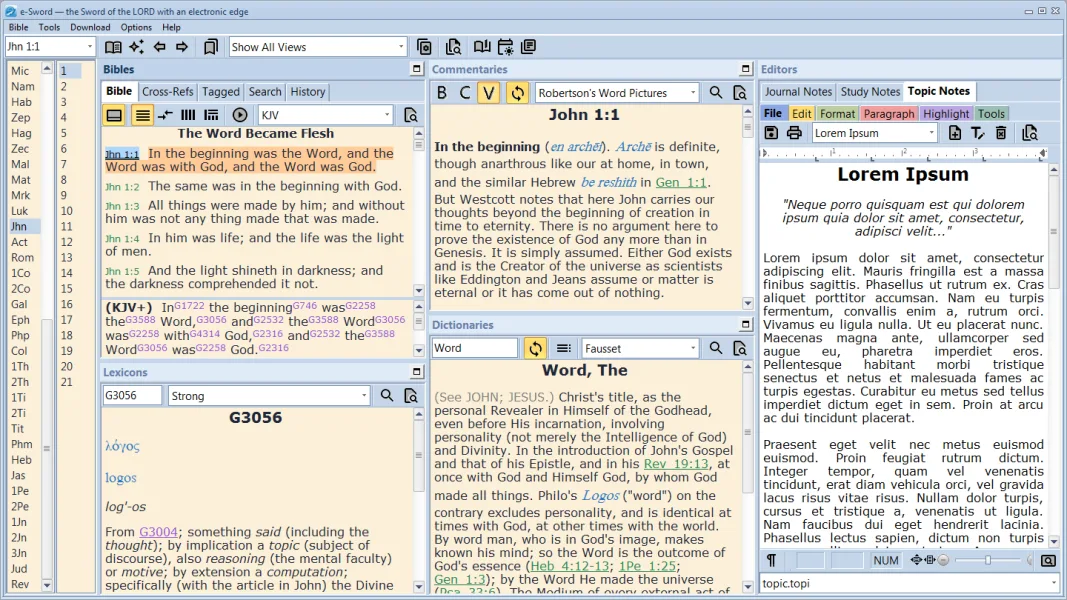
e-Sword brings Bible texts, commentaries, dictionaries and writing tools into one Windows application. It is designed for reading Scripture alongside reference material and preparing personal studies, lessons or sermons. Parallel Bible and comparison views help you examine translations, while word searches and Strong's-number searches support closer study. The integrated editor keeps notes, journals and sermon writing alongside the resources you use.
The basic installation includes the King James Bible, a KJV study Bible with Strong's numbers, Hebrew and Greek dictionaries, Smith's Bible Dictionary, F. B. Meyer's Through the Bible Day by Day commentary, Treasury of Scripture Knowledge cross references and Spurgeon's Morning & Evening devotional. Additional resources are available through the application's Download menu, but premium modules are separate purchases.
The publisher lists version 15.2.0 as an EXE setup download for Windows 7 through Windows 11. Upgrading users should check their library first: version 15 no longer displays older RTF-based modules, and the publisher advises reinstalling updated modules through the app. This entry links to the publisher's Windows setup file; package architecture has not been established.
What it offers
- Read Bible passages alongside commentaries, dictionaries and cross references.
- Compare Bible translations using parallel and comparison views.
- Search Scripture by words or Strong's numbers.
- Write study notes, journals and sermons in the integrated editor.
- Start with included KJV and reference resources, then expand the library through the in-app Download menu.
Good to know
- Version 15 does not display older RTF-based modules; updated editions must be reinstalled through the app where available.
- The Windows application is free, but premium study modules require a separate purchase and its product key.
Product images
Sources
References used for this listing. Retrieval dates do not indicate hands-on testing.
- e-Sword: Free Bible Study for the PC ↗Retrieved
- e-Sword: Free Bible Study for the PC | Downloads ↗Retrieved
- e-Sword: Free Bible Study for the PC | FAQ ↗Retrieved
- e-Sword - Download ↗Retrieved
More in utilities
View category ↗
1.1.1.1 with WARP 2026.8.2115.0
Encrypt traffic from your Mac to Cloudflare’s network with WARP, or use DNS-only mode for encrypted DNS queries to the 1.1.1.1 resolver.
1.1.1.1 with WARP 2026.8.2115.0
Encrypt traffic between your Windows PC and Cloudflare, or use encrypted DNS only, with the free 1.1.1.1 with WARP app.


3uTools 9.12.005
Manage iPhone and iPad photos, music, apps and backups from Windows with 3uTools, a free utility that also includes device checks and firmware flashing tools.