
Utilities Windows
eduVPN Client
Connect a Windows PC to your institution’s eduVPN service for encrypted network access. Available services depend on your organization and its account requirements.
- Operating system
- Windows 10 or later
- Architecture
- Separate x86, x64 and ARM64 MSI packages are available; the linked EXE is not architecture-labelled.
- Download package
- EXE installer
.NET Framework 4.8 or later; ARM64 requires 4.8.1 or later. EXE installs required client components. Keep the same EXE/MSI deployment method for upgrades.
Link checked · Download guidance
What is eduVPN Client?
eduVPN Client connects Windows computers to institution-operated VPN services. It is intended for students, researchers and staff whose organization provides eduVPN, rather than a public VPN account supplied with the installer. Institute Access reaches internal institutional resources; Secure Internet provides a tunnel through a trusted gateway when using public networks. Which service you can use depends on your organization.
The Windows client includes OpenVPN and WireGuard components, an institution search interface and self-updating support. The linked EXE is version 4.6.3, released on 21 October 2026. The publisher recommends the EXE installer for most users and provides separate MSI packages for managed deployments.
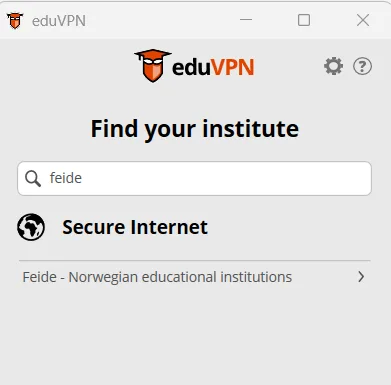
Check your institution’s instructions before installing, particularly on a managed PC. Keep the same installation method for upgrades: EXE and MSI deployments should not be mixed. This release requires Windows 10 or later; the publisher identifies 4.2 as the last release for Windows 7. The screenshot illustrates the Windows institution-search workflow with a Norwegian provider; it does not establish access to that provider or depict a verified 4.6.3 session.
What it offers
- Search for an institution from the Windows client’s Find your institute screen.
- Use institution-provided Institute Access or Secure Internet services where your organization offers them.
- Connect using the OpenVPN and WireGuard components included with the Windows client.
- Receive self-update offers by default, with separate MSI packages available for managed deployments.
Good to know
- Installing the client does not provide a VPN account or a central eduVPN service; access and support come from your institution.
- Service profiles vary by institution; Secure Internet access does not necessarily include access to internal campus resources.
- Version 4.6.3 requires Windows 10 or later. Windows 7 support ends at version 4.2.
- Do not mix EXE and MSI installation methods when upgrading an existing client.
Product images
Sources
References used for this listing. Retrieval dates do not indicate hands-on testing.
- eduVPN | Applications ↗Retrieved
- eduVPN for Windows 4.6.3 release ↗Retrieved
- Deployment of eduVPN Clients for Windows ↗Retrieved
- eduVPN Windows GNU General Public License v3 ↗Retrieved
- eduVPN End-User Support ↗Retrieved
- Configuring VPN at UiO: eduVPN ↗Retrieved
- Index - eduVPN ↗Retrieved
More in utilities
View category ↗
1.1.1.1 with WARP 2026.8.2115.0
Encrypt traffic from your Mac to Cloudflare’s network with WARP, or use DNS-only mode for encrypted DNS queries to the 1.1.1.1 resolver.
1.1.1.1 with WARP 2026.8.2115.0
Encrypt traffic between your Windows PC and Cloudflare, or use encrypted DNS only, with the free 1.1.1.1 with WARP app.


3uTools 9.12.005
Manage iPhone and iPad photos, music, apps and backups from Windows with 3uTools, a free utility that also includes device checks and firmware flashing tools.