
Utilities Windows
Efficient Elements for presentations
Build agenda slides, reuse slide elements and align objects in Microsoft PowerPoint with Efficient Elements for presentations, a Windows add-in with a 30-day trial.
- Operating system
- Windows 10 or 11; PowerPoint 2021, PowerPoint 2024 or Microsoft 365; .NET Framework 4.7.2 or newer
- Architecture
- 32-bit or 64-bit PowerPoint, as listed by the publisher
- Download package
- MSI installer; standard per-machine installation
Administrator privileges required for this installer. A separate per-user installer is available. Shared network storage or SharePoint Online is optional and required only for EE Sync.
Link checked · Download guidance
What is Efficient Elements for presentations?
Efficient Elements for presentations adds a task pane and slide-production tools to Microsoft PowerPoint. It is intended for people who repeatedly assemble business presentations and need reusable content, consistent formatting and structured agendas rather than a separate presentation editor.
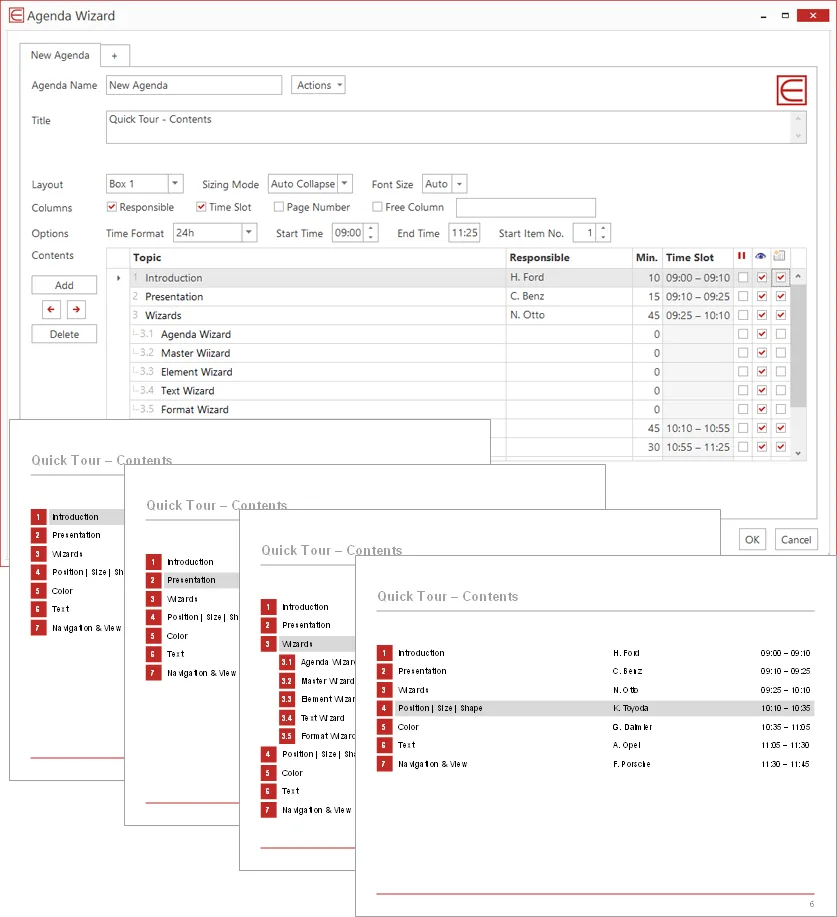
The Agenda Wizard creates agenda slides between topics and can calculate time slots or page numbers. Element Wizard provides reusable layouts, process chains, diagrams and other slide elements; My Elements stores your own content, while Team Elements shares content with colleagues. Alignment and sizing tools work on selected objects, and the presentation checker flags issues such as corporate colors, fonts, bullet formats and spacing. Selected slides can also be saved or attached to an email as PowerPoint or PDF files.
This Windows download is the standard per-machine MSI installer and requires administrator privileges. The publisher also offers a per-user installer for people without administrator access. In a managed workplace, check installation policy with IT before installing. The add-in requires an existing supported PowerPoint installation; it does not replace PowerPoint.
The publisher offers a 30-day trial, not an unrestricted free license. Continued use after the trial requires a license, and license activation requires an internet connection. The screenshot is the publisher's Agenda Wizard illustration, showing the Windows dialog and example agenda slides; it is not evidence of a locally installed or tested copy.
What it offers
- Create agenda slides with automatic time slots or page numbers and collapsible sub-items.
- Insert reusable layouts, process chains, diagrams, maps and other slide elements from Element Wizard.
- Keep personal slide elements in My Elements and share collections through Team Elements.
- Align, resize, dock or swap selected slide objects using the add-in's layout tools.
- Check corporate colors, fonts, bullet formats and spacing; save or email selected slides as PowerPoint or PDF files.
Good to know
- Requires a supported desktop PowerPoint installation on Windows; this is an add-in, not a standalone presentation editor.
- The trial lasts 30 days; continued use requires a license, and activation requires an internet connection.
- The linked per-machine MSI requires administrator privileges; users without them need the publisher's separate per-user package.
Product images
Sources
References used for this listing. Retrieval dates do not indicate hands-on testing.
More in utilities
View category ↗
1.1.1.1 with WARP 2026.8.2115.0
Encrypt traffic from your Mac to Cloudflare’s network with WARP, or use DNS-only mode for encrypted DNS queries to the 1.1.1.1 resolver.
1.1.1.1 with WARP 2026.8.2115.0
Encrypt traffic between your Windows PC and Cloudflare, or use encrypted DNS only, with the free 1.1.1.1 with WARP app.

3uTools 9.12.005
Manage iPhone and iPad photos, music, apps and backups from Windows with 3uTools, a free utility that also includes device checks and firmware flashing tools.