
Utilities Windows
Elite Dangerous Market Connector
Share Elite Dangerous market, exploration and commander data with community tools, or export local files, using this open-source Windows companion for PC players.
- Operating system
- Windows; publisher overview names Windows 10 as primary and Windows 11 as untested
- Architecture
- x64
- Download package
- EXE installer
Selected package is 6.1.2 x64; a separate x86 installer is listed. Installation wiki says Windows 8.1+, but overview excludes 7/8/8.1 and limits support to vendor-supported OS configurations. Exact current-build compatibility is not established.
Link checked · Download guidance
What is Elite Dangerous Market Connector?
Elite Dangerous Market Connector (EDMC) connects a PC player's game activity to community data services. It reads the game's Journal files and uses Frontier's Companion API to collect information about your commander, ship and station. Optional outputs include station market data for EDDN, commander records for EDSM or Inara, and local market or ship-loadout files. It is a companion utility, not the Elite Dangerous game or a standalone trading simulator.
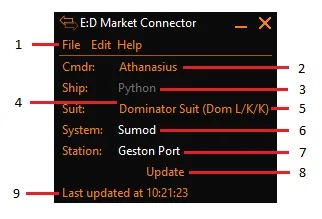
The compact window shows your commander, ship, suit, system and station, with an Update control and status line. Start EDMC before entering the game so it can follow the session's journal events. Frontier authentication is required for API access; integrations such as EDSM and Inara also require their own accounts and API keys. Choose the outputs you actually want rather than assuming every integration must be enabled.
Console accounts are not supported. EDMC handles both Live and Legacy PC journals, but the publisher prioritizes Live, and Inara does not accept Legacy commander data. The Windows documentation also disagrees on older operating-system support: the installation page says Windows 8.1 or later, while the overview explicitly excludes Windows 7, 8 and 8.1 and describes Windows 11 as untested. This entry does not promise compatibility with an untested Windows build.
What it offers
- Read Elite Dangerous Journal files and use Frontier's Companion API for commander and station data.
- Optionally send market, outfitting, shipyard, system and scan information to the Elite Dangerous Data Network (EDDN).
- Send configured commander and flight-log information to EDSM or Inara.
- Save market data and ship loadouts to local files for use with compatible trading and outfitting tools.
- Extend the application through third-party plugins.
Good to know
- Requires PC Elite Dangerous game data; PS4 and Xbox accounts are not supported.
- Frontier authentication is required for API data, and an API outage would curtail related functionality.
- Inara integration supports the Live galaxy only; Legacy support elsewhere depends on the receiving service.
- Publisher Windows support pages conflict on older versions; Windows 11 is described as untested, not verified compatible.
Product images
Sources
References used for this listing. Retrieval dates do not indicate hands-on testing.
More in utilities
View category ↗
1.1.1.1 with WARP 2026.8.2115.0
Encrypt traffic from your Mac to Cloudflare’s network with WARP, or use DNS-only mode for encrypted DNS queries to the 1.1.1.1 resolver.
1.1.1.1 with WARP 2026.8.2115.0
Encrypt traffic between your Windows PC and Cloudflare, or use encrypted DNS only, with the free 1.1.1.1 with WARP app.


3uTools 9.12.005
Manage iPhone and iPad photos, music, apps and backups from Windows with 3uTools, a free utility that also includes device checks and firmware flashing tools.