

Utilities macOS
eMail Extractor for macOS
Extract email addresses from local documents, exported mailbox files and pasted text on Mac, then save a list without duplicates with Maxprog's eMail Extractor.
- Operating system
- macOS 10.14 or higher, according to the publisher download catalog
- Architecture
- Not specified in the consulted publisher download catalog
- Download package
- DMG disk image
The selected URL is the publisher's macOS package. Architecture and installed behavior were not verified; the installer was not downloaded or run.
Link checked · Download guidance
What is eMail Extractor?
eMail Extractor collects email addresses from material you already have, such as exported messages, contact files and documents. Drop files or folders onto its window, paste text from the clipboard or supply an individual web-page URL. The publisher lists text, PDF, Word, Excel, HTML, RTF and EML inputs, with settings and extraction rules for controlling the results.
The output can be a text list with one address per line and duplicates removed. This makes it useful for recovering contacts from several files rather than copying addresses manually. The publisher's Mac guide says that mailbox messages should be exported to a file before extraction.
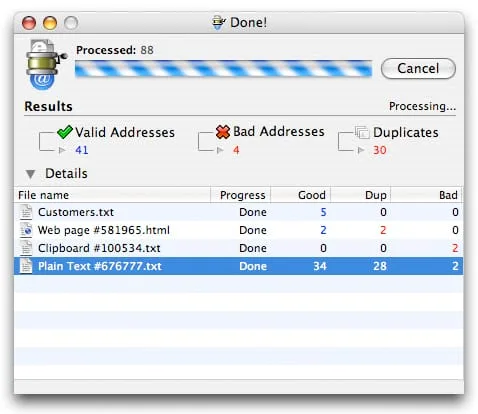
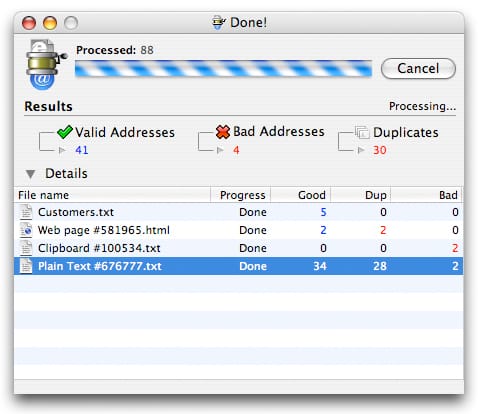
This is commercial, try-before-buy software, not freeware. Scanning entire messages can also collect unrelated addresses; the manual warns that some recipients may regard subsequent newsletters as spam. Extracting an address is not evidence of permission to contact its owner. The screenshot is the publisher's older Mac interface illustration, not a verified image of version 3.9.2.
What it offers
- Extract addresses from TXT, PDF, DOC/DOCX, XLS/XLSX, HTML, RTF and EML files listed by the publisher.
- Process files and folders through drag and drop, or extract from clipboard text and individual web-page URLs.
- Remove duplicate addresses and save a text list with one address per line.
- Adjust extraction settings and rules; the publisher also lists delimiter, vCard and Excel output options.
Good to know
- Commercial try-before-buy license; the download is not a freeware license.
- Whole-message extraction can include unrelated addresses. The publisher warns that sending newsletters to those contacts can be perceived as spam.
- The Mac guide's mailbox workflow requires exporting messages to a file first.
Product images
Sources
References used for this listing. Retrieval dates do not indicate hands-on testing.
- Maxprog Download Page ↗Retrieved
- Email Extraction Software - eMail Extractor ↗Retrieved
- eMail Extractor Getting Started - User Guide ↗Retrieved
- eMail Extractor - macOS - Screenshots ↗Retrieved
More in utilities
View category ↗
1.1.1.1 with WARP 2026.8.2115.0
Encrypt traffic from your Mac to Cloudflare’s network with WARP, or use DNS-only mode for encrypted DNS queries to the 1.1.1.1 resolver.
1.1.1.1 with WARP 2026.8.2115.0
Encrypt traffic between your Windows PC and Cloudflare, or use encrypted DNS only, with the free 1.1.1.1 with WARP app.

3uTools 9.12.005
Manage iPhone and iPad photos, music, apps and backups from Windows with 3uTools, a free utility that also includes device checks and firmware flashing tools.