

Utilities macOS
eMail Verifier for macOS
Check individual email addresses or mailing lists on your Mac with eMail Verifier, a paid desktop utility with a trial, detailed connection logs and exportable results.
- Operating system
- macOS 10.14 or higher, according to the publisher
- Architecture
- Not established by the consulted publisher pages
- Download package
- DMG disk image
This link selects the macOS package, not the separate Windows EXE. Installer contents and execution were not inspected.
Link checked · Download guidance
What is eMail Verifier?
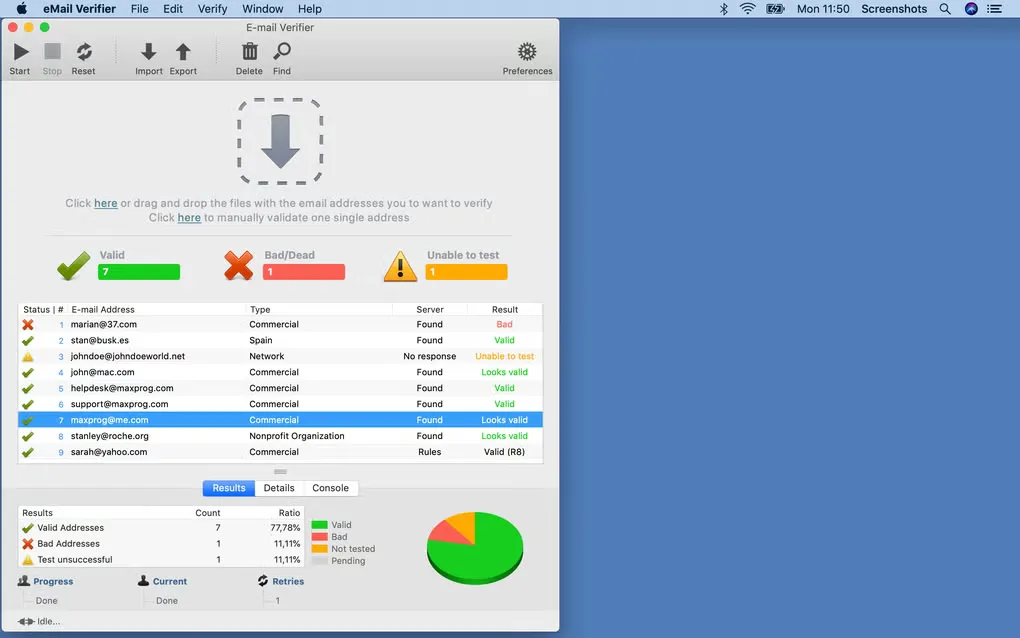
eMail Verifier checks email addresses before you use them in a mailing list. It looks up mail servers through DNS and attempts an SMTP conversation to assess an address, disconnecting without sending an email message. You can check one address or process a list, inspect the connection details and export the results alongside your original data.
This is a list-checking utility, not an email client or a newsletter sender. Its results depend on what remote mail servers disclose. In particular, Maxprog says outbound port 25 must be available for the final mail-server check: if your provider blocks it, syntax and domain checks can still work, but full address verification cannot.
The publisher offers eMail Verifier as try-before-buy software. The linked download is the macOS DMG package; Maxprog lists macOS 10.14 or higher. The screenshot illustrates the Mac interface supplied through the source gallery, not an installation or a verification run performed by SoftGalaxy.
What it offers
- Check a single email address or a mailing list through DNS lookups and SMTP responses without sending a message.
- Inspect per-address results, DNS lookup details and a complete connection log.
- Export original data, verification results or both using the customizable export function.
- Process lists with a multithreaded engine and distribute domain lookups between two DNS servers.
Good to know
- Full mail-server verification requires outbound port 25. If it is blocked, only syntax and domain checks can be completed.
- The download is a trial of paid software, not a free unrestricted license.
Product images
Sources
References used for this listing. Retrieval dates do not indicate hands-on testing.
- eMail Verifier for Mac - Download ↗Retrieved
- Maxprog Download Page ↗Retrieved
- Email verifier software for macOS and Windows ↗Retrieved
- Does eMail Verifier need port 25 or an SMTP relay to work? ↗Retrieved
- Maxprog Legal Notice ↗Retrieved
More in utilities
View category ↗
1.1.1.1 with WARP 2026.8.2115.0
Encrypt traffic from your Mac to Cloudflare’s network with WARP, or use DNS-only mode for encrypted DNS queries to the 1.1.1.1 resolver.
1.1.1.1 with WARP 2026.8.2115.0
Encrypt traffic between your Windows PC and Cloudflare, or use encrypted DNS only, with the free 1.1.1.1 with WARP app.

3uTools 9.12.005
Manage iPhone and iPad photos, music, apps and backups from Windows with 3uTools, a free utility that also includes device checks and firmware flashing tools.