
Development macOS
ethui
Interact with Ethereum chains from a macOS desktop wallet with Anvil synchronization, a local contract explorer and multiple-wallet support for development workflows.
- Operating system
- macOS; minimum version not specified in the reviewed installation documentation
- Architecture
- Universal, as labelled in the publisher's macOS asset name
- Download package
- DMG disk image
This entry links to ethui_1.27.0_universal.dmg. Browser integration requires the companion Chrome or Firefox extension. No installation or runtime compatibility test was performed.
Link checked · Download guidance
What is ethui?
ethui combines an Ethereum desktop wallet with tools for developing and inspecting smart contracts. It connects to local Anvil chains, indexes ABI files from Forge projects and matches them to on-chain bytecode to provide an interactive contract explorer. Multiple wallets let you separate development contexts without maintaining a browser profile for each one. Version 1.27.0 also adds Hardhat node compatibility and support for Hardhat compilation artifacts.
For web3 sites, install the companion Chrome or Firefox extension alongside the desktop app. The extension connects the site to ethui, while wallet interactions happen in the desktop interface. Initial onboarding covers wallet creation and optional external API keys; those choices can be changed later.
Development shortcuts are not interchangeable with live-fund wallet security. Fast Mode is documented for Anvil-based chains and skips transaction dialogs and private-key decryption. The publisher explicitly warns against holding real funds in Plaintext or Impersonator testing wallets, even though they can work on live networks.
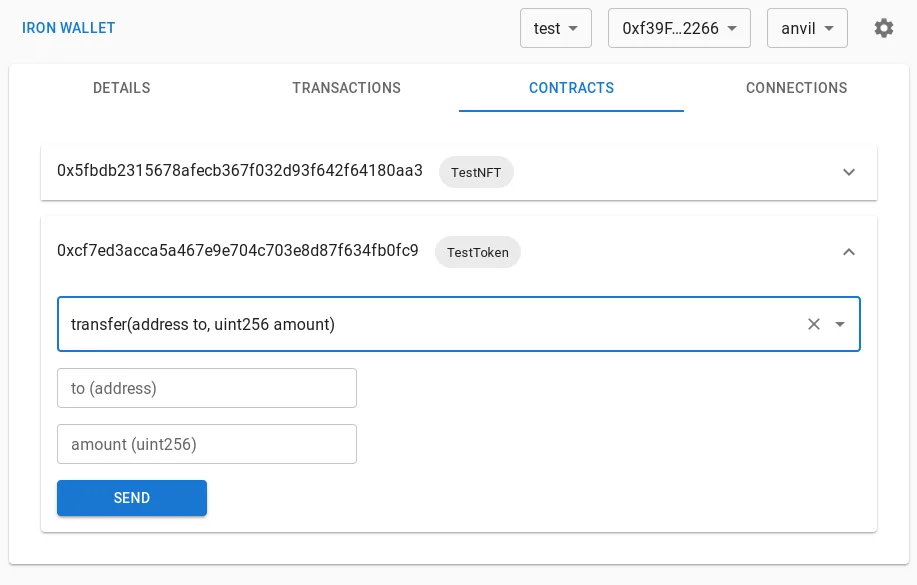
The linked download is the publisher's version 1.27.0 universal macOS DMG. The installation documentation does not state a minimum macOS version. The illustrated contract interface is a historical screenshot retained in the project's repository, labelled Iron Wallet, rather than a capture of this release or a verified macOS-specific screen.
What it offers
- Synchronize with local Anvil chains across restarts, reverts and downtime.
- Index Forge ABI outputs and use a built-in explorer to interact with matching deployed contracts.
- Create and switch between multiple wallets without separate browser profiles.
- Connect web3 sites through a companion Chrome or Firefox extension.
- Use Hardhat node compatibility and compilation-artifact ABI support introduced in version 1.27.0.
Good to know
- Browser-based web3 connections require the companion extension as well as the desktop app.
- Plaintext and Impersonator wallets are testing tools; the publisher says not to use them to hold real funds.
- Fast Mode is an Anvil-chain development shortcut that skips transaction dialogs and private-key decryption, not a general live-network workflow.
- The reviewed installation documentation does not specify a minimum macOS version.
Product images
Sources
References used for this listing. Retrieval dates do not indicate hands-on testing.
- ethui | An Ethereum toolkit for Developers ↗Retrieved
- Installation | Docs | ethui ↗Retrieved
- ethui/ethui — official repository ↗Retrieved
- Release v1.27.0 · ethui/ethui ↗Retrieved
- ethui v1.27.0 — official asset listing ↗Retrieved
- Forge | Docs | ethui ↗Retrieved
- Fast Mode | Docs | ethui ↗Retrieved
- Wallets | Docs | ethui ↗Retrieved
- History for screenshot.png — ethui/ethui ↗Retrieved
More in development
View category ↗


010 Editor 17.0
Inspect and edit binary files on Mac with 010 Editor, a paid text and hex editor with Binary Templates, file comparison and a 30-day trial.
010 Editor 17.0
Inspect and edit binary files with 010 Editor for Windows, a text and hex editor with Binary Templates, file comparison and scripting. Includes a 30-day trial.
10x Editor
Edit and navigate C++ projects on Windows with a built-in parser, workspace search and Visual Studio project support. A paid license is required after the 30-day trial.