
Utilities Windows
Eusing Maze Lock
Lock your Windows desktop with a drawn dot pattern. Eusing Maze Lock offers tray and hotkey locking, idle auto-lock and configurable pattern grids for free.
- Operating system
- Windows XP, 2003, Vista, 7, 8, 10 and 11 (publisher-listed)
- Architecture
- Not specified by publisher
- Download package
- EXE installer (EMLSetup.exe)
Publisher compatibility claims only; no installation, security or Windows-build testing performed.
Link checked · Download guidance
What is Eusing Maze Lock?
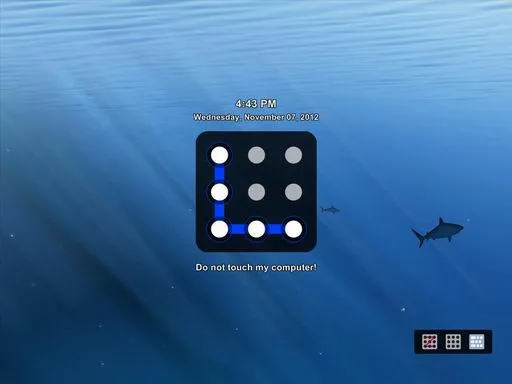
Eusing Maze Lock adds a pattern-based lock screen to Windows. Instead of typing a password into its unlock panel, you hold the mouse button, trace your chosen path through a grid of dots and release to confirm. It is aimed at people who want a visual way to lock a desktop when stepping away.
The publisher offers 3×3, 4×4 and 5×5 grids, a system-tray lock control and automatic locking after inactivity or at Windows startup. You can customize the background and transparency, and the feature list includes multiple-monitor support and pattern backup. The online help documents Win+A for locking and Win+C for opening configuration.
Before relying on it, learn the preset pattern, replace it with your own and keep a pattern backup. The publisher warns users to note the default pattern; forgetting a changed pattern can require recovery or reinstallation. This is a separate locking utility, not evidence of protection equivalent to Windows account authentication. The publisher lists Windows XP, 2003, Vista, 7, 8, 10 and 11, but does not identify processor architecture or tested Windows builds on the product page.
What it offers
- Draw an unlock pattern on a 3×3, 4×4 or 5×5 dot grid.
- Lock from the system tray or use the documented Win+A shortcut.
- Configure automatic locking after inactivity or at Windows startup.
- Customize the lock-screen background and transparency, with publisher-listed multiple-monitor support.
- Back up your chosen pattern using the publisher-listed backup feature.
Good to know
- Forgetting the pattern can require recovery or reinstallation; learn the default pattern and back up your replacement before enabling automatic locking.
- A separate pattern lock is not demonstrated equivalent to Windows account authentication; no security testing is claimed.
- The publisher lists Windows versions but does not specify processor architecture or tested Windows build numbers.
Product images
Sources
References used for this listing. Retrieval dates do not indicate hands-on testing.
- Eusing Maze Lock — official product page ↗Retrieved
- Eusing Maze Lock Online Help ↗Retrieved
More in utilities
View category ↗
1.1.1.1 with WARP 2026.8.2115.0
Encrypt traffic from your Mac to Cloudflare’s network with WARP, or use DNS-only mode for encrypted DNS queries to the 1.1.1.1 resolver.
1.1.1.1 with WARP 2026.8.2115.0
Encrypt traffic between your Windows PC and Cloudflare, or use encrypted DNS only, with the free 1.1.1.1 with WARP app.

3uTools 9.12.005
Manage iPhone and iPad photos, music, apps and backups from Windows with 3uTools, a free utility that also includes device checks and firmware flashing tools.