

Utilities Windows
Everything for Windows
Find files and folders by name on Windows with Everything, a free search utility with a filename index and results that update as files change.
- Operating system
- Windows 11, 10, 8, 7, Vista and XP (publisher-listed)
- Architecture
- x64 (64-bit Windows)
- Download package
- Multilingual EXE installer, version 1.4.1.1032
This is the x64 installer, not a portable or beta package. Administrator permission is needed for installation; NTFS indexing needs the Everything service or administrator privileges.
Link checked · Download guidance
What is Everything?
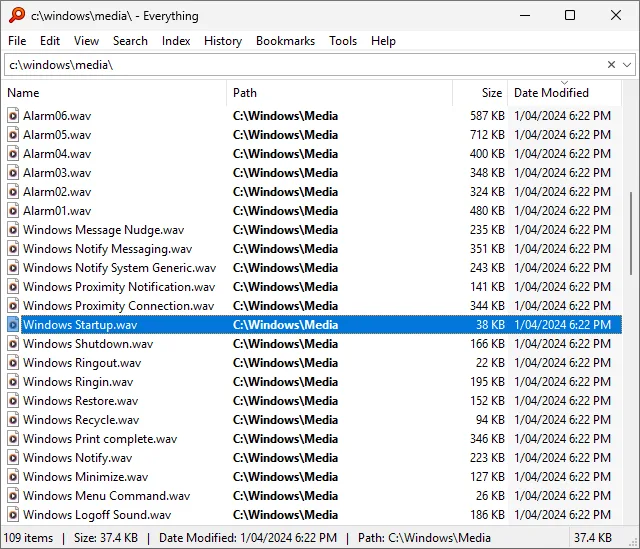
Everything helps you find a file when you remember part of its name but not where you saved it. Type a partial filename to narrow the results, or use an extension, folder path or wildcard to make the search more specific. It monitors file-system changes to keep results up to date.
Its index is built for file and folder names, not the text inside documents. The content: search function can look inside files, but those contents are not indexed and the publisher describes content searches as slow. NTFS indexing needs the Everything service or administrator privileges; the service lets the main window run as a standard user.
The linked download is the multilingual x64 EXE installer for version 1.4.1.1032, not the separately listed 1.5 beta or a portable ZIP. It requires 64-bit Windows and administrator permission to install.
What it offers
- Narrow file and folder results by typing part of a name.
- Filter searches with extensions, folder paths, wildcards and Boolean operators.
- Update search results as monitored files and folders change.
- Use the Everything service for NTFS indexing while the main program runs as a standard user.
Good to know
- File contents are not indexed. The content: function searches inside files without a content index, which the publisher describes as slow.
- NTFS indexing requires the Everything service or administrator privileges; installing the selected EXE also requires administrator permission.
Product images
Sources
References used for this listing. Retrieval dates do not indicate hands-on testing.
More in utilities
View category ↗
1.1.1.1 with WARP 2026.8.2115.0
Encrypt traffic from your Mac to Cloudflare’s network with WARP, or use DNS-only mode for encrypted DNS queries to the 1.1.1.1 resolver.
1.1.1.1 with WARP 2026.8.2115.0
Encrypt traffic between your Windows PC and Cloudflare, or use encrypted DNS only, with the free 1.1.1.1 with WARP app.

3uTools 9.12.005
Manage iPhone and iPad photos, music, apps and backups from Windows with 3uTools, a free utility that also includes device checks and firmware flashing tools.