
Utilities Windows
FakeFlashTest
Check USB flash drives and SD cards for falsely reported capacity with this free Windows utility. Its Quick Size Test is destructive, so back up files before testing.
- Operating system
- Windows; specific supported releases are not stated in the cited publisher documentation
- Architecture
- Not specified by the cited publisher documentation
- Download package
- Password-protected ZIP containing FakeFlashTest.exe
Archive password: fake. Extract before use and run with Administrator privileges. Modern Windows compatibility has not been independently tested.
Link checked · Download guidance
What is FakeFlashTest?
FakeFlashTest checks whether a USB flash drive or SD card has the storage capacity it claims. It looks for missing chunks of flash memory rather than testing every bit of every byte. That makes it a capacity-screening tool, not a comprehensive memory-health check or a way to repair unreliable storage.
The publisher provides version 1.1.5 as a beta in a password-protected ZIP. Extract it with an archive tool such as 7-Zip or WinRAR using the password fake. Run FakeFlashTest.exe with Administrator privileges; the publisher says USB drives will not be listed otherwise. Specific Windows releases and processor architectures are not established by the cited documentation.
Back up the target drive before testing and check that the selected device is the one you intend to erase. Quick Size Test is explicitly destructive. The interface also offers Test Empty Space, but writing test data to a fake-capacity device can corrupt existing files, so it is not a substitute for a backup. A passing quick test does not prove that all flash memory is fault-free.
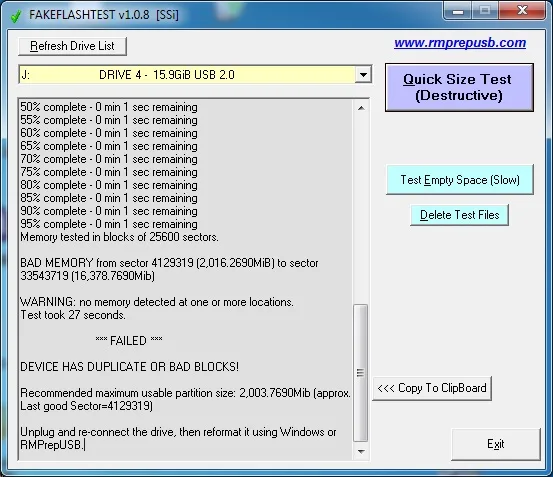
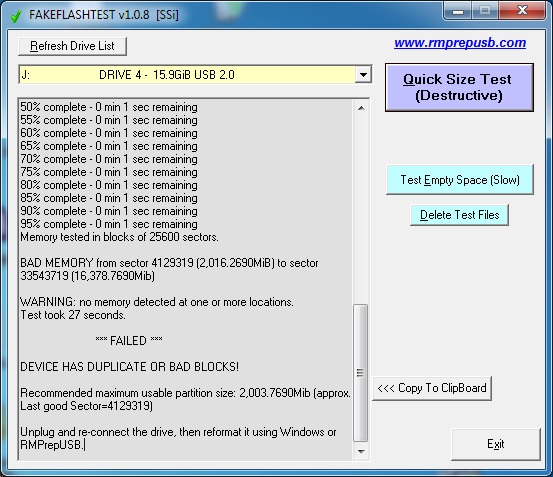
The screenshot is the publisher's historical version 1.0.8 interface, showing a failed capacity test; it is not a test performed by SoftGalaxy or a screenshot of the linked 1.1.5 beta. The publisher warns that fake devices can become unusable when writes reach nonexistent storage, and reducing their formatted capacity does not make them dependable for important files.
What it offers
- Screen USB flash drives and SD cards for fake capacity by checking for missing memory chunks.
- Use Quick Size Test for a destructive capacity check.
- Use the Test Empty Space mode shown in the publisher's historical interface.
- Read a test log identifying missing or duplicate blocks and an estimated usable partition size.
Good to know
- Quick Size Test destroys data. Back up the selected drive before testing; tests that write files can also corrupt existing data on fake media.
- This is not a thorough test of every memory location. A quick-test pass is not a guarantee of memory health.
- Administrator privileges are required to list USB drives. Specific Windows-version and CPU-architecture support is not established by the cited publisher page.
- The linked package is the publisher's 1.1.5 beta; the historical screenshot shows version 1.0.8.
- Testing may expose defective fake-drive controllers that leave the device unusable; the tool does not repair fake storage.
Product images
Sources
References used for this listing. Retrieval dates do not indicate hands-on testing.
More in utilities
View category ↗
1.1.1.1 with WARP 2026.8.2115.0
Encrypt traffic from your Mac to Cloudflare’s network with WARP, or use DNS-only mode for encrypted DNS queries to the 1.1.1.1 resolver.
1.1.1.1 with WARP 2026.8.2115.0
Encrypt traffic between your Windows PC and Cloudflare, or use encrypted DNS only, with the free 1.1.1.1 with WARP app.

3uTools 9.12.005
Manage iPhone and iPad photos, music, apps and backups from Windows with 3uTools, a free utility that also includes device checks and firmware flashing tools.