
Utilities Windows
Fast Duplicate File Finder
Find exact duplicate files by comparing their contents, preview matches and choose which copies to remove with MindGems Fast Duplicate File Finder for Windows.
- Operating system
- Windows 11, 10, 8.1, 8 and 7
- Architecture
- Publisher lists support for 32-bit and 64-bit Windows
- Download package
- EXE installer
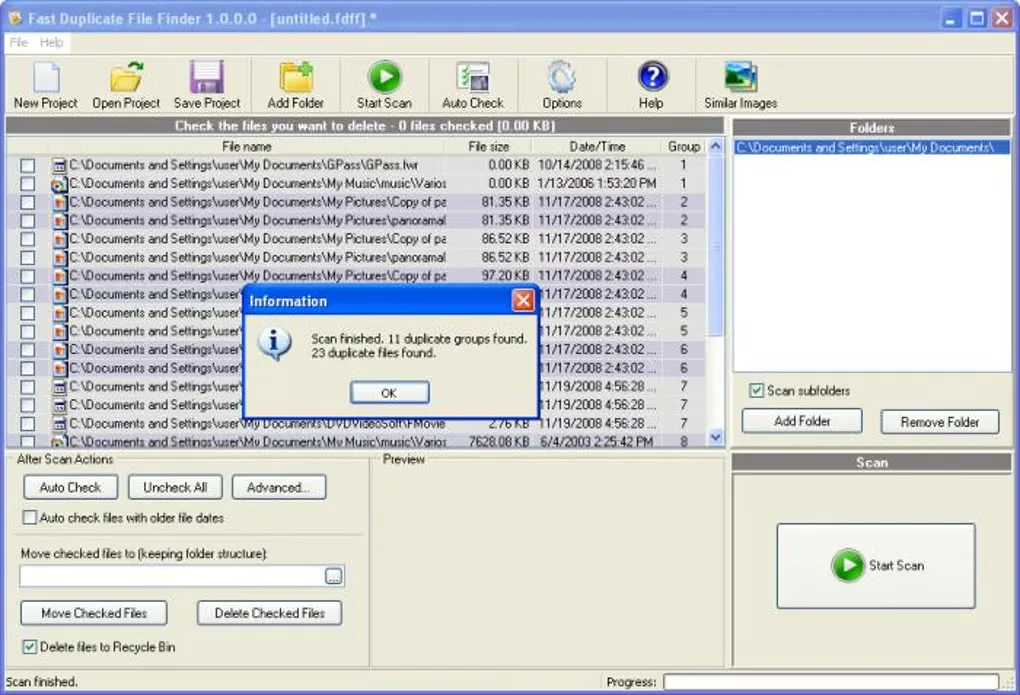
Exact installer architecture and package version were not independently inspected. Screenshot shows a historical interface, not a verified current release.
Link checked · Download guidance
What is Fast Duplicate File Finder?
Fast Duplicate File Finder helps review repeated files across folders, external drives and network storage. Its exact-match mode compares file contents rather than relying on matching names, so renamed copies can still appear together. A results list, built-in previews and Auto Check selection help you choose which duplicates to keep before moving or deleting the others.
The free edition is for non-commercial use and covers exact duplicate detection. Professional adds similar-file and similar-filename searches, filtering and other advanced controls. This is not the same task as finding visually similar photos or matching songs across different formats; MindGems offers separate tools for those jobs.
Review the selected files before removal and keep a backup of important data. Use the Recycle Bin option instead of permanent deletion when you need a recovery route. The screenshot is a historical Windows interface from the Softonic gallery, visibly labeled version 1.0.0.0; it is not a screenshot of a verified current release.
What it offers
- Compare actual file contents to find exact duplicates even when names differ.
- Scan selected folders, external drives and network locations.
- Review grouped results with built-in file previews before choosing copies to remove.
- Use Auto Check to select duplicates, then move them or send them to the Recycle Bin.
Good to know
- The free edition is licensed for non-commercial use only.
- Similar-file and similar-filename searches, filtering and Quick Check/Uncheck require Professional.
- The free edition can save projects but cannot load them; PDF and RAW previews are limited to the first 10 groups.
Product images
Sources
References used for this listing. Retrieval dates do not indicate hands-on testing.
More in utilities
View category ↗
1.1.1.1 with WARP 2026.8.2115.0
Encrypt traffic from your Mac to Cloudflare’s network with WARP, or use DNS-only mode for encrypted DNS queries to the 1.1.1.1 resolver.
1.1.1.1 with WARP 2026.8.2115.0
Encrypt traffic between your Windows PC and Cloudflare, or use encrypted DNS only, with the free 1.1.1.1 with WARP app.

3uTools 9.12.005
Manage iPhone and iPad photos, music, apps and backups from Windows with 3uTools, a free utility that also includes device checks and firmware flashing tools.