

Utilities Windows
FastCopy for Windows
Copy, move and synchronize files on Windows with hash verification and include/exclude filters. Free use is limited to non-profit household use; workplace use requires Pro.
- Operating system
- Windows 7, 8, 8.1, 10 and 11; Windows Server 2012/R2, 2016, 2019, 2022 and 2025
- Architecture
- 32-bit and 64-bit
- Download package
- EXE installer with Extract only option
Publisher lists one installer for 32-bit/64-bit Windows. Free use is non-profit household use only; workplace use requires Pro.
Link checked · Download guidance
What is FastCopy?
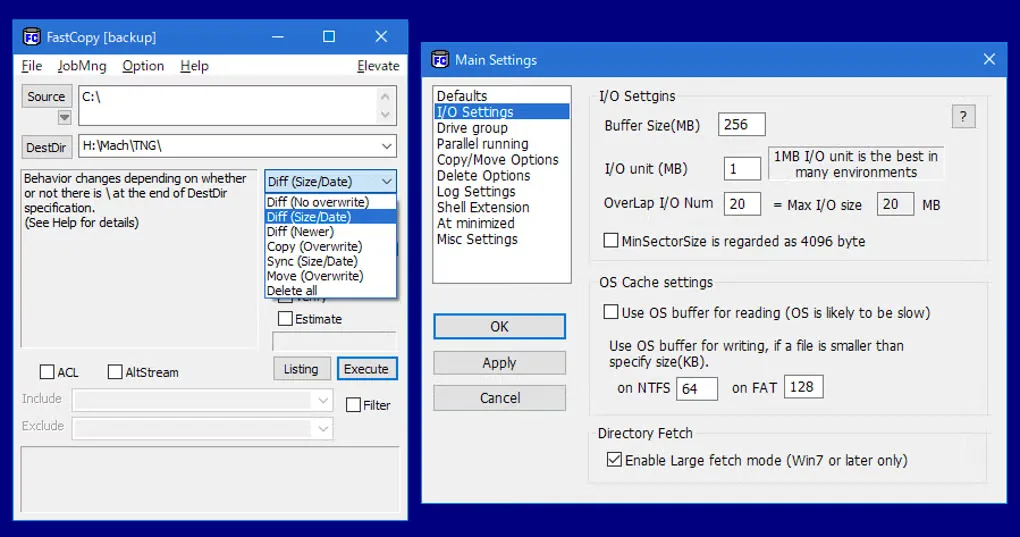
FastCopy transfers files and folders with control over which existing files to replace. Use its difference modes to copy missing, changed or newer files, or apply include/exclude filters to limit a transfer. Hash verification can compare copied data, and the Listing button previews which files an operation will copy or delete.
Choose Sync only when you want the destination to match the source: its sync modes also delete destination files and folders that are absent from the source. Standard verification is available without Pro, but Perfect Verify, which re-reads both source and destination, requires a Pro license. Free use is restricted to individuals using it for non-profit purposes within the household; workplace use requires Pro.
The linked EXE installer is the publisher's 32-bit/64-bit Windows package. Its Extract only option can unpack the program for use from a USB drive instead of a conventional installation.
What it offers
- Copy missing, changed or newer files using difference modes, or overwrite all files in a copy operation.
- Filter transfers by include/exclude patterns, file size and modification date.
- Verify copied data with hashes; Perfect Verify is a separate Pro-only option.
- Preview the files to be copied or deleted with Listing before executing an operation.
- Handle Unicode filenames and paths longer than 260 characters.
Good to know
- Free use is limited to individuals for non-profit use within the household; workplace use requires a Pro license.
- Sync modes delete destination files and folders that do not exist in the source.
- Perfect Verify, which re-reads both source and destination, requires Pro.
Product images
Sources
References used for this listing. Retrieval dates do not indicate hands-on testing.
More in utilities
View category ↗
1.1.1.1 with WARP 2026.8.2115.0
Encrypt traffic from your Mac to Cloudflare’s network with WARP, or use DNS-only mode for encrypted DNS queries to the 1.1.1.1 resolver.
1.1.1.1 with WARP 2026.8.2115.0
Encrypt traffic between your Windows PC and Cloudflare, or use encrypted DNS only, with the free 1.1.1.1 with WARP app.

3uTools 9.12.005
Manage iPhone and iPad photos, music, apps and backups from Windows with 3uTools, a free utility that also includes device checks and firmware flashing tools.