
Utilities Windows
FastPaste for Windows
Paste reusable text, formatted snippets and images with customizable hotkeys in FastPaste for Windows. A 30-day trial is available; keyboard scripts require the Professional edition.
- Operating system
- Windows 11, 10, 8, 7, Vista, XP and 2000
- Architecture
- Publisher lists support for 32-bit and 64-bit Windows
- Download package
- EXE installer
Publisher compatibility claims, not installation-tested here. The download's native executable architecture was not inspected.
Link checked · Download guidance
What is FastPaste?
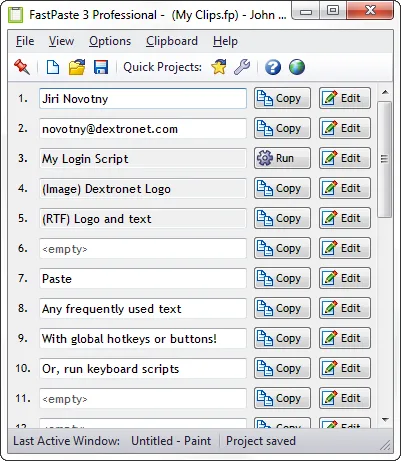
FastPaste stores reusable clips so you can insert a recurring reply, contact detail or other frequently used content without typing it again. Clips can contain plain text, rich text or images. Trigger them with a global hotkey, choose them from a paste menu, or copy them from the main window or notification-area menu. Automatic pasting can be disabled if you only want to copy a clip to the clipboard.
Projects organize clips into reusable sets, with 30 clips per project. The Quick Projects feature provides keyboard or button access to up to 300 clips. You can reorder clips by dragging their numbers and display them in one, two or three columns to suit your workspace.
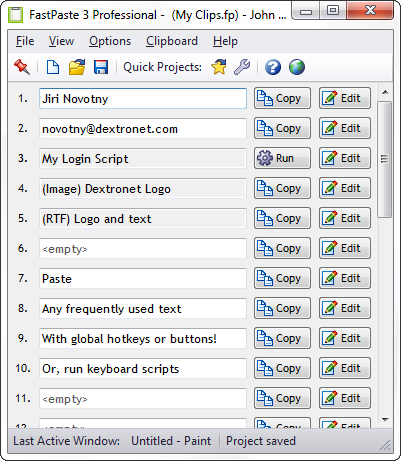
FastPaste is commercial software with a fully functional 30-day trial, not an unrestricted free utility. Keyboard scripts for filling forms or sending key sequences are limited to the Professional edition. The screenshot is the publisher's FastPaste 3 Professional example; it is not a capture of a newly installed version 3.3.
What it offers
- Store plain-text clips, rich-text snippets and images for reuse.
- Assign customizable global hotkeys or use the paste menu, main window and notification-area menu.
- Organize 30 clips per project and access up to 300 clips through Quick Projects.
- Reorder clips with drag and drop and choose a one-, two- or three-column layout.
- Use keyboard scripts to fill forms or send key sequences in the Professional edition.
Good to know
- The fully functional trial lasts 30 days; continued use requires a paid license.
- Keyboard scripts are available only in the Professional edition.
Product images
Sources
References used for this listing. Retrieval dates do not indicate hands-on testing.
More in utilities
View category ↗
1.1.1.1 with WARP 2026.8.2115.0
Encrypt traffic from your Mac to Cloudflare’s network with WARP, or use DNS-only mode for encrypted DNS queries to the 1.1.1.1 resolver.
1.1.1.1 with WARP 2026.8.2115.0
Encrypt traffic between your Windows PC and Cloudflare, or use encrypted DNS only, with the free 1.1.1.1 with WARP app.

3uTools 9.12.005
Manage iPhone and iPad photos, music, apps and backups from Windows with 3uTools, a free utility that also includes device checks and firmware flashing tools.