
Utilities Windows
Febooti Hex Editor
View and edit file bytes in hexadecimal or ASCII from Windows file Properties with Febooti Hex Editor, a freeware utility for files up to 2 GB.
- Operating system
- Windows 10 explicitly documented; Windows 11 also listed in the publisher's site-wide compatibility statement
- Architecture
- x86 and x64 in one universal setup
- Download package
- EXE installer
The product page supports 32-bit and 64-bit Windows; release history documents a combined x86/x64 EXE. Windows 11 coverage is a general publisher statement, not an independent test.
Link checked · Download guidance
What is Febooti Hex Editor?
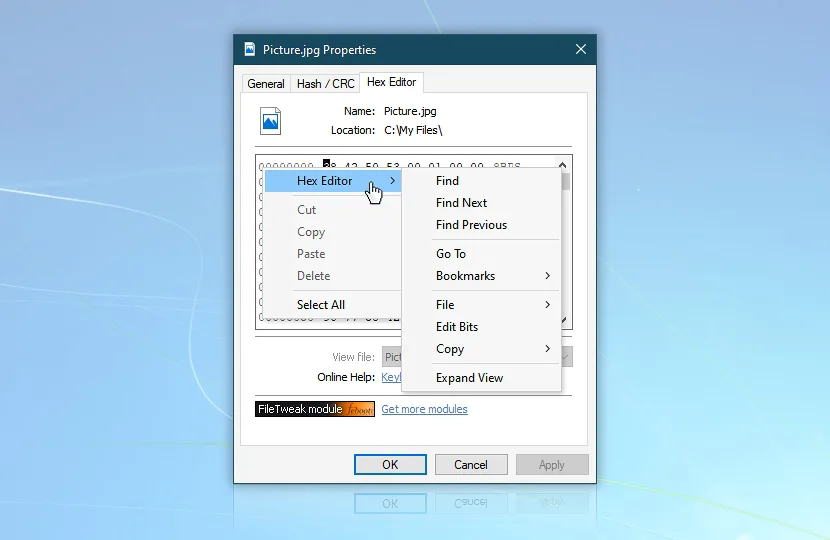
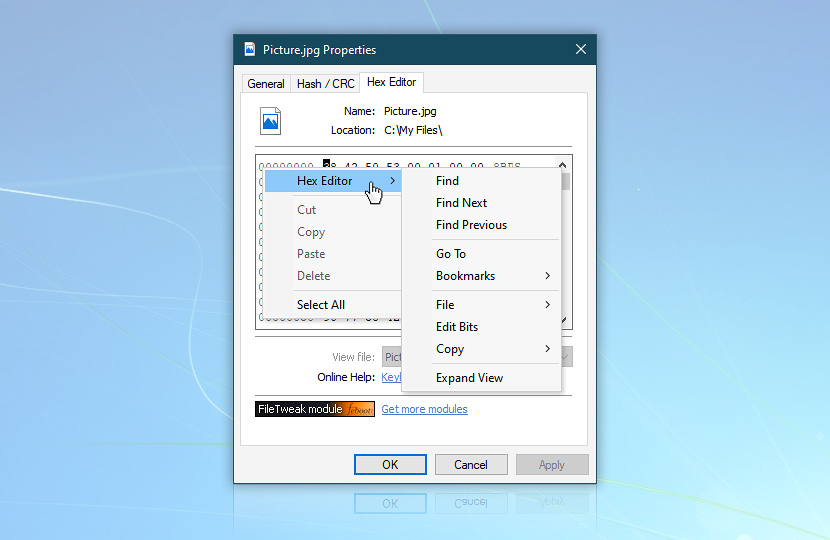
Febooti Hex Editor adds a Hex Editor tab to Windows file Properties. It is a compact option for inspecting bytes, finding a value or changing a specific region of a file without opening a separate editor window. Right-click a file and choose Properties to reach the editing interface; opening several Properties windows provides separate editing views.
The editor supports hexadecimal and ASCII views, insert and overwrite modes, address navigation, search, clipboard commands and bookmarks. Its context menu also provides bit-level editing and an expanded view. The publisher documents Ctrl+F for search, Ctrl+G for an address and Tab to move from the hexadecimal area to ASCII.
The documented file-size ceiling is 2 GB. The download catalog lists version 3.7, and its product-specific release notes date that version to September 25, 2015, with an explicit Windows 10 compatibility fix. The publisher now also lists Windows 11 in a site-wide compatibility statement; that broader statement is not a newer Hex Editor release note or an independent compatibility test.
Ctrl+S saves changes to the file. The documented Ctrl+N command discards current changes and returns to the last saved state; it should not be treated as a way to undo an already saved edit. Make a separate copy before modifying an important file.
What it offers
- Edit hexadecimal or ASCII content in a tab within Windows file Properties.
- Switch between insert and overwrite editing modes and navigate to a specified hexadecimal address.
- Search for hexadecimal or ASCII values, then find the next or previous occurrence.
- Use clipboard commands, bit-level editing and up to 10 global bookmarks.
- Expand the editing area and use keyboard shortcuts for common editing operations.
Good to know
- The publisher documents support for files up to 2 GB, not larger files.
- Version 3.7 has product-specific release notes from September 25, 2015. Windows 11 is named in a broader publisher compatibility statement, not a newer product-specific release note; no independent runtime test was performed.
- Saved byte edits change the file itself. The documented discard command returns only to the last saved state; retain a separate original before editing.
Product images
Sources
References used for this listing. Retrieval dates do not indicate hands-on testing.
- Freeware Hex Editor — official product page ↗Retrieved
- Download Center — Febooti Hex Editor package listing ↗Retrieved
- History of the Febooti Hex Editor ↗Retrieved
- Hex Editor keys & shortcuts ↗Retrieved
- Context menu screenshot — official Hex Editor gallery ↗Retrieved
- Freeware hex editor screenshot — access through Properties ↗Retrieved
More in utilities
View category ↗
1.1.1.1 with WARP 2026.8.2115.0
Encrypt traffic from your Mac to Cloudflare’s network with WARP, or use DNS-only mode for encrypted DNS queries to the 1.1.1.1 resolver.
1.1.1.1 with WARP 2026.8.2115.0
Encrypt traffic between your Windows PC and Cloudflare, or use encrypted DNS only, with the free 1.1.1.1 with WARP app.

3uTools 9.12.005
Manage iPhone and iPad photos, music, apps and backups from Windows with 3uTools, a free utility that also includes device checks and firmware flashing tools.