

Utilities Windows
Fiji for Windows
Process and analyze scientific images with Fiji, a free ImageJ distribution that bundles community plugins. This Windows download is the 64-bit Stable package with Java 8.
- Operating system
- Windows XP or later, as listed by the publisher for Fiji Stable
- Architecture
- x86-64 (64-bit)
- Download package
- Portable ZIP archive with Java 8 runtime
Selected download is Fiji Stable, not Fiji Latest. A separate 32-bit Stable package is available. Extract to a user-writable directory.
Link checked · Download guidance
What is Fiji?
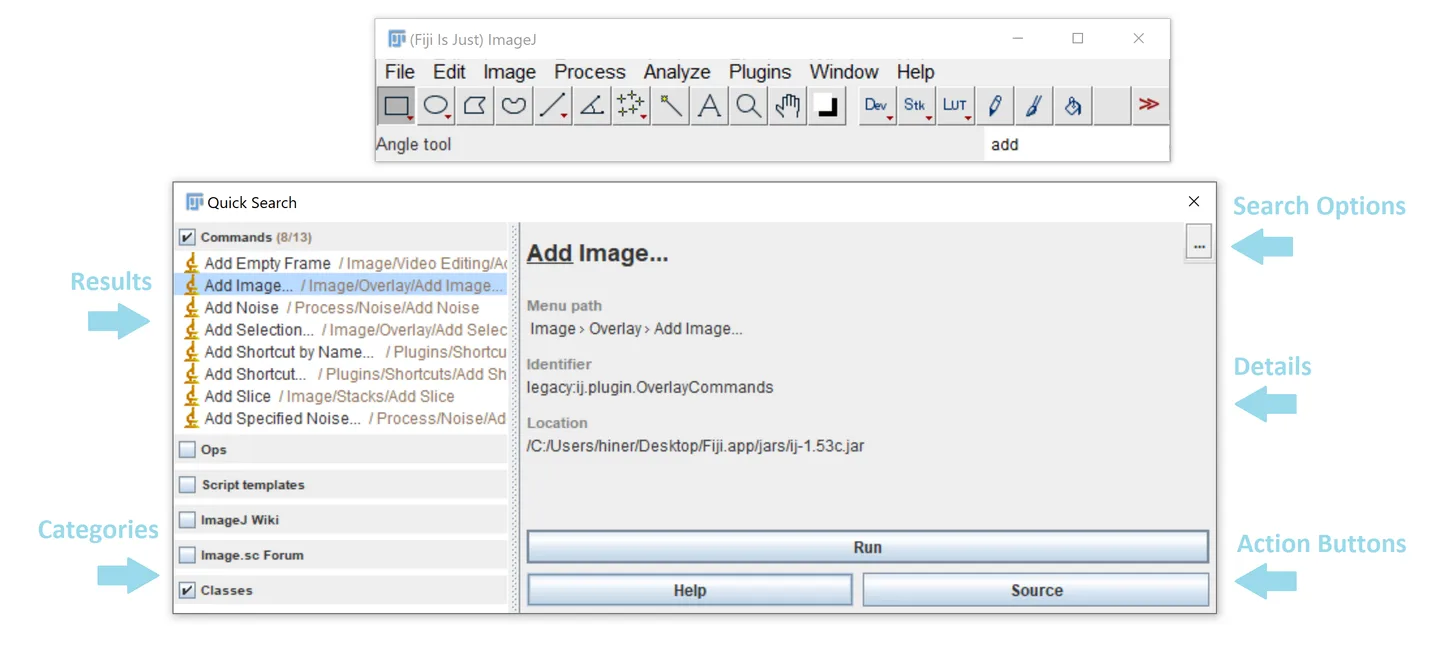
Fiji brings ImageJ and ImageJ2 together with a collection of plugins for scientific image processing and analysis. Its menus cover opening and saving images, working with image stacks, applying filters and running analysis tools. A command search helps locate tools and documentation without browsing every plugin menu. Fiji also includes an updater that manages plugin dependencies.
The linked download is Fiji Stable for Windows x86-64 with its Java runtime included. It is a portable ZIP package: extract it into a user-writable folder and start the application, rather than running an installer. The publisher advises against placing Fiji in Program Files because restricted write access can prevent updates.
Stable is intended for Java 8, older operating systems or older-plugin compatibility. The publisher recommends its separate Latest distribution for most users and requires that branch for the newest features and plugins; this Stable download should not be mistaken for it.
What it offers
- Use ImageJ and ImageJ2 with bundled community plugins for scientific image analysis.
- Open and save images, manipulate stacks, apply filters and access analysis commands from the menus.
- Find commands and documentation through the search panel, with result categories and command details.
- Manage plugin updates and dependencies with the built-in updater.
Good to know
- This Stable package uses Java 8; the publisher requires Fiji Latest for the newest Fiji features and plugins.
- Installing under Program Files can prevent the updater from writing to the Fiji directory; use a user-writable folder.
Product images
Sources
References used for this listing. Retrieval dates do not indicate hands-on testing.
- Fiji ImageJ - Download ↗Retrieved
- Fiji: ImageJ, with "Batteries Included" ↗Retrieved
- Fiji Downloads ↗Retrieved
- Introduction — ImageJ Wiki ↗Retrieved
- Licensing — ImageJ Wiki ↗Retrieved
More in utilities
View category ↗
1.1.1.1 with WARP 2026.8.2115.0
Encrypt traffic from your Mac to Cloudflare’s network with WARP, or use DNS-only mode for encrypted DNS queries to the 1.1.1.1 resolver.
1.1.1.1 with WARP 2026.8.2115.0
Encrypt traffic between your Windows PC and Cloudflare, or use encrypted DNS only, with the free 1.1.1.1 with WARP app.

3uTools 9.12.005
Manage iPhone and iPad photos, music, apps and backups from Windows with 3uTools, a free utility that also includes device checks and firmware flashing tools.