
Utilities Windows
File Converter
Convert audio, video, images and documents from the Windows Explorer right-click menu with File Converter, a free, open-source utility with editable presets.
- Operating system
- Windows 7, 8, 10 and 11
- Architecture
- x64
- Download package
- MSI installer
Office-document conversion requires installed, activated Microsoft Office. The 32-bit package is a separate legacy release.
Link checked · Download guidance
What is File Converter?
File Converter adds conversion presets to the Windows Explorer context menu, so you can convert selected files without starting a separate conversion workflow. It handles audio, video, images and documents, with output choices such as MP3, MP4, PNG and PDF depending on the source format. The preset editor lets you add or remove menu entries and adjust conversion options.
The supported input list is broader than the output list: accepting a file does not mean the application can write that same format. Office-document conversion also requires Microsoft Office to be installed and activated. Check those requirements before choosing it for document work.
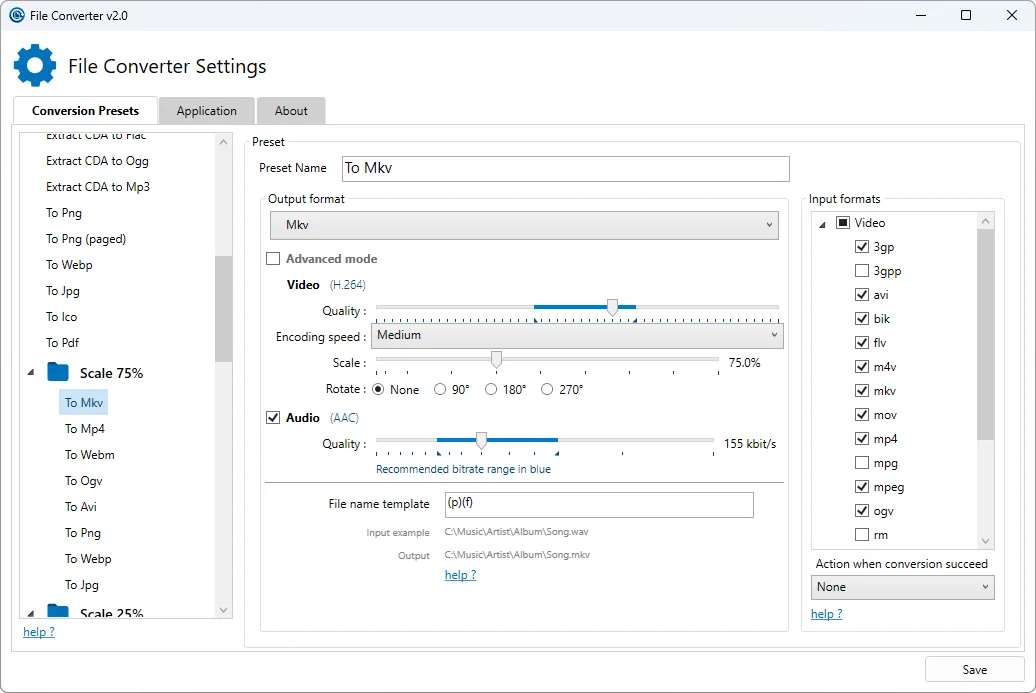
This entry links to the publisher’s version 2.2 Windows x64 MSI. The publisher lists Windows 7, 8, 10 and 11 for File Converter 2; the separate 32-bit download belongs to the legacy 1.2.3 release. The screenshot is the publisher’s File Converter v2.0 preset editor and illustrates the settings workflow, not a verified capture of version 2.2.
What it offers
- Convert files from the Windows Explorer context menu.
- Choose audio, video, image and PDF outputs according to the supported format table.
- Add, remove and edit conversion presets and their options.
- Use AVIF image input and output, added in version 2.2.
Good to know
- Converting Office documents requires Microsoft Office to be installed and activated.
- Supported input formats are not all available as output formats; document output is PDF.
- This version 2.2 download is x64; the publisher’s 32-bit package is the older 1.2.3 release.
Product images
Sources
References used for this listing. Retrieval dates do not indicate hands-on testing.
More in utilities
View category ↗
1.1.1.1 with WARP 2026.8.2115.0
Encrypt traffic from your Mac to Cloudflare’s network with WARP, or use DNS-only mode for encrypted DNS queries to the 1.1.1.1 resolver.
1.1.1.1 with WARP 2026.8.2115.0
Encrypt traffic between your Windows PC and Cloudflare, or use encrypted DNS only, with the free 1.1.1.1 with WARP app.

3uTools 9.12.005
Manage iPhone and iPad photos, music, apps and backups from Windows with 3uTools, a free utility that also includes device checks and firmware flashing tools.