
Utilities Windows
File Shredder
Queue files and folders for overwriting, choose from five shredding algorithms or wipe free disk space with File Shredder, a free Windows utility with no publisher support.
Version 2.50 · Direct publisher file
Link checked · Download guidance
What is File Shredder?
File Shredder is a Windows utility for overwriting unwanted files and folders. It provides a queue for reviewing selected items before starting the destructive operation, a choice of five shredding algorithms and a separate free-space wiping function. The publisher lists version 2.50 and makes the software free for personal and commercial use under the GNU GPL.
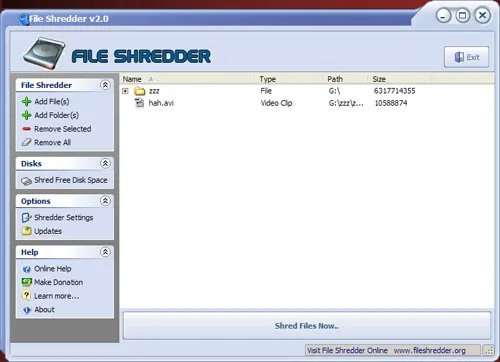
Adding an item to the queue does not delete it. Add File(s) and Add Folder(s) collect the intended items; Remove Selected and Remove All only clear queue entries, leaving the underlying files unchanged. Review that list before choosing Shred Files Now: the publisher warns that shredding cannot be undone. Optional Windows Explorer integration adds right-click commands for deletion or queuing.
The publisher's help lists Windows NT, 2000, XP, Server 2003, Vista, 7, 8 and 10, but does not establish Windows 11 compatibility or current build support. The publisher explicitly offers no support. Erasure effectiveness, particularly on SSDs, has not been independently verified for this entry; do not read the publisher's recovery-prevention claims as a tested guarantee. The included publisher screenshot is a historical v2.0 interface image, not a capture of version 2.50.
What it offers
- Queue individual files or folders, including their subfolders, before starting shredding.
- Remove selected entries or clear the whole queue without deleting the underlying files.
- Choose between five publisher-described shredding algorithms.
- Use a separate free-disk-space wiping function.
- Enable Windows Explorer shell integration for right-click deletion and queuing commands.
Good to know
- Shredding is destructive and cannot be undone according to the publisher; queue removal is not the same operation.
- The publisher explicitly provides no support for File Shredder.
- Windows 11, current Windows builds and SSD erasure effectiveness are not verified by the evidence for this entry.
Product images
Sources
References used for this listing. Retrieval dates do not indicate hands-on testing.
- File Shredder - Download ↗Retrieved
- File Shredder ↗Retrieved
- File Shredder - Online Help ↗Retrieved
- File Shredder - Screenshot ↗Retrieved
More in utilities
View category ↗
1.1.1.1 with WARP 2026.8.2115.0
Encrypt traffic from your Mac to Cloudflare’s network with WARP, or use DNS-only mode for encrypted DNS queries to the 1.1.1.1 resolver.
1.1.1.1 with WARP 2026.8.2115.0
Encrypt traffic between your Windows PC and Cloudflare, or use encrypted DNS only, with the free 1.1.1.1 with WARP app.


3uTools 9.12.005
Manage iPhone and iPad photos, music, apps and backups from Windows with 3uTools, a free utility that also includes device checks and firmware flashing tools.