

Utilities Windows
FileTypesMan for Windows
View registered file extensions and edit their properties and right-click actions with FileTypesMan, a portable freeware utility for Windows.
- Operating system
- Windows XP through Windows 11, as listed by the publisher
- Architecture
- x64
- Download package
- ZIP archive; portable executable
This link is the publisher's x64 package. A separate standard package is listed on the same publisher page; no installation process or additional DLL files are required.
Link checked · Download guidance
What is FileTypesMan?
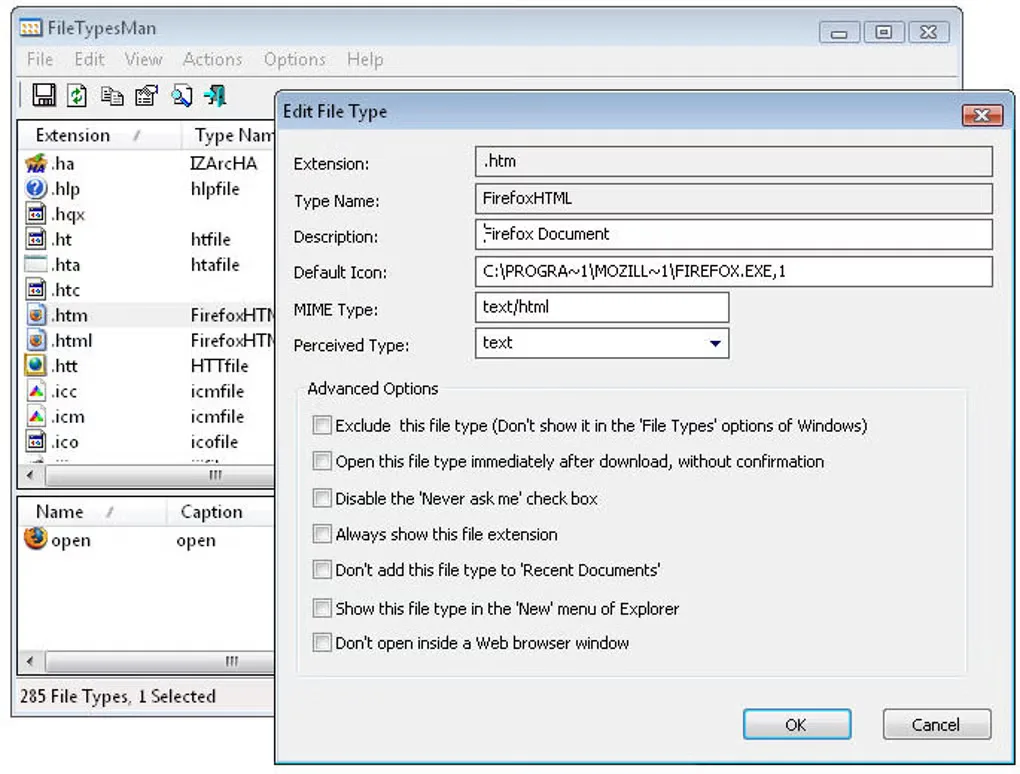
FileTypesMan lists the file extensions and file types registered in Windows so you can inspect their associations and change how they behave. Select an extension in the upper pane to see its actions in the lower pane. The utility can edit file-type properties, including descriptions and default icons, and add, change or remove actions used in context menus.
It is useful when you need to examine an association or adjust a file type's menu entries rather than browse files. You can also export the types and extensions list to text, CSV, HTML or XML through command-line options. The publisher distributes it without an installation process; the linked ZIP package is the x64 edition.
Changes to a file type can affect several extensions that share it. FileTypesMan does not allow changing the default icon for the .exe extension. NirSoft also documents reports of the Choose Icon window becoming unresponsive on some Windows 10 systems; entering the icon filename and number directly avoids that dialog. The gallery image illustrates an older Windows-style interface, not a verified capture of version 2.01.
What it offers
- Inspect registered file types with descriptions, MIME types, perceived types and flags.
- Add, edit or remove actions for a selected file type.
- Edit file-type properties, including the default icon for supported extensions.
- Export file-type information to text, CSV, HTML or XML using command-line options.
- Switch the main tables to a black background with white text using the version 2.01 View option.
Good to know
- Editing a file type can affect multiple extensions that share it.
- Changing the default icon for the .exe extension is not supported.
- The publisher documents reports of the Choose Icon dialog hanging on some Windows 10 systems; icon details can be entered directly instead.
Product images
Sources
References used for this listing. Retrieval dates do not indicate hands-on testing.
More in utilities
View category ↗
1.1.1.1 with WARP 2026.8.2115.0
Encrypt traffic from your Mac to Cloudflare’s network with WARP, or use DNS-only mode for encrypted DNS queries to the 1.1.1.1 resolver.
1.1.1.1 with WARP 2026.8.2115.0
Encrypt traffic between your Windows PC and Cloudflare, or use encrypted DNS only, with the free 1.1.1.1 with WARP app.

3uTools 9.12.005
Manage iPhone and iPad photos, music, apps and backups from Windows with 3uTools, a free utility that also includes device checks and firmware flashing tools.