

Utilities macOS
FileZilla for macOS
Upload and download files between your Mac and a remote server with FileZilla, a free FTP, FTPS and SFTP client with local and remote file panes.
- Operating system
- macOS; minimum version for this archive unconfirmed
- Architecture
- Intel Mac (macos-x86 package)
- Download package
- Application archive (.app.tar.bz2)
Selected SourceForge package is 3.69.3. Apple Silicon-native compatibility and a minimum macOS version are not established by this receipt.
Link checked · Download guidance
What is FileZilla?
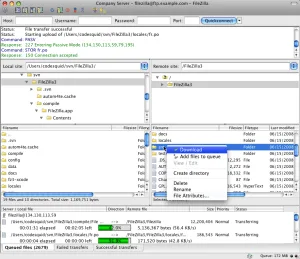
FileZilla is a file-transfer client for moving website files and other folders between your Mac and a remote server. Its two-pane layout shows local files on one side and server files on the other, with a transfer queue below. Drag files between the panes to upload or download them, and save recurring server connections in Site Manager.
You need the remote server's address and appropriate access details; FileZilla does not supply a hosting account. Quickconnect lets you enter connection information directly, while Site Manager keeps named connection profiles for return visits. FTP, FTPS and SFTP support lets you choose the protocol offered by your server.
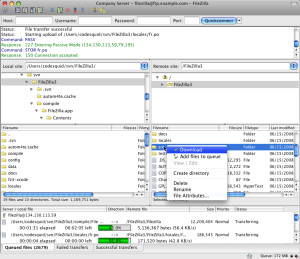
The linked download is the publisher project's dated SourceForge package, FileZilla 3.69.3 for Intel Macs, listed there on October 11, 2025. It is not presented as the newest release or an Apple Silicon-native package. Minimum macOS requirements for this exact archive were not confirmed. The screenshot is a historical OS X interface illustration from the project gallery, not a capture of this package running on a current Mac.
What it offers
- Connect to remote servers using FTP, FTP over TLS (FTPS) or SFTP.
- Browse local and remote folders side by side.
- Upload and download files with drag-and-drop and a transfer queue.
- Save named server connection profiles in Site Manager.
Good to know
- Requires a remote server address and suitable login or anonymous-access permission; hosting is not included.
- The linked 3.69.3 archive is a dated Intel Mac package, not a confirmed current release or Apple Silicon-native download. Its minimum macOS version was not verified.
Product images
Sources
References used for this listing. Retrieval dates do not indicate hands-on testing.
More in utilities
View category ↗
1.1.1.1 with WARP 2026.8.2115.0
Encrypt traffic from your Mac to Cloudflare’s network with WARP, or use DNS-only mode for encrypted DNS queries to the 1.1.1.1 resolver.
1.1.1.1 with WARP 2026.8.2115.0
Encrypt traffic between your Windows PC and Cloudflare, or use encrypted DNS only, with the free 1.1.1.1 with WARP app.

3uTools 9.12.005
Manage iPhone and iPad photos, music, apps and backups from Windows with 3uTools, a free utility that also includes device checks and firmware flashing tools.