
Utilities Windows
FireDaemon Fusion
Manage Windows services and FireDaemon Pro services from a browser, with remote-node access, role-based controls and a REST API. Commercial Windows x64 software with a 30-day trial.
- Operating system
- Windows 10, 11; Windows Server 2012, 2012 R2, 2016, 2019, 2022, 2025
- Architecture
- Intel/AMD x64 (64-bit)
- Download package
- EXE installer
Publisher lists these systems as compatible/supported for Fusion 8. No x86 support; older compatible Windows versions have unsupported status. Runs as a native Windows service.
Link checked · Download guidance
What is FireDaemon Fusion?
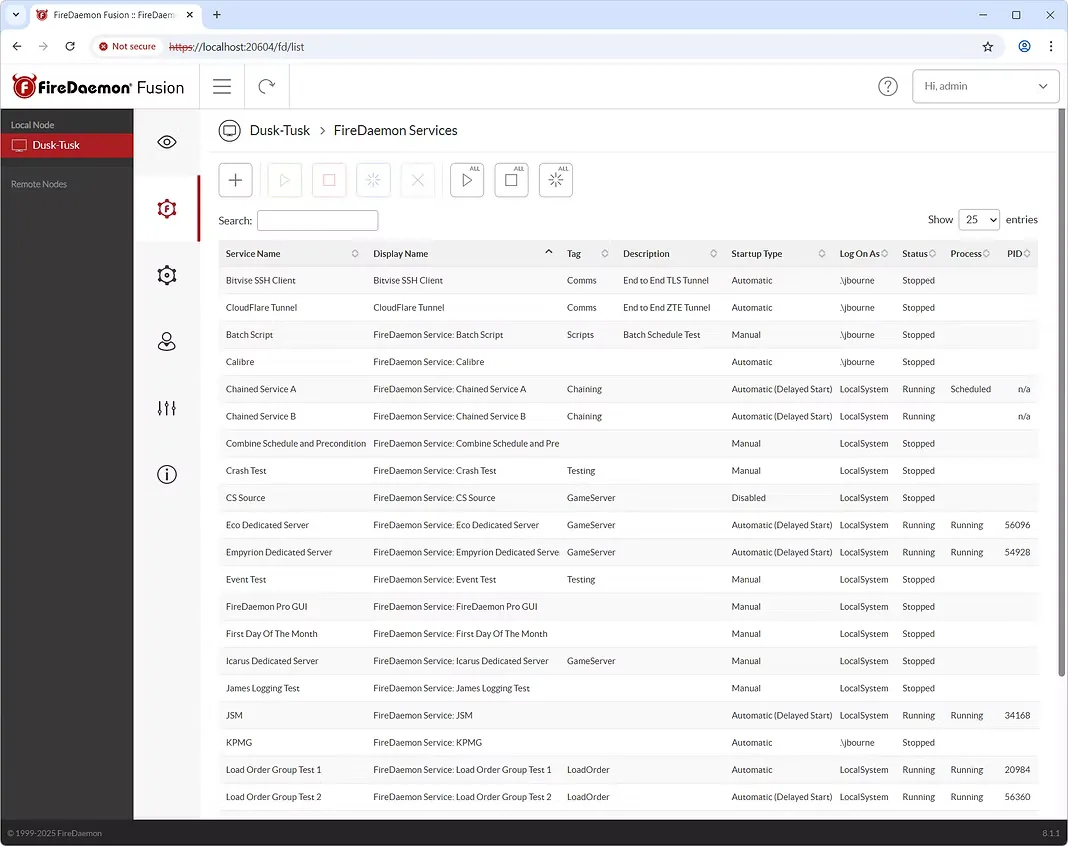
FireDaemon Fusion gives administrators a browser interface for creating, editing and controlling Windows services. It runs its own web server as a native Windows service, so service administration does not require opening a full remote-desktop session. A single interface can connect to multiple computers running Fusion.
Use it on its own for Windows service management, or alongside FireDaemon Pro to manage Pro services as well. The overview exposes service status, active processes, user sessions and computer information. Administrative and user accounts can be given access to specific services, including permissions to view, edit, start and stop them.
For automation, Fusion provides a RESTful API with CORS support. Its web-server settings include HTTPS with your own TLS certificate and binding to selected IPv4 or IPv6 interfaces and ports. These are publisher-described capabilities, not a security audit or a hands-on installation test.
The linked download is the Windows x64 trial of the commercial end-user edition, not the OEM redistribution edition. Fusion 8 does not support 32-bit Windows. FireDaemon Pro integration depends on using FireDaemon Pro; Fusion alone is not a substitute for that product.
What it offers
- Create, edit, start and stop Windows services through a browser.
- Connect to multiple computers running Fusion from one interface.
- Manage FireDaemon Pro services in conjunction with FireDaemon Pro.
- Assign administrative and user accounts granular access to specific services.
- Automate service management through a RESTful API with CORS support.
- Use a standalone Windows-service web server with HTTPS and configurable IPv4/IPv6 bindings.
Good to know
- Commercial software: the fully functional trial lasts 30 days; continued use requires a license.
- Fusion 8 supports x64 Windows, not 32-bit x86 Windows.
- Managing FireDaemon Pro services requires FireDaemon Pro alongside Fusion.
- Each managed computer must be running FireDaemon Fusion for remote-node access.
Product images
Sources
References used for this listing. Retrieval dates do not indicate hands-on testing.
More in utilities
View category ↗
1.1.1.1 with WARP 2026.8.2115.0
Encrypt traffic from your Mac to Cloudflare’s network with WARP, or use DNS-only mode for encrypted DNS queries to the 1.1.1.1 resolver.
1.1.1.1 with WARP 2026.8.2115.0
Encrypt traffic between your Windows PC and Cloudflare, or use encrypted DNS only, with the free 1.1.1.1 with WARP app.


3uTools 9.12.005
Manage iPhone and iPad photos, music, apps and backups from Windows with 3uTools, a free utility that also includes device checks and firmware flashing tools.