
Utilities Windows
Firemin
Trim the working set of Firefox or another selected application with Firemin, a free Windows utility with adjustable memory-reduction intervals and thresholds.
Version 11.8.3.8520 · Direct publisher file
Link checked · Download guidance
What is Firemin?
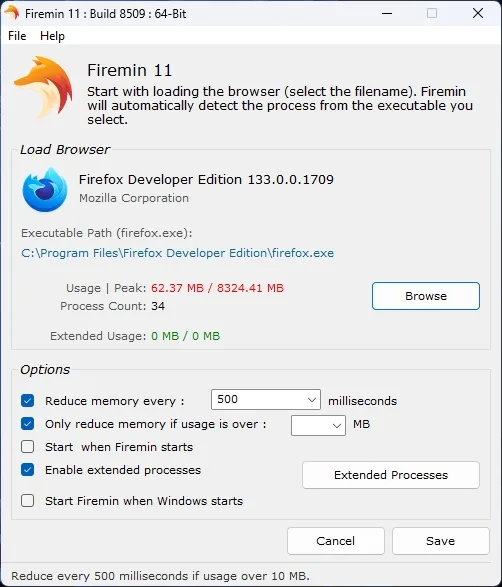
Firemin is a Windows utility for periodically trimming a selected application’s working set. Originally designed for Firefox, it lets you browse to a browser or other executable, choose how often memory reduction runs, and set a usage threshold before it intervenes. Extended Processes settings let you include additional executables.
The publisher says Firemin uses the Windows EmptyWorkingSet API. A smaller working set is not proof that a browser memory leak has been repaired, and performance improvements are not guaranteed. Rizonesoft acknowledges that sluggish performance or audio clipping can require a higher threshold or changes to the extended-process list.
The linked publisher download is the Firemin 11.8.3.8520 setup executable. Rizonesoft says the same setup offers normal installation and portable operation. The screenshot shows the publisher’s earlier Firemin 11 build 8509 interface, not a test of the linked build.
What it offers
- Select Firefox, another browser or another application by its executable path.
- Adjust the memory-reduction interval and apply a minimum usage threshold.
- Include additional executables through Extended Processes settings.
- Optionally launch the selected browser with Firemin or start Firemin with Windows.
Good to know
- Working-set trimming is not evidence of repairing the application’s memory leaks or guaranteeing faster performance.
- The publisher notes possible sluggish performance or audio clipping and suggests adjusting the memory threshold or extended processes.
Product images
Sources
References used for this listing. Retrieval dates do not indicate hands-on testing.
- Firemin | Rizonesoft ↗Retrieved
- Firemin - Download ↗Retrieved
- EmptyWorkingSet function (psapi.h) - Win32 apps | Microsoft Learn ↗Retrieved
More in utilities
View category ↗
1.1.1.1 with WARP 2026.8.2115.0
Encrypt traffic from your Mac to Cloudflare’s network with WARP, or use DNS-only mode for encrypted DNS queries to the 1.1.1.1 resolver.
1.1.1.1 with WARP 2026.8.2115.0
Encrypt traffic between your Windows PC and Cloudflare, or use encrypted DNS only, with the free 1.1.1.1 with WARP app.


3uTools 9.12.005
Manage iPhone and iPad photos, music, apps and backups from Windows with 3uTools, a free utility that also includes device checks and firmware flashing tools.