
Utilities Windows
Flashpaste
Store reusable replies, addresses and code snippets in Flashpaste, a Windows text-template tool with formatted text, macros and a 30-day trial.
Version 6.6 · Direct publisher file
Link checked · Download guidance
What is Flashpaste?
Flashpaste keeps frequently used text in a template library so you can insert a prepared reply, address or code snippet instead of typing it again. It is aimed at repeated writing tasks such as customer-support responses, email replies and documentation. Templates can contain plain text or RTF formatting, including bold text, colors and bulleted lists.
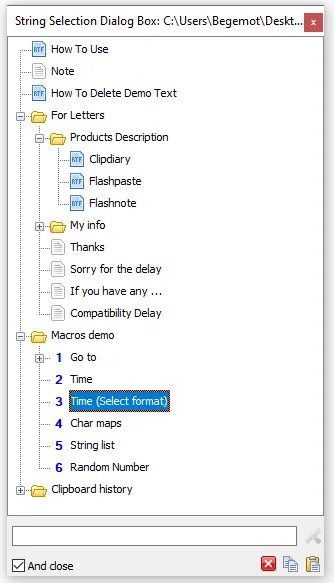
Organize your templates in nested folders, then choose a string to insert into the current window or copy to the clipboard. Keyboard operation and abbreviation expansion offer alternatives to browsing the library. The publisher also documents macros for inserting dates and times or using clipboard contents. Its clipboard history holds the ten most recent copied texts; the template library is the main feature, rather than an unlimited clipboard archive.
This download selects the publisher's 6.6 EXE installer, released on February 22, 2021, rather than the separately listed 6.61 beta or portable ZIP. The fully functional trial lasts 30 days; continued use requires a license. The publisher says templates and settings are preserved when you purchase, and the installed edition can be removed through Windows Control Panel. Exact Windows version and processor-architecture requirements were not established by the cited pages, so check those requirements before choosing it for a particular PC.
What it offers
- Create plain-text and RTF templates for repeated replies, phrases and code snippets.
- Organize templates in folders with nested levels.
- Insert a selected template into the current window or copy it to the clipboard.
- Use keyboard operation, abbreviation expansion and macros for dates, times or clipboard contents.
- Retrieve the ten most recent copied texts from clipboard history.
Good to know
- The fully functional trial is limited to 30 days; continued use requires a license.
- Clipboard history covers the ten most recent copied texts, not an unlimited archive.
- The cited publisher pages do not establish exact Windows version or processor-architecture requirements.
Product images
Sources
References used for this listing. Retrieval dates do not indicate hands-on testing.
More in utilities
View category ↗
1.1.1.1 with WARP 2026.8.2115.0
Encrypt traffic from your Mac to Cloudflare’s network with WARP, or use DNS-only mode for encrypted DNS queries to the 1.1.1.1 resolver.
1.1.1.1 with WARP 2026.8.2115.0
Encrypt traffic between your Windows PC and Cloudflare, or use encrypted DNS only, with the free 1.1.1.1 with WARP app.

3uTools 9.12.005
Manage iPhone and iPad photos, music, apps and backups from Windows with 3uTools, a free utility that also includes device checks and firmware flashing tools.