
Utilities Windows
FlexASIO
Connect ASIO audio applications to Windows audio devices with FlexASIO, a free universal driver supporting WASAPI, DirectSound, MME and Kernel Streaming.
- Operating system
- Windows Vista or later, according to the publisher
- Architecture
- 32-bit and 64-bit ASIO host applications
- Download package
- EXE installer
Publisher-stated requirements; not installed or compatibility-tested here. FlexASIO GUI is a separate optional tool.
Link checked · Download guidance
What is FlexASIO?
FlexASIO bridges ASIO applications and Windows audio devices through PortAudio. It is designed for audio hardware without its own ASIO driver, or for workflows that need a different Windows audio backend. Shared-mode operation lets other applications use the same audio device alongside the ASIO application; exclusive modes offer a different path to the hardware.
Settings such as the backend, input and output devices, buffer size and latency are configured in FlexASIO.toml in your Windows user profile. The default backend is DirectSound. Lower latency requires tuning: smaller buffers can increase audio glitches, and the publisher says the defaults prioritize reliability and ease of use rather than latency.
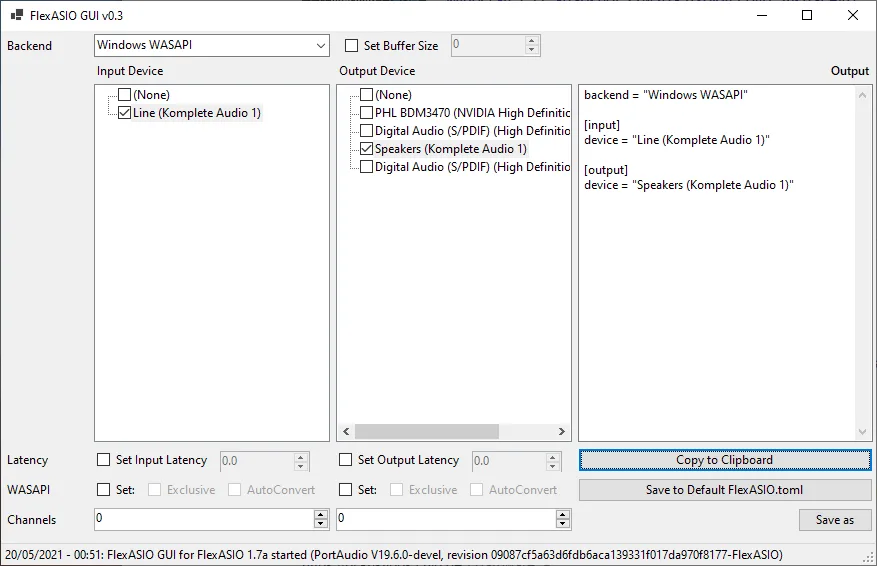
FlexASIO has no built-in graphical settings interface. The screenshot shows FlexASIO GUI v0.3, a separate third-party configuration tool linked by the publisher, not a bundled driver control panel. It is a historical illustration with FlexASIO 1.7a in its status bar, not a capture of the 1.10b installer linked here.
What it offers
- Use ASIO applications with audio devices that do not have a dedicated hardware ASIO driver.
- Choose WASAPI shared or exclusive mode, Kernel Streaming, DirectSound or MME through PortAudio.
- Share an audio device with other Windows applications when using a shared-mode backend.
- Configure input/output devices, channel counts, buffer size and latency through a TOML configuration file.
- Use the included device-list utility and optional detailed logging for troubleshooting.
Good to know
- There is no built-in graphical configuration panel; change the text configuration or use a separate third-party tool.
- Lower buffer sizes can cause glitches. Latency and supported formats depend on the selected backend, devices and host application.
- Invalid configuration values or device names can prevent driver initialization.
Product images
Sources
References used for this listing. Retrieval dates do not indicate hands-on testing.
- FlexASIO - Download — passive product-page observation ↗Retrieved
- FlexASIO publisher README — purpose, backends and requirements ↗Retrieved
- FlexASIO configuration reference ↗Retrieved
- FlexASIO FAQ — control panel and latency limitations ↗Retrieved
- FlexASIO 1.10b publisher release ↗Retrieved
- FlexASIO 1.10b publisher release assets ↗Retrieved
- FlexASIO source license ↗Retrieved
- FlexASIO GUI publisher README and historical screenshot ↗Retrieved
- FlexASIO GUI repository license ↗Retrieved
More in utilities
View category ↗
1.1.1.1 with WARP 2026.8.2115.0
Encrypt traffic from your Mac to Cloudflare’s network with WARP, or use DNS-only mode for encrypted DNS queries to the 1.1.1.1 resolver.
1.1.1.1 with WARP 2026.8.2115.0
Encrypt traffic between your Windows PC and Cloudflare, or use encrypted DNS only, with the free 1.1.1.1 with WARP app.


3uTools 9.12.005
Manage iPhone and iPad photos, music, apps and backups from Windows with 3uTools, a free utility that also includes device checks and firmware flashing tools.