
Utilities Windows
FlexiStation Employee Client
Log work hours and attendance, add time away from your desk and request leave with FlexiStation, the free Windows employee client for an organization's FlexiServer system.
- Operating system
- Windows 7, 8, 8.1, 10 and 11
- Architecture
- Not specified on the inspected employee-client page
- Download package
- EXE installer (fstasetup.exe)
Requires an organization's FlexiServer system and supplied employee logon details. The linked package is the employee client, not FlexiServer.
Link checked · Download guidance
What is FlexiStation Employee Client?
FlexiStation is the employee-side application for NCH Software's FlexiServer attendance and monitoring system. It runs on your workstation, records hours worked in the background and reports them to your organization's server. This download is the Windows employee client, not the central management server. You need the logon details emailed to you when your employer adds you to FlexiServer; installing the client alone does not create a standalone time-tracking system.
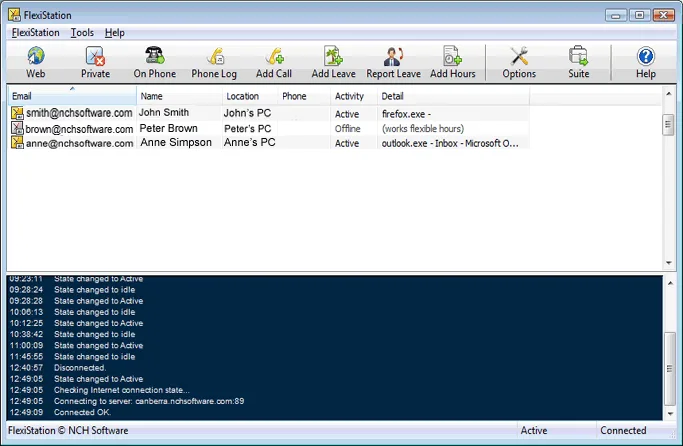
Use the Web toolbar button to open your individual reports in the web control panel. Add Hours lets you enter time spent in meetings or working away from the computer, while Add Leave sends a leave request to your supervisor. The client also displays coworkers' contact information. NCH says the workstation can cache tracking data while FlexiServer is offline and send it when the server returns.
This is workplace monitoring software, not just a personal stopwatch. The system supports screen captures and computer-activity reporting, and NCH requires the computer user's full knowledge and consent. Private mode turns monitoring off for personal tasks, but that time is not counted as work in your timesheet. Check your organization's monitoring policy before using the client. NCH lists Windows 7, 8, 8.1, 10 and 11 for FlexiStation; the inspected client page does not identify the installer architecture.
What it offers
- Automatically record work hours and attendance for reporting to your organization's FlexiServer.
- Open individual hours-worked reports through the Web toolbar button.
- Manually add time spent in meetings or working away from your workstation.
- Send leave requests to your supervisor and receive approval notifications by email.
- View coworkers' contact information in the client.
- Temporarily disable monitoring with Private mode; private time does not count as work.
- Cache tracking data when the server is offline and send it after reconnection.
Good to know
- Not a standalone tracker: both FlexiStation and the organization's FlexiServer are required, along with employee logon details.
- The system can capture screens and report computer activity. NCH requires the user's full knowledge and consent; Private mode stops monitoring but excludes that time from work totals.
- Windows installer architecture and exact package version were not established by the inspected official client page or retained HEAD receipt.
Product images
Sources
References used for this listing. Retrieval dates do not indicate hands-on testing.
- FlexiStation Employee Client - Download — retained discovery observation ↗Retrieved
- Download FlexiStation Employee Client, Productivity & Attendance Software ↗Retrieved
- FlexiServer Productivity & Attendance Software — monitoring and consent ↗Retrieved
- Is FlexiStation completely free? ↗Retrieved
- What is the difference between FlexiServer and FlexiStation? ↗Retrieved
- FlexiServer Screenshots — Flexi Station for Windows image ↗Retrieved
More in utilities
View category ↗
1.1.1.1 with WARP 2026.8.2115.0
Encrypt traffic from your Mac to Cloudflare’s network with WARP, or use DNS-only mode for encrypted DNS queries to the 1.1.1.1 resolver.
1.1.1.1 with WARP 2026.8.2115.0
Encrypt traffic between your Windows PC and Cloudflare, or use encrypted DNS only, with the free 1.1.1.1 with WARP app.

3uTools 9.12.005
Manage iPhone and iPad photos, music, apps and backups from Windows with 3uTools, a free utility that also includes device checks and firmware flashing tools.