
Utilities Windows
FM JPG To PDF Converter Pro
Combine JPG, PNG and other bitmap images into single-page or multi-page PDFs on Windows, with batch processing, layout previews and page-margin controls.
- Operating system
- Windows 10 and 11; publisher lists 32-bit and 64-bit systems
- Architecture
- Installer architecture not independently verified
- Download package
- EXE installer
Publisher requirements list 4+ GB RAM and an internet connection for online services and updates. OS support is a publisher claim, not an installation test.
Link checked · Download guidance
What is FM JPG To PDF Converter Pro?
FM JPG To PDF Converter Pro turns collections of images into PDF documents. Add photos or graphics, arrange their order in the image list, then choose a single multi-page document or separate single-page outputs. It is intended for image-based documents such as photo albums and illustrated product presentations. Supported inputs include JPG/JPEG, PNG, BMP, WebP, PSD and TIFF; the publisher also lists multi-page TIFF and animated GIF conversion.
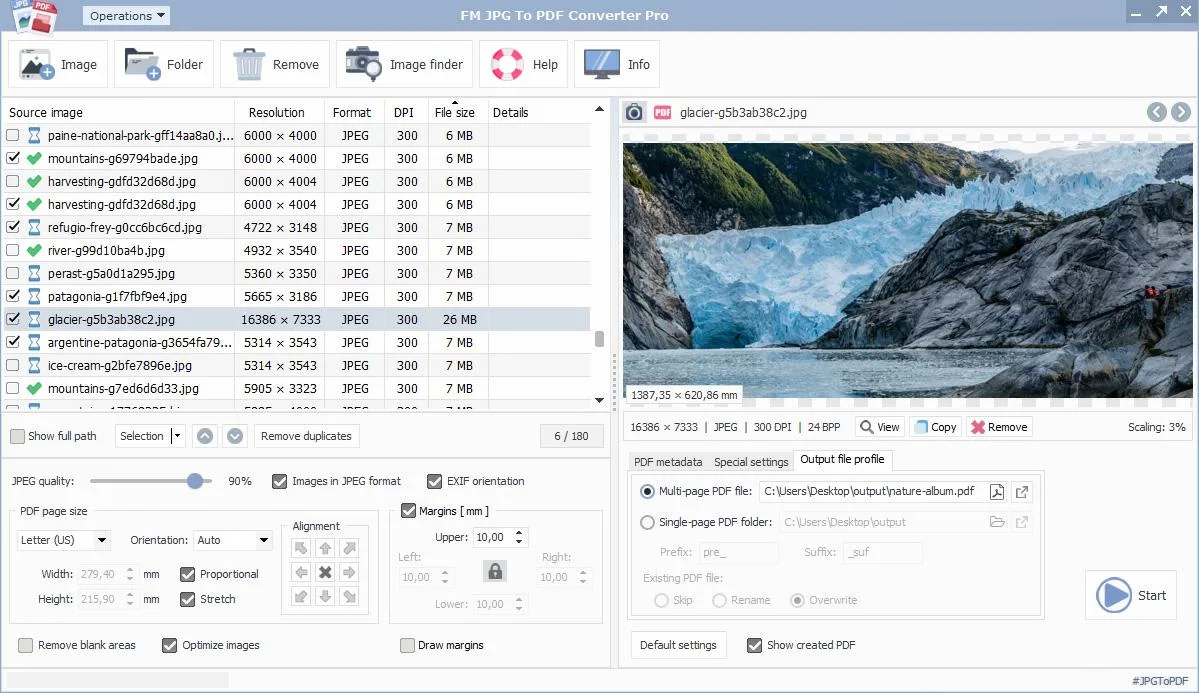
The preview switches between the source image and the planned PDF layout. Page-size, orientation, alignment and margin controls help position images before conversion, while JPEG quality and image-optimization options control how images are embedded. Additional PDF options include document metadata, an opening password, hyperlinks, thumbnails and Fast Web View.
This is a commercial product with paid license choices, not the publisher's separate Free JPG To PDF Converter. The integrated stock-image search service depends on the selected license and requires an internet connection. The publisher pages consulted do not establish the unregistered download's trial duration or export restrictions; check those terms before relying on it for a production workflow.
What it offers
- Batch-convert JPG/JPEG and other supported bitmap formats into single-page or multi-page PDFs.
- Reorder and select source images, remove duplicates and preview the image or PDF layout.
- Set standard or custom page sizes, orientation, alignment and margins before conversion.
- Configure JPEG quality, image optimization, PDF metadata and an opening password.
- Convert multi-page TIFF files and animated GIF frames; access integrated stock-image search with an eligible license.
Good to know
- Commercial licensing applies; integrated stock-image access is excluded from the publisher's User license and included in higher listed license tiers.
- The integrated image-search module requires an active internet connection.
- The consulted publisher pages do not specify trial duration, watermarking or export limits for an unregistered copy.
Product images
Sources
References used for this listing. Retrieval dates do not indicate hands-on testing.
More in utilities
View category ↗
1.1.1.1 with WARP 2026.8.2115.0
Encrypt traffic from your Mac to Cloudflare’s network with WARP, or use DNS-only mode for encrypted DNS queries to the 1.1.1.1 resolver.
1.1.1.1 with WARP 2026.8.2115.0
Encrypt traffic between your Windows PC and Cloudflare, or use encrypted DNS only, with the free 1.1.1.1 with WARP app.

3uTools 9.12.005
Manage iPhone and iPad photos, music, apps and backups from Windows with 3uTools, a free utility that also includes device checks and firmware flashing tools.