
Utilities Windows
Folder Guide
Open favorite folders from Windows Explorer and file dialogs with Folder Guide, a free context-menu utility for legacy Windows versions.
- Operating system
- Windows 9x, Me, NT, 2000, XP and 2003 (publisher-listed)
- Architecture
- Not specified by the publisher
- Download package
- EXE installer (FGSetup.exe)
Legacy Windows shell utility. No verified Windows 10/11 or processor-architecture compatibility claim.
Link checked · Download guidance
What is Folder Guide?
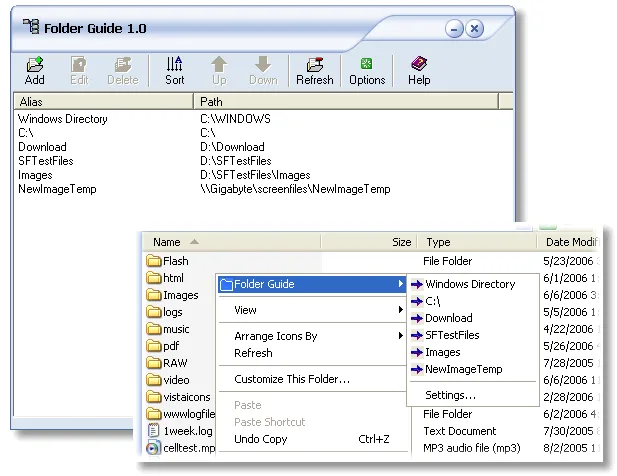
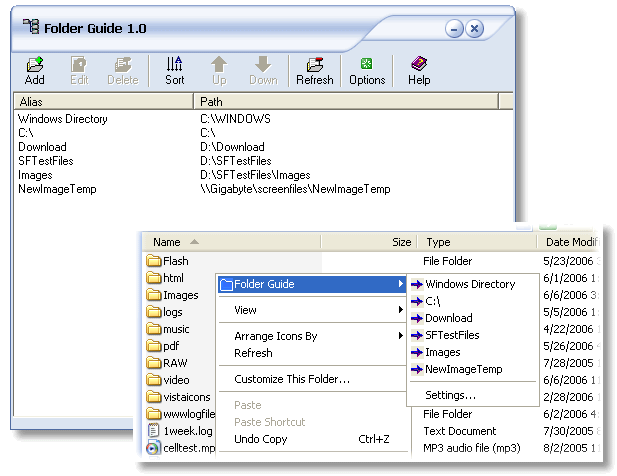
Folder Guide adds a favorites submenu to Windows Explorer so you can jump to frequently used folders without navigating the directory tree each time. Add a folder from its right-click menu, then choose it from the Folder Guide list. The publisher also documents access from Open, Save As and Browse dialogs, the desktop and the Start button.
Its settings window lets you edit folder aliases and paths, sort entries or move them into your preferred order. Import and export commands back up the saved aliases and paths. Removing an entry from the favorites list does not delete the physical folder.
This is a legacy utility: the publisher lists Windows 9x, Me, NT, 2000, XP and 2003, with a last-updated date of August 14, 2008. Compatibility with newer Windows releases is not established by these sources. The publisher's illustration shows the older Folder Guide 1.0 interface; the product page identifies the offered version as 1.2.
What it offers
- Jump to saved folders from a Folder Guide submenu in Windows Explorer.
- Access favorites in common Open, Save As and Browse dialogs, plus the desktop and Start button.
- Add folders from their right-click menu and edit, sort or reorder saved entries.
- Import and export folder aliases and paths to back up the favorites list.
Good to know
- The publisher lists only Windows 9x/Me/NT/2000/XP/2003 and a 2008 last update; compatibility with newer Windows versions is unverified.
- Only one favorites-editor window can run at a time; opening another copy brings the existing editor to the front.
Product images
Sources
References used for this listing. Retrieval dates do not indicate hands-on testing.
- Folder Guide: a fastest way to access folders. ↗Retrieved
- Folder Guide Help — overview ↗Retrieved
- Folder Guide Help — interface ↗Retrieved
More in utilities
View category ↗
1.1.1.1 with WARP 2026.8.2115.0
Encrypt traffic from your Mac to Cloudflare’s network with WARP, or use DNS-only mode for encrypted DNS queries to the 1.1.1.1 resolver.
1.1.1.1 with WARP 2026.8.2115.0
Encrypt traffic between your Windows PC and Cloudflare, or use encrypted DNS only, with the free 1.1.1.1 with WARP app.

3uTools 9.12.005
Manage iPhone and iPad photos, music, apps and backups from Windows with 3uTools, a free utility that also includes device checks and firmware flashing tools.