

Utilities Windows
Folder Painter for Windows
Change Windows folder icons to distinguish projects or categories by color with Folder Painter, a portable freeware utility from Sordum.
- Operating system
- Windows 11, 10, 8.1, 8 and 7
- Architecture
- x86 and x64
- Download package
- ZIP archive containing portable executables
Extract the archive and choose the appropriate executable. Registering the optional context-menu command writes to the registry; it can be removed with the Uninstall button.
Link checked · Download guidance
What is Folder Painter?
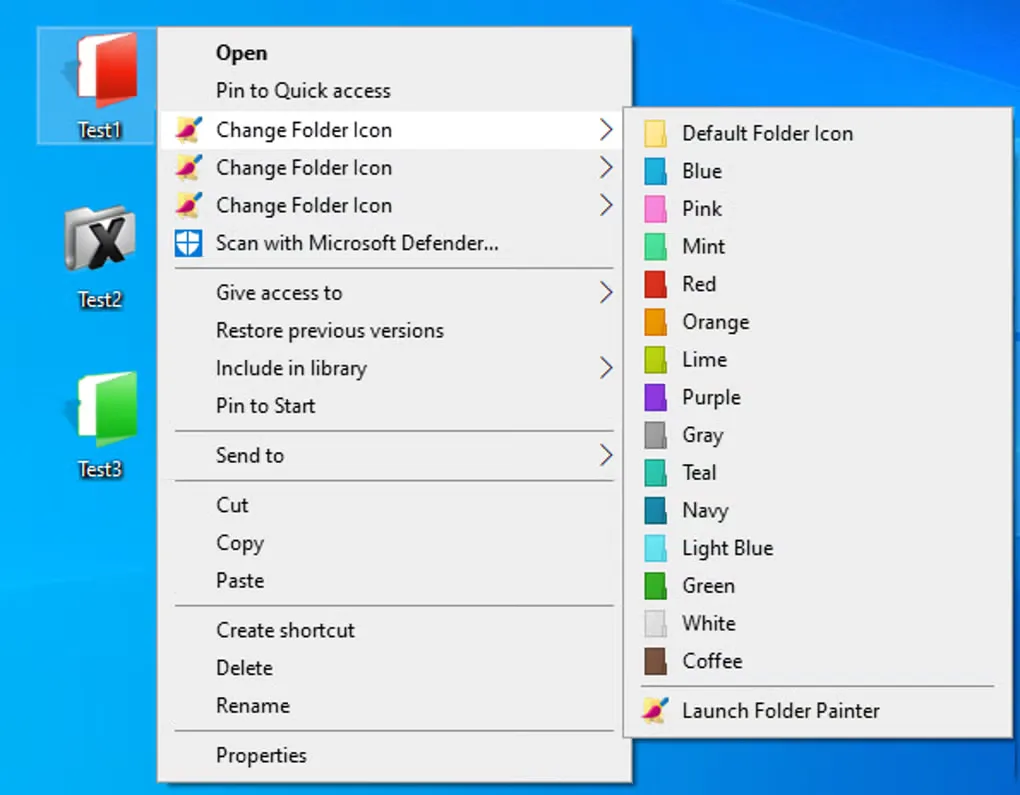
Folder Painter changes folder icons in Windows Explorer so frequently used folders can stand out by color or design. Choose an icon pack in its configuration window, add the Change Folder Icon command to the right-click menu, and select a color for a folder. The Default Folder Icon option restores its original appearance.
Sordum supplies three icon packs with the program and documents support for custom icons, subfolder changes and command-line use. The optional Copy icon while in folder setting copies the selected icon into that folder; the publisher describes this as a way to retain its appearance when moving it to another computer.
The download is a ZIP archive of the portable utility with x86 and x64 executable options. Portable does not mean the context-menu feature leaves Windows unchanged: adding that command writes to the registry. Use the program's Uninstall button to remove its context-menu integration. Sordum also documents a maximum of 16 entries per submenu.
What it offers
- Apply colored folder icons from the Windows right-click menu and restore the default icon.
- Choose from the three bundled icon packs or configure custom icons.
- Apply icon changes to subfolders, with the scope controlled in FolderPainter.ini.
- Use the optional Copy icon while in folder setting or the documented command-line interface.
Good to know
- Adding the context-menu command modifies the Windows registry, even though the utility is portable.
- The publisher documents a limit of 16 items per context submenu.
Product images
Sources
References used for this listing. Retrieval dates do not indicate hands-on testing.
More in utilities
View category ↗
1.1.1.1 with WARP 2026.8.2115.0
Encrypt traffic from your Mac to Cloudflare’s network with WARP, or use DNS-only mode for encrypted DNS queries to the 1.1.1.1 resolver.
1.1.1.1 with WARP 2026.8.2115.0
Encrypt traffic between your Windows PC and Cloudflare, or use encrypted DNS only, with the free 1.1.1.1 with WARP app.

3uTools 9.12.005
Manage iPhone and iPad photos, music, apps and backups from Windows with 3uTools, a free utility that also includes device checks and firmware flashing tools.