

Utilities Windows
FolderMatch for Windows
Compare folders and files side by side, synchronize selected differences and find duplicate files with FolderMatch for Windows. A fully functional 30-day trial is available.
- Operating system
- Windows 10 and Windows 11
- Architecture
- Publisher lists support for 32-bit and 64-bit Windows; installer CPU architecture is not specified
- Download package
- EXE installer
The publisher lists one EXE installer and a separate ZIP package. System support is publisher-stated; software was not installed or tested.
Link checked · Download guidance
What is FolderMatch?
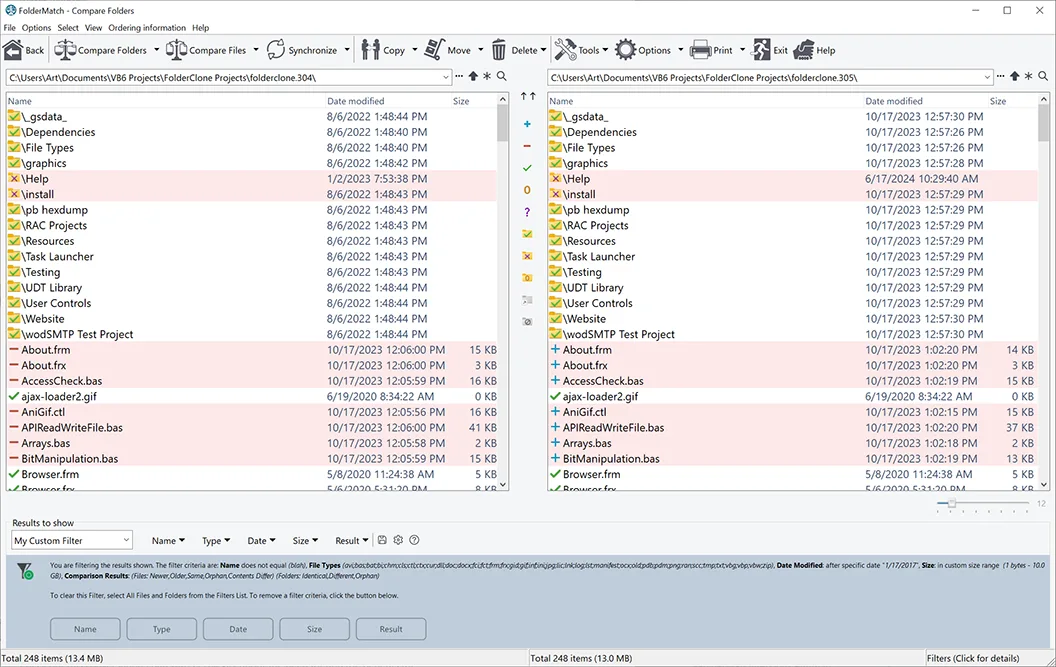
FolderMatch helps you reconcile two copies of a folder by showing their files and subfolders side by side. Compare names, sizes, timestamps or contents, filter the results, and choose which differences to copy, move, rename or delete. One-way and two-way synchronization methods let you update a destination or bring both folders into step, with a review of proposed copy and delete operations before changes are made.
For individual files, the text comparison view highlights differences in plain text and supported document formats, including Microsoft Office, OpenDocument and PDF. You can ignore whitespace or letter-case differences and view changes at character, word or line level. A separate duplicate finder can match file contents even when filenames differ.
FolderMatch is commercial shareware, not a free ongoing backup service: evaluation lasts 30 days, and continued use requires registration. Synchronization can replace or delete files according to the selected method, so review the proposed operations before committing them. The linked EXE is the publisher's Windows installer; the publisher also lists a ZIP package separately.
What it offers
- Compare folders and subfolders side by side using names, sizes, dates or file contents, with include and exclude filters.
- Synchronize folders one way or two ways, and review proposed copy and delete operations before applying them.
- Show text differences in supported Office, OpenDocument, PDF and plain-text files, with whitespace and letter-case options.
- Find duplicate files by selected criteria, including matching contents when filenames differ.
- Use additional tools for bulk renaming, editing file timestamps and viewing hexadecimal file contents.
Good to know
- The fully functional evaluation lasts 30 days; a paid registration is required for continued use.
- Synchronization methods can replace or delete files. Review the proposed copy and delete operations before applying changes.
Product images
Sources
References used for this listing. Retrieval dates do not indicate hands-on testing.
- FolderMatch Product Info ↗Retrieved
- FolderMatch File and Folder Comparison and Synchronization Software ↗Retrieved
- Free Download - File Comparison and Synchronization Software ↗Retrieved
- Software License Agreement for FolderMatch ↗Retrieved
- FolderMatch Version History ↗Retrieved
- FolderMatch: File and Folder Comparison and Synchronization Software Screenshots ↗Retrieved
More in utilities
View category ↗
1.1.1.1 with WARP 2026.8.2115.0
Encrypt traffic from your Mac to Cloudflare’s network with WARP, or use DNS-only mode for encrypted DNS queries to the 1.1.1.1 resolver.
1.1.1.1 with WARP 2026.8.2115.0
Encrypt traffic between your Windows PC and Cloudflare, or use encrypted DNS only, with the free 1.1.1.1 with WARP app.


3uTools 9.12.005
Manage iPhone and iPad photos, music, apps and backups from Windows with 3uTools, a free utility that also includes device checks and firmware flashing tools.