

Utilities macOS
Folx for macOS
Manage file downloads, torrents and magnet links on Mac with Folx. The free version includes tagging and automatic resuming; scheduling and speed controls require PRO.
- Operating system
- macOS 10.13 or later
- Architecture
- Not specified in the cited publisher product page
- Download package
- DMG disk image
Publisher-listed minimum system requirement; CPU architecture and installation were not independently verified.
Link checked · Download guidance
What is Folx?
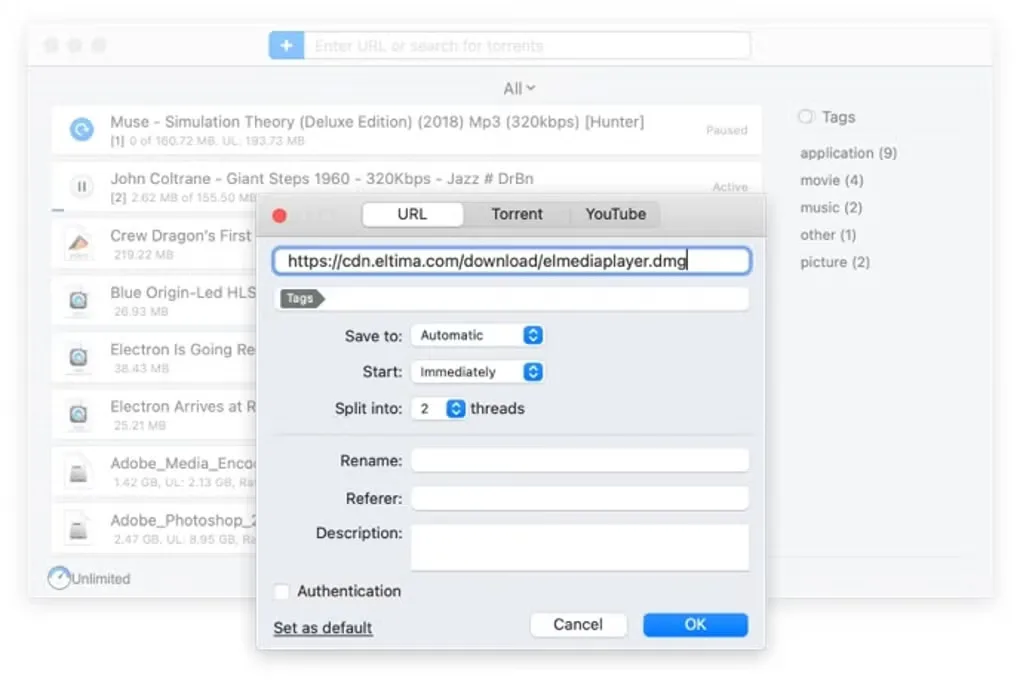
Folx is a Mac download manager for keeping file transfers and torrents in one place. It can split a download into two threads, resume interrupted transfers automatically and organize downloaded files with tags. Torrent and magnet-link support makes it useful when downloads arrive through more than ordinary file links.
The free edition covers these core tasks. Folx PRO adds download scheduling, manual or automatic speed adjustment, up to 20 threads per download and built-in torrent search. Those advanced controls are not included in the free tier. Choose the edition around the controls you need rather than assuming that every advertised feature is free.
What it offers
- Organize downloads with one or more tags.
- Automatically resume interrupted downloads.
- Split a download into two threads in the free edition.
- Handle torrents and magnet links alongside other downloads.
- PRO adds scheduling, speed adjustment, up to 20 threads and built-in torrent search.
Good to know
- Download scheduling, smart speed adjustment and built-in torrent search require the paid PRO edition.
- The free edition splits a download into two threads; up to 20 threads requires PRO.
Product images
Sources
References used for this listing. Retrieval dates do not indicate hands-on testing.
- Folx for Mac - Download ↗Retrieved
- Folx: Free Download Manager for Mac ↗Retrieved
More in utilities
View category ↗
1.1.1.1 with WARP 2026.8.2115.0
Encrypt traffic from your Mac to Cloudflare’s network with WARP, or use DNS-only mode for encrypted DNS queries to the 1.1.1.1 resolver.
1.1.1.1 with WARP 2026.8.2115.0
Encrypt traffic between your Windows PC and Cloudflare, or use encrypted DNS only, with the free 1.1.1.1 with WARP app.

3uTools 9.12.005
Manage iPhone and iPad photos, music, apps and backups from Windows with 3uTools, a free utility that also includes device checks and firmware flashing tools.