

Utilities Windows
Free Alarm Clock for Windows
Set one-time or repeating Windows alarms with reminder labels, music and snooze controls using Free Alarm Clock, free for personal and commercial use.
- Operating system
- Windows 11, 10, 8.1, 8, 7, Vista and XP, as listed by the publisher
- Architecture
- Not specified in the cited publisher pages
- Download package
- EXE installation package
A separate portable ZIP is available from the publisher. Windows compatibility is publisher-stated, not independently tested.
Link checked · Download guidance
What is Free Alarm Clock?
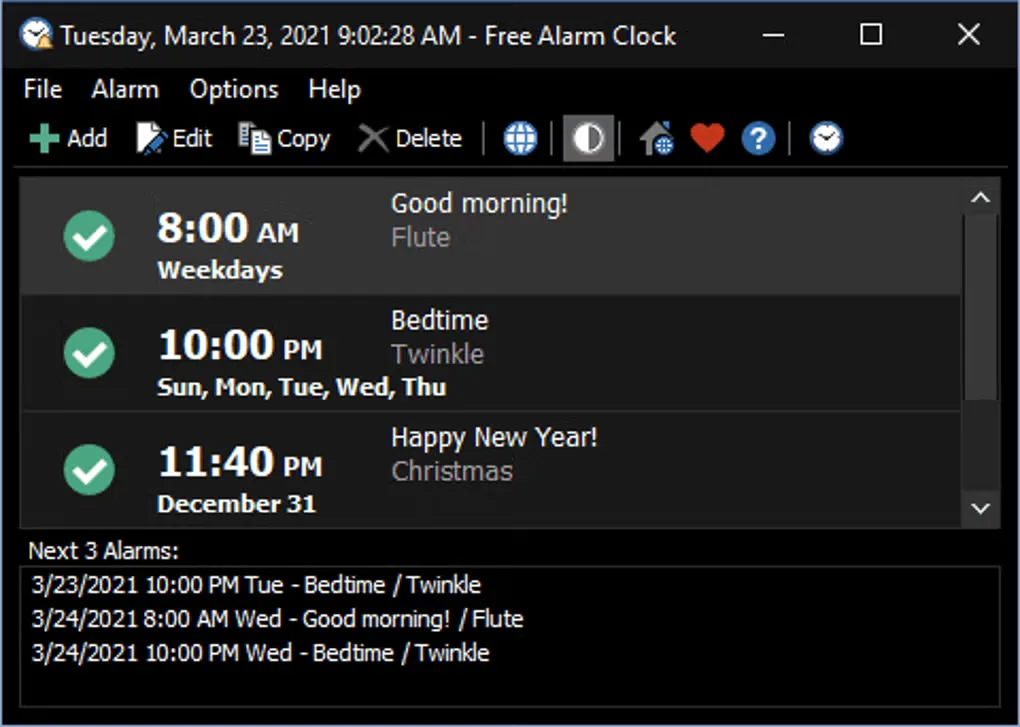
Free Alarm Clock turns a Windows computer into an alarm clock for wake-up calls and scheduled reminders. Create one-time alarms or repeat them on selected days of the week, then add a label to explain each reminder. Choose a supplied sound or a music file, and enable snooze when you want another prompt before dismissing the alarm.
The program includes a floating clock and a night-mode interface. Its optional volume control can unmute Windows and set an alarm volume, restoring the previous level afterward. The publisher also offers a separate portable ZIP that keeps settings in Data.ini; the download linked here is the EXE installation package.
Wake-from-sleep alarms depend on the PC and its wake-timer settings. The publisher explicitly says the program will not wake a laptop with its lid closed, so it is not a substitute for an independent alarm in that situation. Simultaneous alarm events produce one notification and alarm rather than separate alerts.
What it offers
- Create one-time alarms or repeating alarms on selected weekdays, with labels for each reminder.
- Use supplied tones or supported audio files, including MP3, WAV, OGG and FLAC.
- Configure snooze and how long the alarm sound plays.
- Optionally unmute Windows and set an alarm volume, restoring the previous volume afterward.
- Display a floating clock and switch the application to night mode.
Good to know
- Wake-from-sleep support depends on the PC and its wake-timer configuration; the publisher says it will not wake a laptop with its lid closed.
- Concurrent alarm events produce only one notification and alarm.
- The optional volume adjustment temporarily changes the system volume and can affect other running applications.
Product images
Sources
References used for this listing. Retrieval dates do not indicate hands-on testing.
More in utilities
View category ↗
1.1.1.1 with WARP 2026.8.2115.0
Encrypt traffic from your Mac to Cloudflare’s network with WARP, or use DNS-only mode for encrypted DNS queries to the 1.1.1.1 resolver.
1.1.1.1 with WARP 2026.8.2115.0
Encrypt traffic between your Windows PC and Cloudflare, or use encrypted DNS only, with the free 1.1.1.1 with WARP app.

3uTools 9.12.005
Manage iPhone and iPad photos, music, apps and backups from Windows with 3uTools, a free utility that also includes device checks and firmware flashing tools.