
Utilities Windows
Free IP Scanner
Scan an IP range, check TCP ports and export host details with Eusing Free IP Scanner, a freeware Windows utility supplied as a standalone executable.
- Operating system
- Windows 9x/2000/XP/2003/Vista/7/8/10/11 (publisher list)
- Architecture
- Not specified by the publisher
- Download package
- Standalone EXE (ipscan.exe)
No installation or additional DLLs required according to Eusing. Settings use options.ini. Optional setup package is not selected; compatibility is not runtime-tested.
Link checked · Download guidance
What is Free IP Scanner?
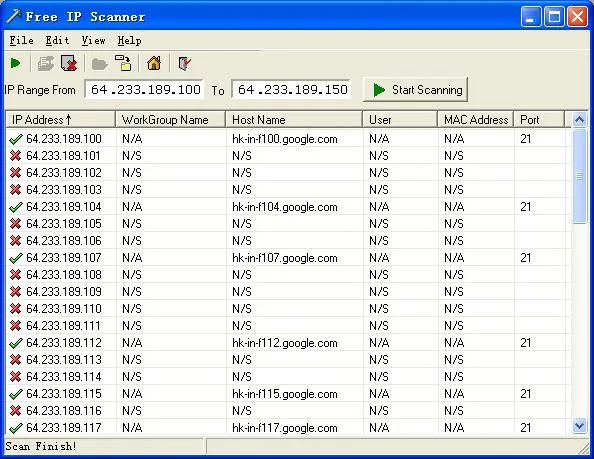
Free IP Scanner helps you check which addresses respond within a network range and gather host information in one table. Enter the first and last IP addresses, start the scan, and review the results before exporting them to a plain-text file. It is aimed at administrators and other users who need a compact network inventory rather than an installation-heavy management tool.
The publisher documents optional hostname and NetBIOS details, including workgroup, user and MAC address, plus configurable TCP port checks. You can load a custom IP list instead of entering a range, adjust scanning threads and timeouts, and enable repeat scans at a preset interval. The IP-only option skips the extra host-information lookups.
This download is the publisher’s standalone ipscan.exe, not its optional setup package. Eusing says it needs no installation or additional DLLs; the help page notes that settings are saved separately in options.ini. The publisher lists Windows versions through Windows 11, but does not identify the executable’s processor architecture on the product page. Compatibility has not been runtime-tested here.
Results depend on responses and the selected options. The help page explicitly provides a setting to display non-responding hosts, so a missing response should not be treated as a complete device inventory. TCP scanning checks the ports you specify; it does not establish that a host is secure. Scan only networks you own or are authorized to assess.
What it offers
- Scan an entered IP range or load and save a custom IP list.
- Resolve optional hostname and NetBIOS information, including workgroup, user and MAC address.
- Check specified TCP ports, including comma-separated ports and ranges.
- Adjust maximum scanning threads, IP and port timeouts, and automatic refresh intervals.
- Export scan results to a plain-text file.
Good to know
- IP-only mode skips workgroup, hostname, user and MAC-address detection; non-responding hosts require the display option to be included.
- The publisher does not specify CPU architecture or exact Windows build requirements on the product page; the listed compatibility has not been tested here.
Product images
Sources
References used for this listing. Retrieval dates do not indicate hands-on testing.
More in utilities
View category ↗
1.1.1.1 with WARP 2026.8.2115.0
Encrypt traffic from your Mac to Cloudflare’s network with WARP, or use DNS-only mode for encrypted DNS queries to the 1.1.1.1 resolver.
1.1.1.1 with WARP 2026.8.2115.0
Encrypt traffic between your Windows PC and Cloudflare, or use encrypted DNS only, with the free 1.1.1.1 with WARP app.

3uTools 9.12.005
Manage iPhone and iPad photos, music, apps and backups from Windows with 3uTools, a free utility that also includes device checks and firmware flashing tools.