
Utilities Windows
Free IP Switcher
Save and switch Windows network profiles with Free IP Switcher, a freeware utility for IP addresses, DNS, proxy settings and default printers.
- Operating system
- Windows 2000, XP, 2003, Vista, 7, 8, 10 and 11, as listed by Eusing
- Architecture
- Not specified by the publisher on the cited product page
- Download package
- EXE installer (FISSetup.exe)
Publisher-listed compatibility, not an installation test. Publisher lists 3.5.1; Softonic lists 3.3. Binary contents and architecture were not inspected.
Link checked · Download guidance
What is Free IP Switcher?
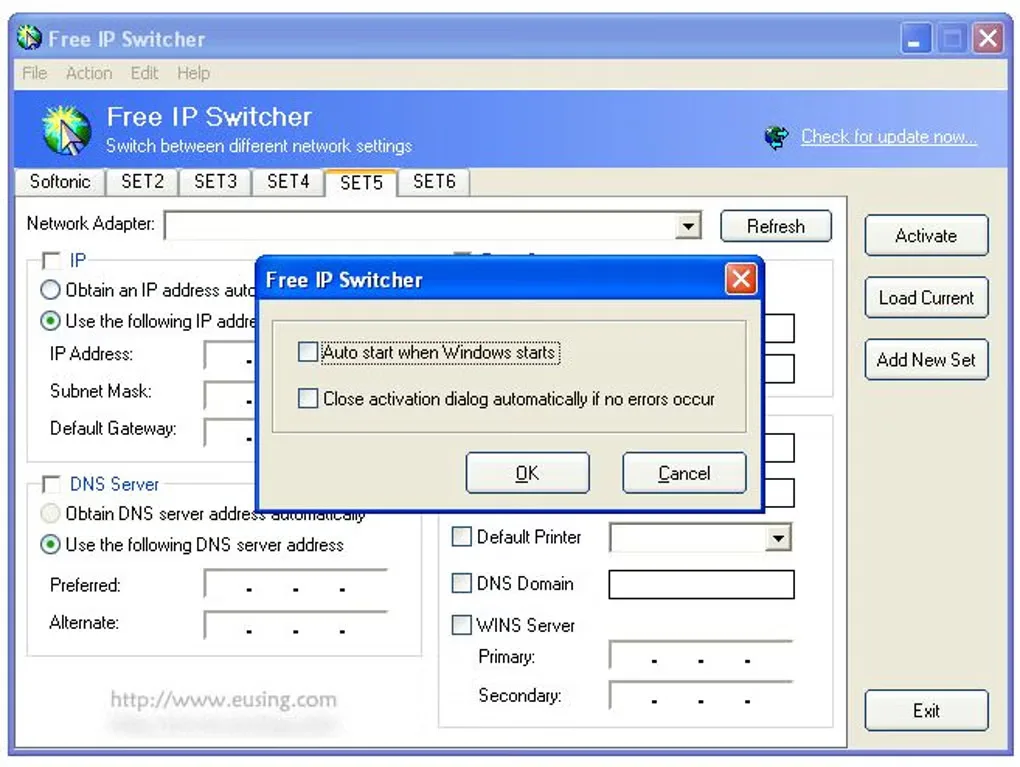
Free IP Switcher keeps network settings in named profiles so you can reuse the configuration for home, an office or another location. Select a network adapter, enter its IP address, subnet mask, gateway and DNS settings, or load the adapter's current configuration. Activating a profile applies the settings you have checked rather than every field on the page.
Profiles can also include Internet Explorer proxy settings, a default printer and other network-related options. DHCP and automatic DNS remain options where the network supports them. This makes the utility useful for moving between known networks that require different configurations, rather than entering the same values repeatedly in Windows.
This is a network-configuration tool, not an IP-hiding service: switching a saved profile does not disguise your public IP address. Use values appropriate to the selected network. Eusing lists version 3.5.1 and Windows support through Windows 11; the older Softonic listing still shows 3.3. The gallery image shows an older Windows-style interface, not a verified capture of version 3.5.1.
What it offers
- Keep separate network profiles and load settings from the selected adapter with Load Current.
- Configure an IP address, subnet mask, default gateway, preferred DNS and alternate DNS.
- Choose DHCP and automatic DNS where the network supports them.
- Include proxy settings and a default printer in a profile.
- Apply only checked settings when activating a profile.
Good to know
- Changes network configuration; it does not hide or disguise your public IP address.
- Automatic IP and DNS assignment depend on support from the selected network.
Product images
Sources
References used for this listing. Retrieval dates do not indicate hands-on testing.
More in utilities
View category ↗
1.1.1.1 with WARP 2026.8.2115.0
Encrypt traffic from your Mac to Cloudflare’s network with WARP, or use DNS-only mode for encrypted DNS queries to the 1.1.1.1 resolver.
1.1.1.1 with WARP 2026.8.2115.0
Encrypt traffic between your Windows PC and Cloudflare, or use encrypted DNS only, with the free 1.1.1.1 with WARP app.

3uTools 9.12.005
Manage iPhone and iPad photos, music, apps and backups from Windows with 3uTools, a free utility that also includes device checks and firmware flashing tools.