

Utilities macOS
FreeFileSync for macOS
Compare folders and synchronize changed files on macOS with FreeFileSync. Choose mirror or two-way synchronization for personal backups; commercial use requires the Business Edition.
What is FreeFileSync?
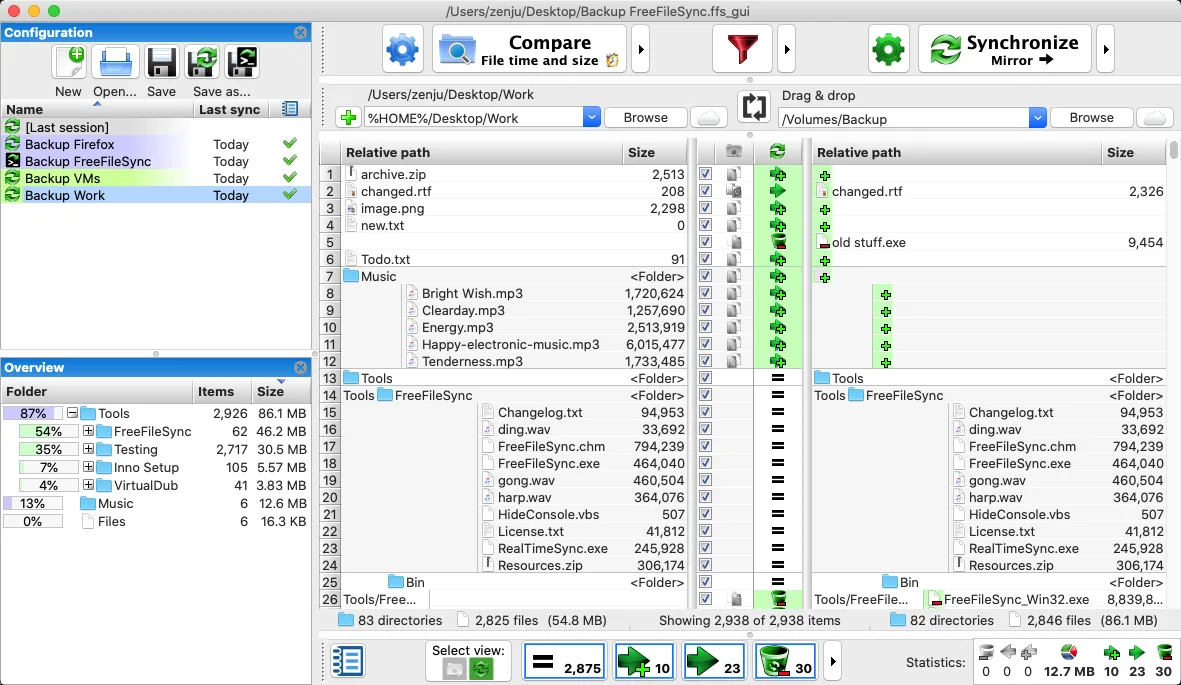
FreeFileSync compares a source folder with a target folder and transfers the files needed to bring them into sync. On a Mac, it can help maintain a second copy of working folders on another drive or a network share without copying every unchanged file again. The comparison view shows differences before synchronization, and saved configurations let you reuse folder pairs.
Choose a synchronization mode to match the job: mirror synchronization makes the target follow the source, while two-way synchronization handles changes on both sides. Filters include or exclude files, and batch jobs support repeated synchronization tasks. These are file-and-folder workflows rather than a claim of whole-system recovery.
The linked macOS ZIP is the standard edition. The publisher permits it for personal use by private individuals, not commercial or organizational use; those uses require a Business Edition license. The standard edition also excludes the auto-updater, parallel file copying and email notifications. Review the comparison and synchronization settings before applying changes: synchronization can propagate deletions. The screenshot is a publisher-provided macOS interface illustration, not a capture of version 14.13 running in this session.
What it offers
- Compare source and target folders before transferring changed files.
- Choose mirror or two-way synchronization rules.
- Synchronize folders on local drives and network shares.
- Include or exclude files with filters and automate recurring work with batch jobs.
Good to know
- The standard and Donation editions are restricted to personal use by private individuals; commercial and organizational use requires the Business Edition.
- The standard edition does not include the auto-updater, parallel file copy or email notifications.
- Synchronization can propagate deletions; review the comparison and selected synchronization mode before proceeding.
Product images
Sources
References used for this listing. Retrieval dates do not indicate hands-on testing.
More in utilities
View category ↗
1.1.1.1 with WARP 2026.8.2115.0
Encrypt traffic from your Mac to Cloudflare’s network with WARP, or use DNS-only mode for encrypted DNS queries to the 1.1.1.1 resolver.
1.1.1.1 with WARP 2026.8.2115.0
Encrypt traffic between your Windows PC and Cloudflare, or use encrypted DNS only, with the free 1.1.1.1 with WARP app.

3uTools 9.12.005
Manage iPhone and iPad photos, music, apps and backups from Windows with 3uTools, a free utility that also includes device checks and firmware flashing tools.