

Utilities Windows
FreeFileSync for Windows
Compare folders and synchronize backup copies on local drives or network shares with FreeFileSync for Windows. The standard edition is free for personal use only.
- Operating system
- Windows 11, 10, 8.1, 8 and 7
- Architecture
- Native 64-bit support; setup CPU targets not enumerated by publisher
- Download package
- EXE installer — standard edition
Personal use only. This is a local setup package, not the Donation Edition portable ZIP; ARM64 compatibility is not established.
Link checked · Download guidance
What is FreeFileSync?
FreeFileSync compares two folders and applies the synchronization rules you choose. It suits keeping a backup drive aligned with a working folder or exchanging changes between two locations. Compare files by modification time and size, or choose content comparison when you need to check whether their bytes match. Local drives, network shares, FTP, FTPS, SFTP and Google Drive are supported destinations.
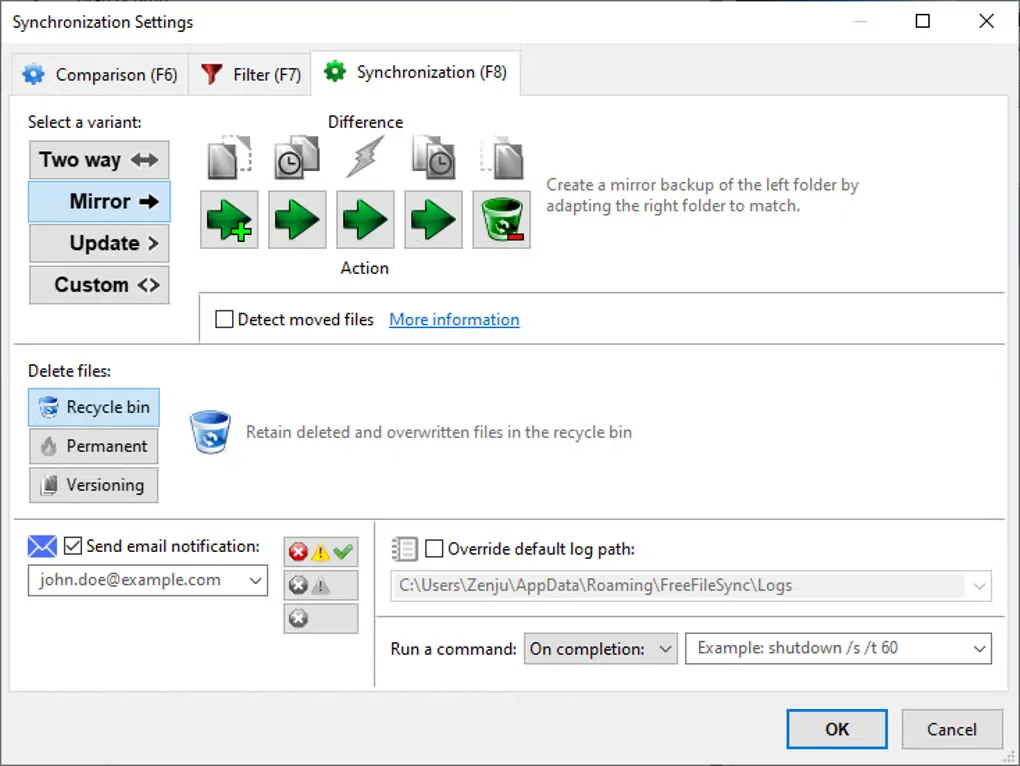
The sync mode changes what happens to your files. Two way passes changes in both directions; Mirror makes the target match the source, including deleting target files that no longer exist at the source. Update retains backup files after their source copies are deleted. Check the proposed operations before synchronizing, and configure Versioning if you need to keep deleted or overwritten files.
This download is the standard Windows EXE setup package, not the Donation Edition portable ZIP. The standard edition lacks the auto-updater, parallel file copy and email notifications offered in paid or donation editions. Its personal-use license does not cover commercial use, organizations or government agencies; those uses require the Business Edition.
What it offers
- Compare folders by file time and size, file content or file size alone.
- Choose Two way, Mirror, Update or custom synchronization rules.
- Synchronize local drives and network shares, plus FTP, FTPS, SFTP and Google Drive locations.
- Configure Versioning to retain deleted or overwritten files in a separate folder.
- Automate saved synchronization work as batch jobs.
Good to know
- The standard edition is licensed for personal use only. Commercial use and use by organizations or government agencies require the Business Edition.
- Mirror synchronization can delete files from the target to match the source. Retaining older files requires appropriate deletion-handling or Versioning settings.
- The standard edition has no auto-updater, parallel file copy, email notifications or portable ZIP package.
Product images
Sources
References used for this listing. Retrieval dates do not indicate hands-on testing.
- FreeFileSync — official download and release changes ↗Retrieved
- FreeFileSync FAQ — features, supported systems and edition licensing ↗Retrieved
- FreeFileSync manual — synchronization settings ↗Retrieved
- FreeFileSync manual — comparison settings ↗Retrieved
- FreeFileSync manual — file versioning ↗Retrieved
- FreeFileSync — official product overview ↗Retrieved
- FreeFileSync - Download — Windows screenshot gallery ↗Retrieved
More in utilities
View category ↗
1.1.1.1 with WARP 2026.8.2115.0
Encrypt traffic from your Mac to Cloudflare’s network with WARP, or use DNS-only mode for encrypted DNS queries to the 1.1.1.1 resolver.
1.1.1.1 with WARP 2026.8.2115.0
Encrypt traffic between your Windows PC and Cloudflare, or use encrypted DNS only, with the free 1.1.1.1 with WARP app.

3uTools 9.12.005
Manage iPhone and iPad photos, music, apps and backups from Windows with 3uTools, a free utility that also includes device checks and firmware flashing tools.