
Utilities Windows
FreePortScanner
Check TCP ports on a specified IP address with FreePortScanner, a free Windows networking utility that lists port status, service names and descriptions.
- Operating system
- Windows; Softonic lists Windows 11
- Architecture
- 32-bit (Win32), as documented by ManageEngine
- Download package
- EXE installer (third-party mirror)
Compatibility is source-reported, not an installation test. Publisher's legacy product page now redirects to NSAuditor AI, a different product.
Link checked · Download guidance
What is FreePortScanner?
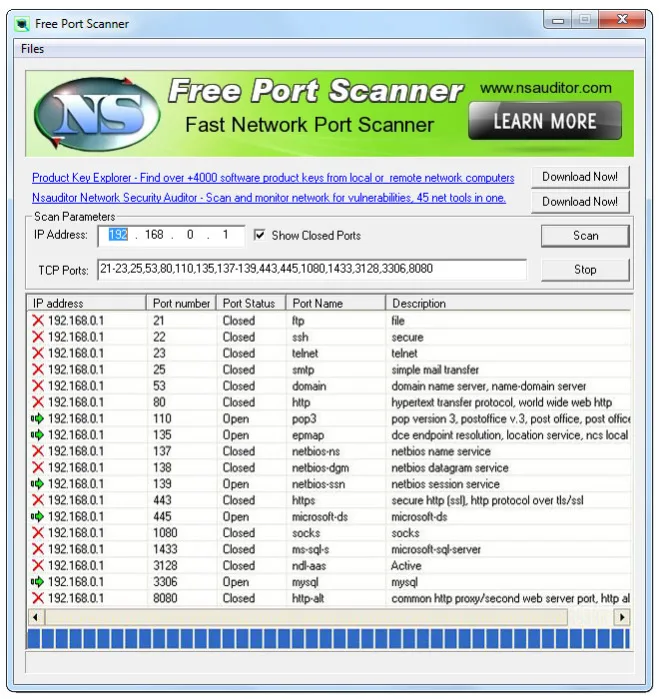
FreePortScanner checks TCP ports on a computer or network device identified by its IP address. Enter the target address and the ports you want to inspect, then review a table of port numbers, open or closed status, service names and descriptions. It suits a focused check of which TCP services a device exposes rather than a broad network audit.
The Windows interface includes an editable TCP Ports field and a Show Closed Ports option. You can use a predefined selection of ports or change the list to focus on the services you need to check. Scan only systems you own or have explicit written authorization to assess.
The documented scope is TCP port scanning; the sources do not establish UDP scanning or vulnerability detection for this utility. The linked EXE is hosted by FileEagle, not the publisher: the observed legacy publisher installer URL redirects to an HTML homepage. A successful HEAD request confirms the mirror responds with a binary MIME type, not the file's authenticity, safety or ability to run on your PC.
What it offers
- Scan TCP ports on a target entered by IP address.
- Use predefined ports or edit the TCP port selection for a focused scan.
- Review IP address, port number, port status, service name and description in a results table.
- Show closed ports as well as open ports using the interface checkbox.
Good to know
- TCP port scanning is documented; UDP scanning and vulnerability detection are not established for this product.
- The download is a third-party FileEagle mirror because the observed legacy publisher installer URL redirects to an HTML homepage. File authenticity and runtime compatibility have not been independently verified.
- Use is restricted to networks and systems you own or have explicit written authorization to access under Nsasoft's terms.
Product images
Sources
References used for this listing. Retrieval dates do not indicate hands-on testing.
- FreePortScanner - Download — normal browser observation ↗Retrieved
- FreePortScanner 3.6.4 — publisher description and application screenshot ↗Retrieved
- Silent Installation of FreePortScanner (3.6.4) — ManageEngine ↗Retrieved
- Free Port Scanner 3.6.4 FreePortScanner.exe — FileEagle mirror ↗Retrieved
- Nsasoft US LLC Terms of Service — updated April 10, 2026 ↗Retrieved
More in utilities
View category ↗
1.1.1.1 with WARP 2026.8.2115.0
Encrypt traffic from your Mac to Cloudflare’s network with WARP, or use DNS-only mode for encrypted DNS queries to the 1.1.1.1 resolver.
1.1.1.1 with WARP 2026.8.2115.0
Encrypt traffic between your Windows PC and Cloudflare, or use encrypted DNS only, with the free 1.1.1.1 with WARP app.

3uTools 9.12.005
Manage iPhone and iPad photos, music, apps and backups from Windows with 3uTools, a free utility that also includes device checks and firmware flashing tools.