

Utilities Windows
Fullscreenizer for Windows
Turn windowed games into borderless fullscreen on Windows, with reversible window changes, multi-monitor support and an optional hotkey.
Version 1.0 · Direct publisher file
Link checked · Download guidance
What is Fullscreenizer?
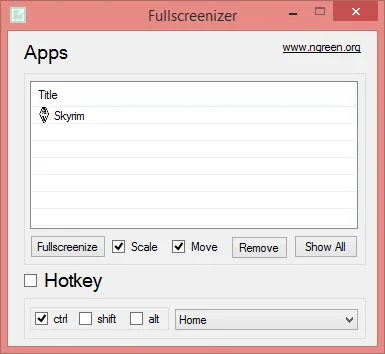
Fullscreenizer is a Windows utility for moving a windowed game into borderless fullscreen. Select a running application in its interface or use a hotkey to apply the change. A user-set application filter helps keep the list focused, and the publisher describes the window changes as reversible to their initial settings.
The utility supports multiple monitors and saves configuration options. Its hotkey can be enabled automatically when Fullscreenizer starts. The linked publisher download is the Fullscreenizer-v1.zip binary archive for version 1.0, whose release notes date the build to 30 March 2021.
The publisher explicitly states that the project is not maintained. Treat it as a legacy utility: this entry does not establish compatibility with every game or current Windows release, and the software has not been installed or tested for this card.
What it offers
- Change windowed games to borderless fullscreen.
- Filter the application list to reduce clutter.
- Restore fullscreenized applications to their initial window settings.
- Use multiple monitors and an optional hotkey instead of the interface.
- Save configuration options and optionally enable the hotkey when the utility starts.
Good to know
- The publisher states that the project is not maintained; the linked build dates to March 2021.
- Compatibility with individual games and current Windows releases has not been verified for this entry.
Product images
Sources
References used for this listing. Retrieval dates do not indicate hands-on testing.
- Fullscreenizer — publisher README and maintenance status ↗Retrieved
- Fullscreenizer v1.0 — publisher release notes ↗Retrieved
- Fullscreenizer v1.0 — release asset list ↗Retrieved
- Publisher license — MIT with attribution instruction ↗Retrieved
- Fullscreenizer - Download — protected passive browser observation ↗Retrieved
- Publisher repository — Fullscreenizer application screenshot ↗Retrieved
More in utilities
View category ↗
1.1.1.1 with WARP 2026.8.2115.0
Encrypt traffic from your Mac to Cloudflare’s network with WARP, or use DNS-only mode for encrypted DNS queries to the 1.1.1.1 resolver.
1.1.1.1 with WARP 2026.8.2115.0
Encrypt traffic between your Windows PC and Cloudflare, or use encrypted DNS only, with the free 1.1.1.1 with WARP app.

3uTools 9.12.005
Manage iPhone and iPad photos, music, apps and backups from Windows with 3uTools, a free utility that also includes device checks and firmware flashing tools.