

Development Windows
GameMaker for Windows
Build 2D games with GameMaker for Windows using GML Code or GML Visual, room and sprite tools, and a debugger. Free for non-commercial use; commercial releases require a paid licence.
What is GameMaker?
GameMaker is a 2D game development environment for creating game logic, arranging levels and working with visual assets. Choose GML Visual or write GML Code, organise objects in rooms, and create or import sprites, tilesets and backgrounds. Its integrated editors keep these tasks in the same development workflow.
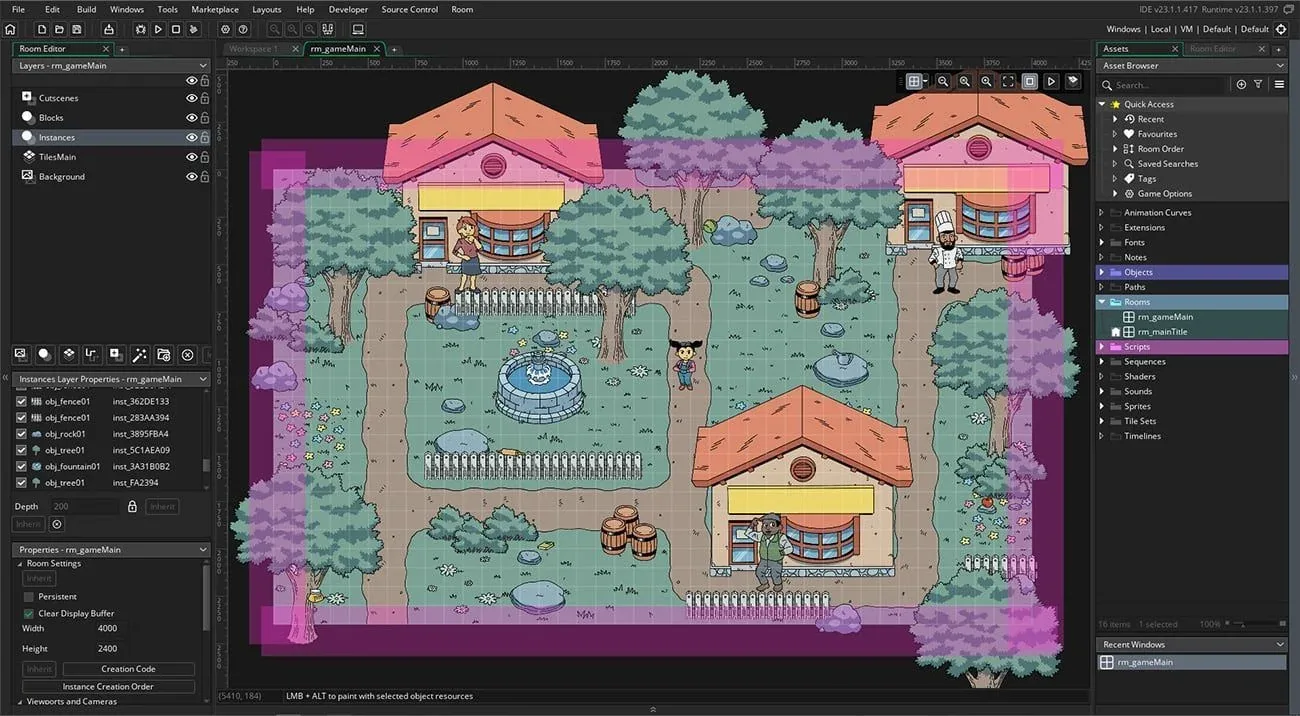
This entry links to the publisher’s Windows Long Term Stable (LTS) EXE download. The publisher recommends this branch for a consistent feature set: it receives critical fixes rather than new feature updates during its two-year lifecycle. The screenshot illustrates the publisher’s Room Editor; it is an older interface example, not a capture of the currently linked installer.
The free licence is for non-commercial projects and includes desktop, web, mobile and GX.games exports. Selling a game requires a commercial licence, while console exports require an Enterprise subscription. GameMaker Studio is the name used by the discovery listing; the publisher calls the current product GameMaker.
What it offers
- Choose GML Code or GML Visual to build 2D game logic.
- Arrange levels and configure camera controls in the Room Editor.
- Create objects and rearrange workspaces for your project.
- Create or import sprites, tilesets, character animations and backgrounds.
- Use tile brushes, auto-tiles and animated tiles, with an integrated debugger for investigating errors.
Good to know
- The free licence is non-commercial; a paid commercial licence is required to sell games.
- Console exports require the Enterprise subscription.
- The linked LTS branch does not receive new feature updates during its two-year lifecycle.
Product images
Sources
References used for this listing. Retrieval dates do not indicate hands-on testing.
More in development
View category ↗

010 Editor 17.0
Inspect and edit binary files on Mac with 010 Editor, a paid text and hex editor with Binary Templates, file comparison and a 30-day trial.
010 Editor 17.0
Inspect and edit binary files with 010 Editor for Windows, a text and hex editor with Binary Templates, file comparison and scripting. Includes a 30-day trial.
10x Editor
Edit and navigate C++ projects on Windows with a built-in parser, workspace search and Visual Studio project support. A paid license is required after the 30-day trial.