
Utilities Windows
Geek Uninstaller for Windows
Remove Windows programs and scan for leftover traces with Geek Uninstaller, a portable uninstaller free for personal use.
- Operating system
- Windows 7, 8, 8.1, 10 and 11; Windows 10 and 11 on ARM
- Architecture
- x86, x64 and ARM64
- Download package
- ZIP archive containing a portable EXE
Requires administrator permissions. The same EXE automatically runs natively on x64 and ARM64 Windows; a separate 7Z archive is also offered.
Link checked · Download guidance
What is Geek Uninstaller?
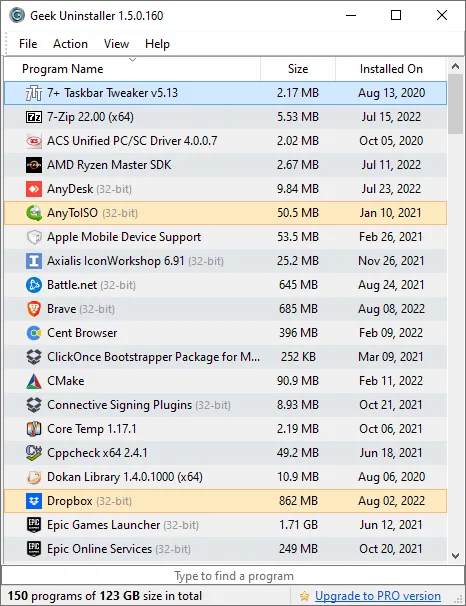
Geek Uninstaller lists installed Windows programs so you can find an application, uninstall it and scan for traces left behind. Type to filter the list, or use Force Removal for a broken program that cannot be removed normally. It also has a separate Microsoft Store apps view, reached through the View menu or Ctrl+Tab.
The free edition runs as a portable executable rather than requiring its own installation. This download is the publisher's ZIP archive; extract it to access the application. The same executable selects native 64-bit operation on x64 and ARM64 Windows. Administrator permissions are required.
Free use is limited to personal use and does not include support. The publisher lists batch removal, real-time installation monitoring and startup-program management under its paid PRO offering, Uninstall Tool, not this free download. The screenshot is the publisher's older 1.5.0.160 interface illustration, not a capture of the currently listed 1.6.0.200 release.
What it offers
- Uninstall desktop applications and scan for leftover traces.
- Use Force Removal for stubborn or broken programs.
- Switch between desktop programs and Microsoft Store apps with View or Ctrl+Tab.
- Type to search the installed-program list.
- Run a portable executable with native x64 and ARM64 support.
Good to know
- The free edition is for personal use only and includes no support.
- Administrator permissions are required.
- Batch removal, real-time installation monitoring and startup-program management are listed for the paid PRO offering, not the free edition.
Product images
Sources
References used for this listing. Retrieval dates do not indicate hands-on testing.
More in utilities
View category ↗
1.1.1.1 with WARP 2026.8.2115.0
Encrypt traffic from your Mac to Cloudflare’s network with WARP, or use DNS-only mode for encrypted DNS queries to the 1.1.1.1 resolver.
1.1.1.1 with WARP 2026.8.2115.0
Encrypt traffic between your Windows PC and Cloudflare, or use encrypted DNS only, with the free 1.1.1.1 with WARP app.

3uTools 9.12.005
Manage iPhone and iPad photos, music, apps and backups from Windows with 3uTools, a free utility that also includes device checks and firmware flashing tools.