
Utilities Windows
GetPixelColor
Read desktop pixel colors and copy RGB or hexadecimal values with GetPixelColor, a free Windows color picker with taskbar access and a color palette.
- Operating system
- Windows 11, 10, 8.1 and 7, as listed by the publisher
- Architecture
- Publisher lists x86 (32-bit) and x64; selected ZIP architecture unspecified
- Download package
- ZIP archive (primary publisher distribution)
A separately named portable ZIP is also listed. No installation, architecture inspection or compatibility test was performed.
Link checked · Download guidance
What is GetPixelColor?
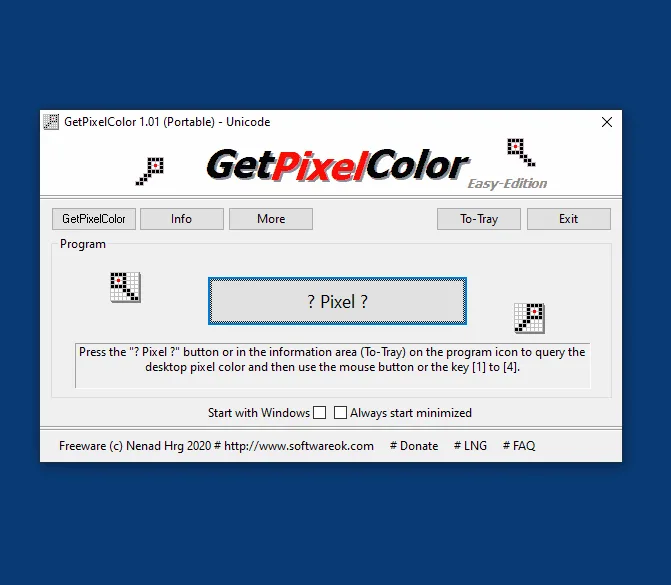
GetPixelColor is a focused Windows utility for finding the color of a pixel on your screen. It suits copying a color from an image, a web page or another application into a design workflow without opening a larger graphics program. Start a query from the program or its taskbar notification-area icon, point at the desired pixel and click to inspect it in the Windows color palette.
For copying values, the publisher documents four keyboard shortcuts: 1 for #RRGGBB, 2 for #RRGGBBAA, 3 for an RGB component list and 4 for an RGBA component list. The palette lets you adjust the selected color, and an optional setting starts the utility with Windows. These are documented features, not results of an installation or hands-on software test.
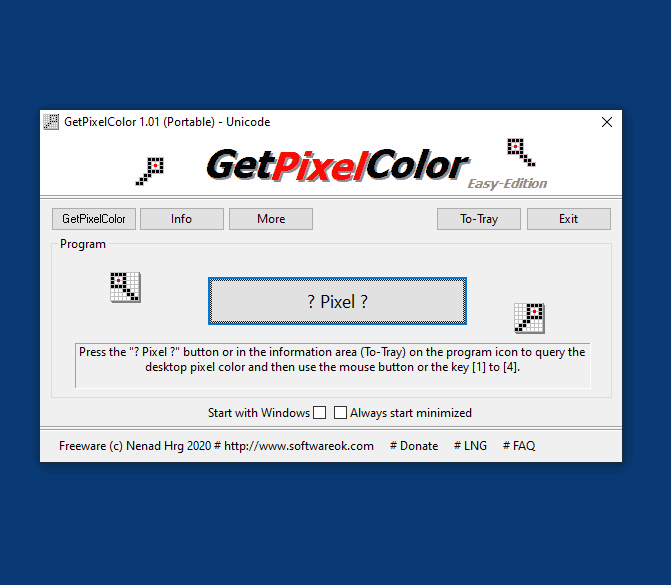
The publisher lists version 3.55, released on 30 June 2026, and offers desktop and portable distributions. This entry links to the primary publisher ZIP archive; it is not the separately named portable ZIP. The screenshot illustrates an older 1.01 portable interface, not the listed release. Pixel sampling is not guaranteed on every computer: the publisher acknowledges rare failures but does not identify affected hardware or a universal fix.
What it offers
- Query desktop pixel colors from the program or the taskbar notification area.
- Inspect RGB, RGBA and HLS color values and adjust a selection with the color palette.
- Copy hexadecimal or RGB/RGBA component values using keys 1 through 4.
- Optionally start with Windows or activate pixel query with the get_pixel_color argument.
Good to know
- The publisher acknowledges rare computers where pixel query fails; affected hardware and a guaranteed fix are not documented.
- The included publisher screenshot shows version 1.01 Portable, not the listed 3.55 release.
Product images
Sources
References used for this listing. Retrieval dates do not indicate hands-on testing.
- GetPixelColor 3.55 The pixel query function for all Windows OS ↗Retrieved
- GetPixelColor — official Portable Application Description ↗Retrieved
- GetPixelColor - License Agreement ↗Retrieved
- How to use this pixel query tool on MS Windows 11, 10, etc. OS? ↗Retrieved
- I have ordered a new computer, pixel query does not work !? ↗Retrieved
- You can easy get a Pixel Color from you Desktop! ↗Retrieved
More in utilities
View category ↗
1.1.1.1 with WARP 2026.8.2115.0
Encrypt traffic from your Mac to Cloudflare’s network with WARP, or use DNS-only mode for encrypted DNS queries to the 1.1.1.1 resolver.
1.1.1.1 with WARP 2026.8.2115.0
Encrypt traffic between your Windows PC and Cloudflare, or use encrypted DNS only, with the free 1.1.1.1 with WARP app.

3uTools 9.12.005
Manage iPhone and iPad photos, music, apps and backups from Windows with 3uTools, a free utility that also includes device checks and firmware flashing tools.