
Utilities Windows
Ghost Trap
Convert PostScript and PDF files to images from the Windows command line with Ghost Trap, a Ghostscript distribution that adds Chromium-based process sandboxing.
- Operating system
- Windows; Softonic lists Windows 11
- Architecture
- 64-bit binaries; publisher also notes ARM64-compatible installation
- Download package
- EXE installer
Publisher history says installers contain 64-bit binaries only and records ARM64 installer compatibility. A minimum Windows version and native ARM64 binaries were not established; software was not installed or run.
Link checked · Download guidance
What is Ghost Trap?
Ghost Trap converts PostScript and PDF documents into image files from the Windows command line. Developed by Chris Dance with support from PaperCut Software, it combines Ghostscript with Chromium sandbox technology to restrict the conversion process. It suits scripted document rendering rather than a point-and-click PDF editing workflow. The publisher documents PNG output for PostScript and numbered JPEG files for multi-page PDFs.
Use gsc-trapped.exe for the sandboxed conversion path. The bundled gsc.exe is the standard, unsandboxed console interpreter; choosing that executable is not equivalent to using Ghost Trap’s sandbox. Input and output must stay on local disks, and custom FONT or LIB paths cannot be supplied on the command line. The publisher explicitly warns that sandboxing is not infallible.
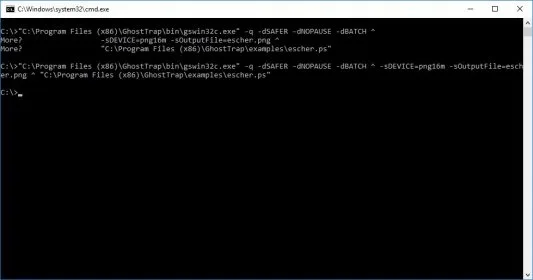
The linked Windows EXE is identified by the publisher as version 1.6.10.07. The release history labels the corresponding May 1, 2026 update 1.6.10.07.0 and records its Ghostscript 10.07.0 base. The screenshot is a historical Windows command-prompt example from a version 1.2 listing: it shows gswin32c.exe, not the current sandboxed executable, and is not evidence of a sandboxed run.
What it offers
- Convert PostScript and PDF input to image output through the command line.
- Use gsc-trapped.exe to render documents inside a Chromium-based process sandbox.
- Follow publisher examples for PNG conversion and numbered JPEG output from multi-page PDFs.
- Restrict interpreter access to identified input and output resources, fonts and Ghostscript library resources.
Good to know
- Input and output files must be on a local disk; network shares are not supported by the sandboxed converter.
- Custom FONT and LIB paths cannot be defined on the command line.
- The sandboxed executable enforces -dSAFER; the separate gsc.exe executable does not provide the Ghost Trap sandbox.
- Sandboxing is not infallible and is not a guarantee that an untrusted document is harmless.
Product images
Sources
References used for this listing. Retrieval dates do not indicate hands-on testing.
More in utilities
View category ↗
1.1.1.1 with WARP 2026.8.2115.0
Encrypt traffic from your Mac to Cloudflare’s network with WARP, or use DNS-only mode for encrypted DNS queries to the 1.1.1.1 resolver.
1.1.1.1 with WARP 2026.8.2115.0
Encrypt traffic between your Windows PC and Cloudflare, or use encrypted DNS only, with the free 1.1.1.1 with WARP app.

3uTools 9.12.005
Manage iPhone and iPad photos, music, apps and backups from Windows with 3uTools, a free utility that also includes device checks and firmware flashing tools.