

Development Windows
GitHub Desktop for Windows
Review changes, create commits and sync Git repositories with GitHub Desktop, a free graphical Git client for Windows.
- Operating system
- Windows 10 64-bit or later
- Architecture
- x64
- Download package
- EXE installer
This link is the x64 EXE; an MSI is offered separately. Repositories using Windows Folder Redirection are unsupported.
Link checked · Download guidance
What is GitHub Desktop?
GitHub Desktop puts everyday Git work in a visual interface. Clone a repository, create a branch, inspect changed lines and choose what belongs in a commit before pushing your work. It suits contributors who want to see their changes without memorizing command-line syntax, and it can work with repositories on GitHub or other Git hosting services.
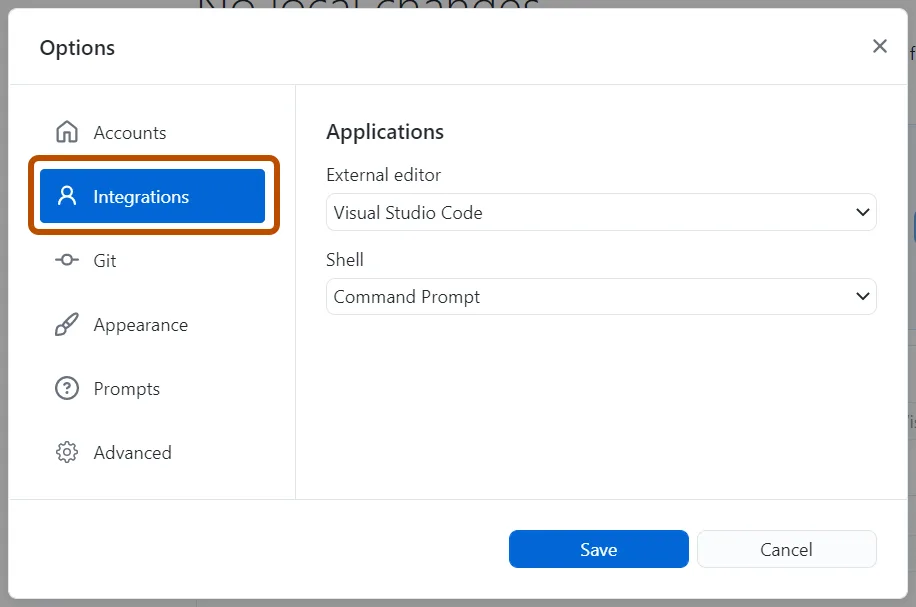
Use a separate editor to change your project files, then return to Desktop to review and commit them. You can also stash unfinished changes or cherry-pick, squash and reorder commits when organizing branch history.
The linked download is the x64 EXE installer for Windows 10 64-bit or later; GitHub offers an MSI separately for organization deployment. Repositories stored using Windows Folder Redirection are not supported, so check where your project folder lives before choosing this client.
What it offers
- Clone repositories and create branches through a graphical interface.
- Review diffs and select individual changed lines for a commit.
- Push local commits and pull changes from remote repositories.
- Stash unfinished changes without committing them.
- Cherry-pick, squash or reorder commits to organize branch history.
Good to know
- Repositories configured with Windows Folder Redirection are not supported.
- The Windows application requires a 64-bit operating system; this installer is x64, not a 32-bit package.
Product images
Sources
References used for this listing. Retrieval dates do not indicate hands-on testing.
- Download GitHub Desktop — official Windows packages ↗Retrieved
- About GitHub Desktop — purpose, cost and workflow ↗Retrieved
- GitHub Desktop documentation — Git operations ↗Retrieved
- GitHub Desktop — official feature overview ↗Retrieved
- Supported operating systems for GitHub Desktop ↗Retrieved
- GitHub Desktop source license ↗Retrieved
- GitHub Open Source Applications Terms and Conditions ↗Retrieved
- GitHub Desktop publisher changelog ↗Retrieved
- GitHub Docs — Windows external editor configuration and screenshot ↗Retrieved
- GitHub Docs — documentation assets license scope ↗Retrieved
- GitHub Docs — CC BY 4.0 license conditions and limits ↗Retrieved
More in development
View category ↗

010 Editor 17.0
Inspect and edit binary files on Mac with 010 Editor, a paid text and hex editor with Binary Templates, file comparison and a 30-day trial.
010 Editor 17.0
Inspect and edit binary files with 010 Editor for Windows, a text and hex editor with Binary Templates, file comparison and scripting. Includes a 30-day trial.
10x Editor
Edit and navigate C++ projects on Windows with a built-in parser, workspace search and Visual Studio project support. A paid license is required after the 30-day trial.